

Zapmail sells real Google Workspace and Microsoft 365 mailboxes from $39/mo for 10 Google inboxes. Mailscale sells self-hosted SMTP inboxes from $79/mo for up to 15 - not real Google or Outlook accounts. Neither publishes a long-term deliverability case study, and both carry detailed critical reviews on Trustpilot.
For cold outreach that depends on the primary inbox, Primeforge is the stronger choice. Real Google Workspace and MS365 mailboxes, automated DNS, SOC 2 compliance, free warm-up through Warmforge, and a public 6-month zero-failure case study from J-Reach. Pricing runs $3.50 to $4.50 per mailbox.
I have run cold email infrastructure on Zapmail, Mailscale, and Primeforge over the last 18 months. The Zapmail vs Mailscale question comes up constantly, and most answers miss the point. These two are not even the same kind of product.
Zapmail is a Google Workspace and Microsoft 365 reseller. Mailscale runs its own SMTP servers. That one difference decides where your emails land more than anything else on either pricing page.
I re-checked both live pricing pages on June 7, 2026, and pulled the current Trustpilot reviews for all three tools. Here is the full picture: mailbox legitimacy, deliverability evidence, stability, pricing at three scale points, and who should pick what.
Cold Email Mailbox Comparison at a Glance: Zapmail vs Mailscale
| Feature | Primeforge | Zapmail | Mailscale |
|---|---|---|---|
| Mailbox type | Real Google Workspace + MS365 | Real Google Workspace + MS365 (separate plans) | Self-hosted SMTP (not Google or Outlook) |
| Entry pricing | $4.50/mailbox monthly, $3.50 annual (10-slot minimum) | $39/mo for 10 Google inboxes (Zapmail Starter) | $79/mo for up to 15 inboxes (Mailscale Solopreneur) |
| Top published plan | Per-mailbox, calculator-driven | $299/mo for 100 inboxes (Zapmail Pro) | $249/mo for up to 200 inboxes (Mailscale Enterprise); $1000+/mo Unlimited by application |
| Automated DNS (SPF, DKIM, DMARC) | Yes, plus custom tracking domains | Yes | Yes |
| Pre-warmed mailboxes | Yes, separate option | Yes, separate purchase | Not offered |
| Setup time | Around 30 minutes | Claimed 5-10 minutes | Around 5 minutes (form-based) |
| API access | Included on every plan | Zapmail Pro only ($299/mo) | Not published below the Unlimited tier |
| Free trial | No (infrastructure product) | No | 7-day trial on three plans |
| Customer evidence | J-Reach case study: 23 domains, 69 mailboxes, 6 months zero failures | 4.4/5 on Trustpilot (76 reviews) | 4.2/5 on Trustpilot (91 reviews) |
| SOC 2 compliant | Yes | Not published | Not published |
| Best for | B2B teams that need ESP-matched primary-inbox placement | Solo founders who want the cheapest real Google inboxes | Cost-per-inbox optimizers who accept SMTP tradeoffs |
Zapmail Overview: Real Google Mailboxes at a Low Entry Price
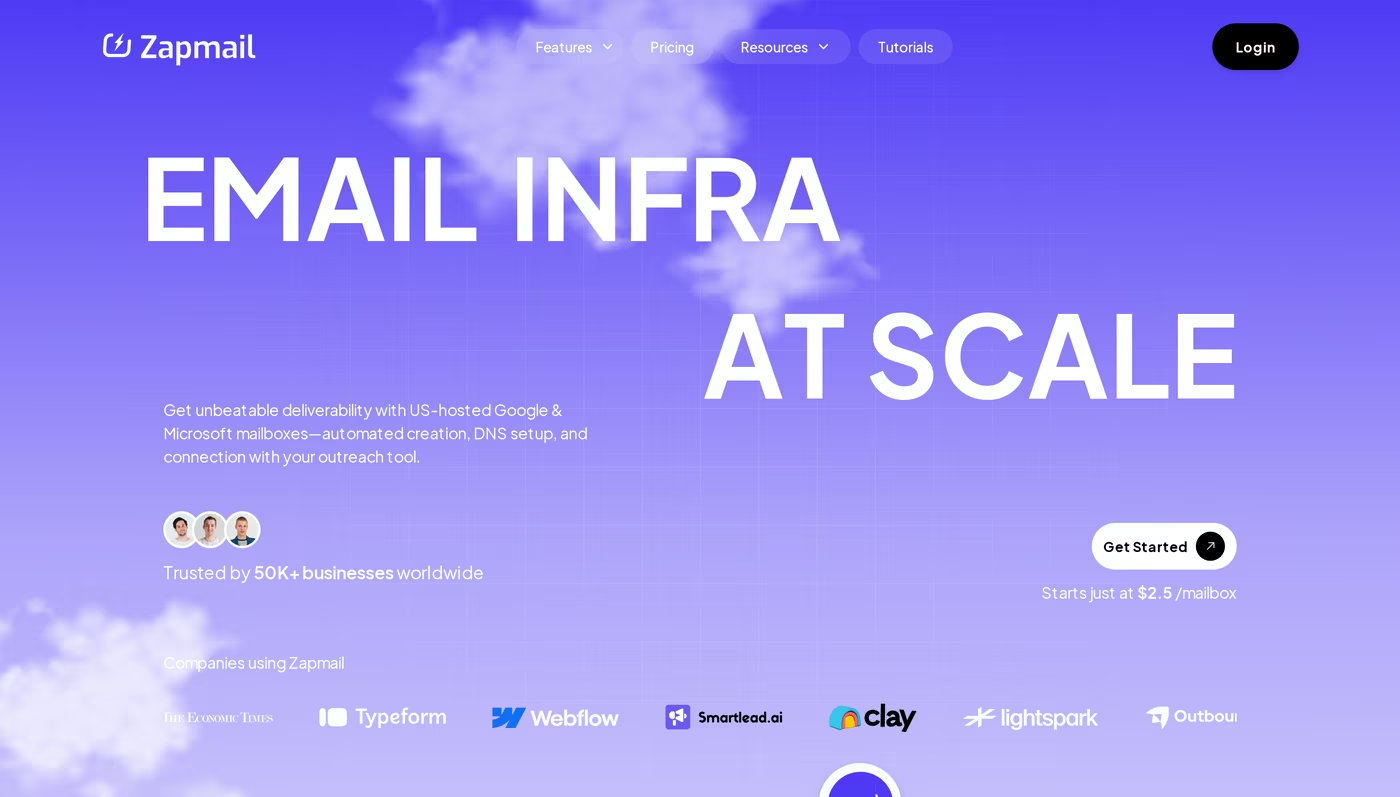
Zapmail provisions real Google Workspace and Microsoft 365 mailboxes for cold outreach. The homepage claims 50,000+ businesses, over 1 million mailboxes set up, and 330,000+ domains managed. Setup is fully automated and claimed at 5 to 10 minutes.
Each domain gets its own isolated workspace. That keeps one client's sender reputation separate from another's. I covered how this model compares to a rival reseller in my Zapmail vs Maildoso comparison.
Core features
- Real Google Workspace mailboxes at the base price. Microsoft 365 mailboxes are a separate plan option.
- Pre-warmed mailboxes and aged domains as separate purchases on top of the base plans.
- Automated DNS for SPF, DKIM, DMARC, and custom tracking domains.
- Workspace-level isolation: one domain per workspace.
- 50+ outreach tool integrations via OAuth, including Instantly, Smartlead, Reply, and Lemlist.
- ZapShield and placement tests: 3 to 30 placement test credits per month, plus 3 to 30 AI Insights credits depending on tier.
- AI workflow tools: Instant Domain Genie for naming, Smart Mailbox Namer, Persona Snapshots for profile photos.
- API access on the Pro plan only.
Pricing (verified on zapmail.ai, June 7, 2026)
- Zapmail Starter: $39/mo for 10 Google mailboxes. Additional mailboxes at $3.50 each.
- Zapmail Growth: $99/mo for 30 Google mailboxes. Additional mailboxes at $3.25 each.
- Zapmail Pro: $299/mo for 100 Google mailboxes. Additional mailboxes at $3.00 each. Includes priority support and API access.
- Yearly billing gives 2 months free, so the derived annual rates are roughly $32.50/mo for Starter, $82.50/mo for Growth, and $249/mo for Pro.
- Microsoft 365 mailboxes and pre-warmed mailboxes are separate purchase toggles on top of these plans.
Who Zapmail fits
Solo founders and small agencies who want real Google Workspace inboxes without manual DNS work. The Starter plan at $39/mo is the lowest entry point I have seen for legitimate Google mailboxes.
What Trustpilot reviewers say
Zapmail sits at 4.4/5 on Trustpilot across 76 reviews. Most are positive about support speed. The recurring pattern in the 1 and 2 star reviews is billing surprises and migration friction. The most substantive critique is from Dmitry Krotov (Trustpilot, February 23, 2026):
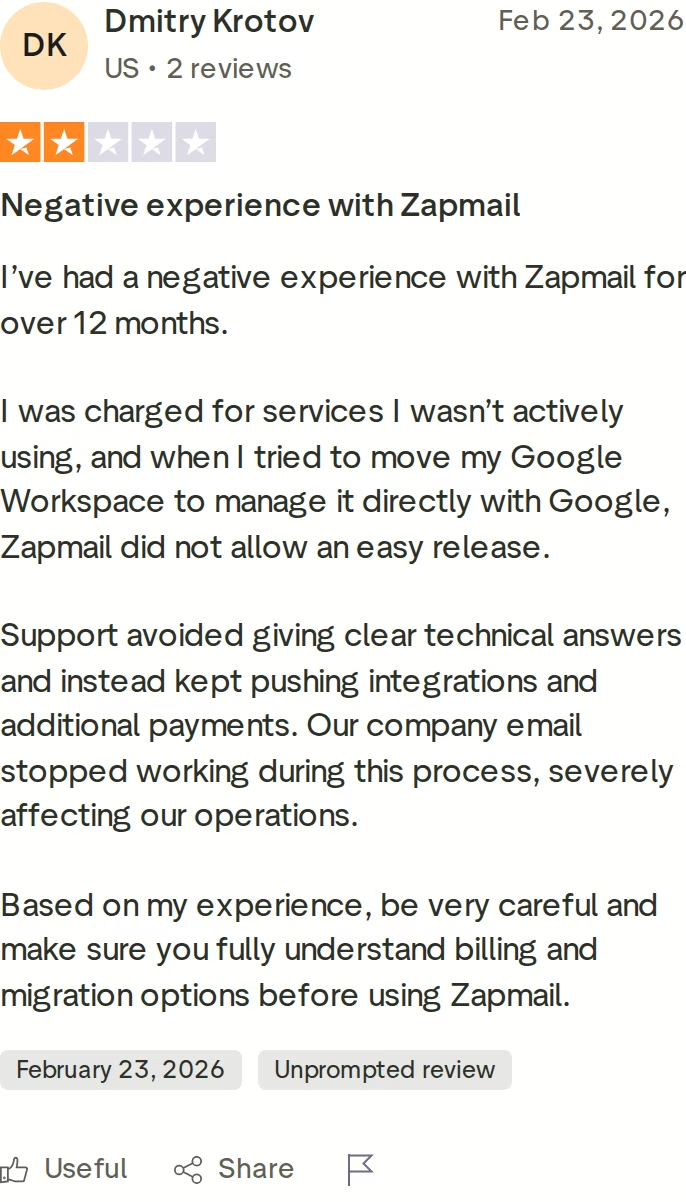
A separate 1-star review from April 1, 2026 documents referral commissions denied because annual plans, add-ons, and upgrades do not qualify - a restriction the reviewer says appears in the terms but not the Q&A. There are also community reports on r/coldemail of Microsoft 365 mailboxes disconnecting more often than the Google ones. These are anecdotal signals, not universal experiences, but worth knowing before an annual commitment.
Honest limitations
- API access and priority support are both gated to the $299/mo Zapmail Pro plan.
- Microsoft 365 is a separate purchase, not included in the Google mailbox plans.
- Pre-warmed mailbox renewal pricing is not shown in the main pricing section.
- Referral program eligibility rules sit in the terms rather than the Q&A, per the April 2026 review above.
Mailscale Overview: Self-Hosted SMTP, Not Google or Microsoft
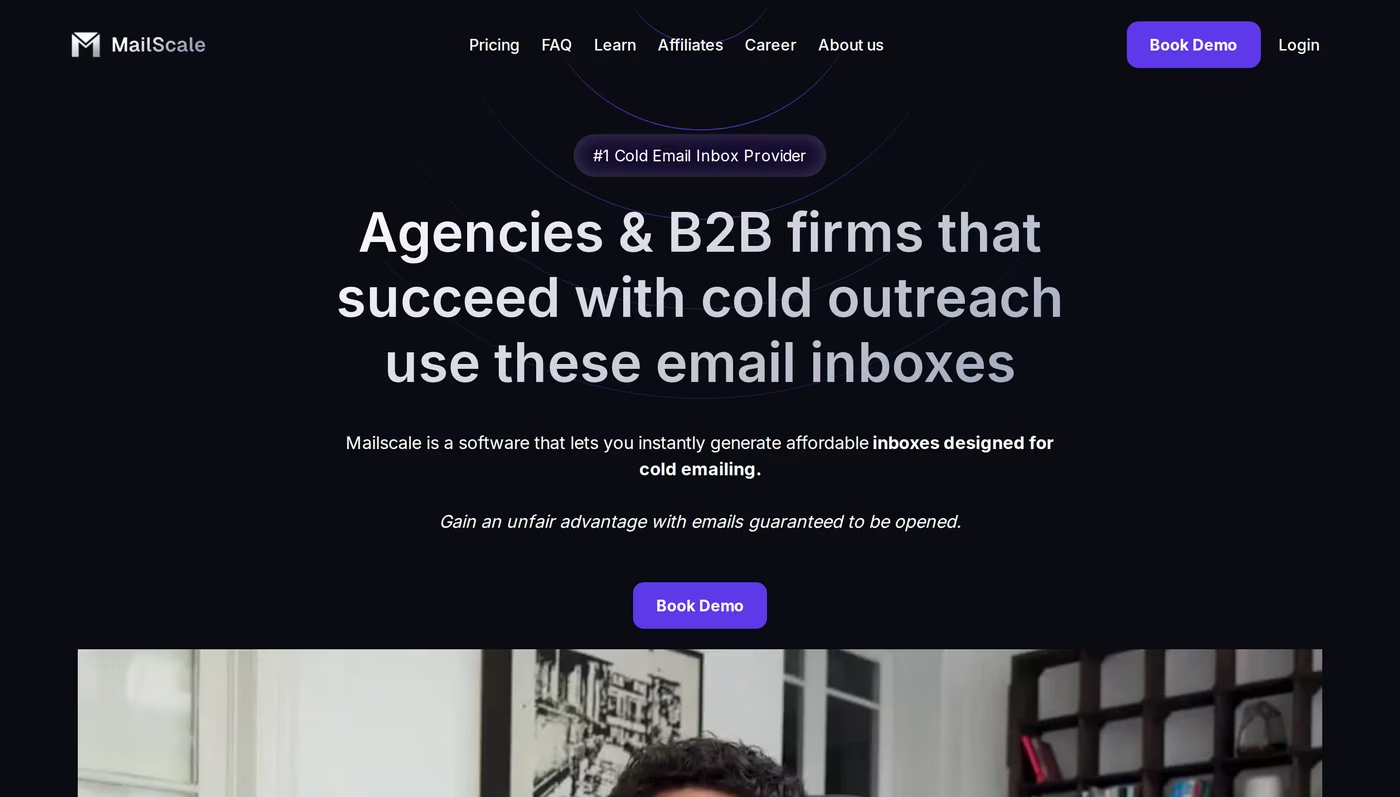
Mailscale is structurally different from Primeforge and Zapmail. It is a self-hosted SMTP provider, not a Google Workspace or Microsoft 365 reseller. From their FAQ: "We're currently the only provider that owns the full infrastructure including SMTP servers, IP pools and more."
This category difference matters more than any price gap. A real Google inbox carries the trust signals of Google itself. An SMTP relay does not. I broke down the mechanics in my guide to Google Workspace vs private SMTP for cold email.
Mailscale leans into this positioning. Their homepage argues that "Google and Microsoft are advertising platforms. They want you to run ads, not send sales emails." That line tells you exactly what you are buying: infrastructure built to route around Google and Microsoft, not through them.
Core features
- Self-hosted SMTP inboxes on Mailscale's own servers and IP pools.
- Automated DNS for SPF, DKIM, and DMARC on every domain.
- Domains inside the app at $10 to $15/year, or bring your own at $2 per domain. Mailscale states it cannot guarantee deliverability on customer-supplied domains.
- Works with any sequencer via IMAP/SMTP credentials: Instantly, Smartlead, Apollo, Reply, Lemlist, Mailshake.
- Deliverability guarantee: 95-100% to professional inboxes, with free domain replacement if health stays under 80% inbox placement after a 30-day recovery period.
- Recommended ceiling of 30 to 50 emails per inbox per day.
Pricing (verified on mailscale.ai, June 7, 2026)
- Mailscale Solopreneur: $79/mo for up to 15 inboxes (around $5.27 per inbox).
- Mailscale Business: $119/mo for up to 50 inboxes (around $2.38 per inbox). Includes a cold email course.
- Mailscale Enterprise: $249/mo for up to 200 inboxes (around $1.25 per inbox). Additional inboxes at $1.50/mo each.
- Mailscale Unlimited: $1000+/mo by application, with dedicated IPs and a dedicated deliverability specialist.
- 7-day free trial on Solopreneur, Business, and Enterprise.
The per-inbox math gets cheap fast. At 200 inboxes on Mailscale Enterprise you are near $1.25 per inbox - lower than any Google Workspace provider. The open question is whether SMTP delivers comparable results, and that is where the reviews split.
Who Mailscale fits
Operators who explicitly want to optimize cost per inbox over ESP-matched deliverability. If you accept the SMTP tradeoff and a shared-IP environment, the Enterprise tier is hard to beat on raw price.
What Trustpilot reviewers say
Mailscale sits at 4.2/5 on Trustpilot across 91 reviews. The positives center on setup speed and hands-on support. The negatives center on two themes: deliverability falling short of the marketing, and difficulty cancelling. The most detailed 1-star account is from Jonathan Chamblee (Trustpilot, April 12, 2026):
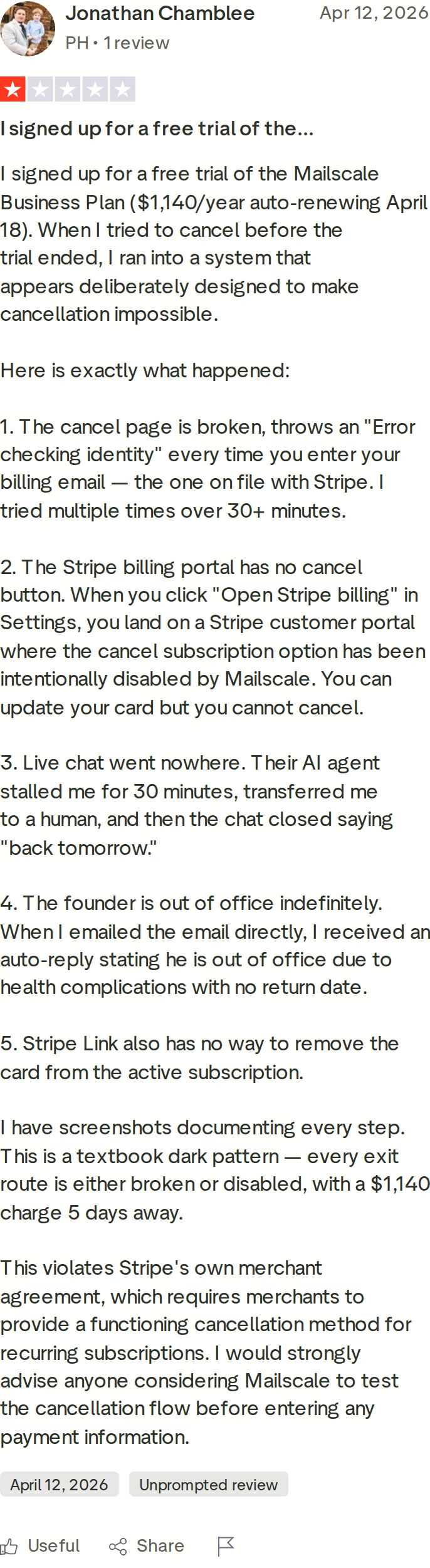
A separate 2-star review from March 2026 reports the advertised self-healing mechanism not working, emails landing in spam, and a partial refund of $1,000 on a $3,000 payment. I dug deeper into the review base in my full Mailscale review. My practical advice: run the cancellation flow during the 7-day trial before any annual commitment. If you cannot exit cleanly, that tells you what you need to know.
Honest limitations
- SMTP only. No real Google Workspace or Microsoft 365 mailboxes exist anywhere in the lineup.
- Shared IP pools, so reputation is pooled with other senders.
- No published API access below the Unlimited tier.
- Pre-warmed mailboxes are not offered. Every inbox starts cold.
- Cancellation friction is documented in public Trustpilot reviews. Test the exit before you commit.
Primeforge Overview: ESP-Matched Mailboxes With Public Proof
Primeforge is the Google Workspace and Microsoft 365 mailbox layer of the Forge Stack. It provisions real Google and MS365 inboxes, configures DNS automatically, and is built for cold outreach rather than daily-use email.
What separates Primeforge in this category is not setup speed or headline price. It is the infrastructure quality and the case-study evidence behind the deliverability claim. More on that below.
Core features
- Real Google Workspace mailboxes with full admin access. No EDU loopholes, no resold accounts.
- Real Microsoft 365 mailboxes on the same plan structure - no switching products to cover both ESPs.
- Automated DNS for SPF, DKIM, DMARC, and custom tracking domains.
- Pre-warmed mailboxes available as a separate option for immediate sending.
- Mailbox profile pictures and GIFs at scale for legitimacy signals.
- Multi-workspace management for agencies running separate client campaigns.
- Bulk DNS updates across hundreds of domains.
- Domain ownership: bring your own, or buy inside Primeforge at $14/year for .com - either way the domains are yours.
- Primeforge API included with every subscription.
- SOC 2 compliant.
The Forge Stack context
Primeforge is one of three infrastructure products in the Forge Stack. Mailforge covers shared-IP infrastructure for cost-effective scaling, and Infraforge covers private dedicated IPs for heavy senders. The recommended setup mixes Primeforge with one of the other two, so you always have a mailbox matching the prospect's ESP plus a second sending environment for risk diversification. Warmforge sits on top for always-on warm-up and deliverability monitoring.
Pricing
- $4.50 per mailbox/month billed monthly.
- $3.50 per mailbox/month on annual billing (2 months free).
- Minimum 10 mailbox slots per subscription.
- Domains at $14/year for .com extensions.
- Calculator example: 25 mailboxes across 9 domains runs $94/mo on annual billing ($113/mo monthly), plus $126/year for domains. You can verify the live price in the calculator.
- No long-term contract. Cancel anytime in-app.
Who Primeforge fits
Teams running cold email or multi-channel outbound where ESP matching matters. Most B2B prospects sit on Google Workspace or Microsoft 365. Sending from the same provider gives you the strongest primary-inbox placement signal available. That is the entire premise.
Real evidence: the J-Reach case study
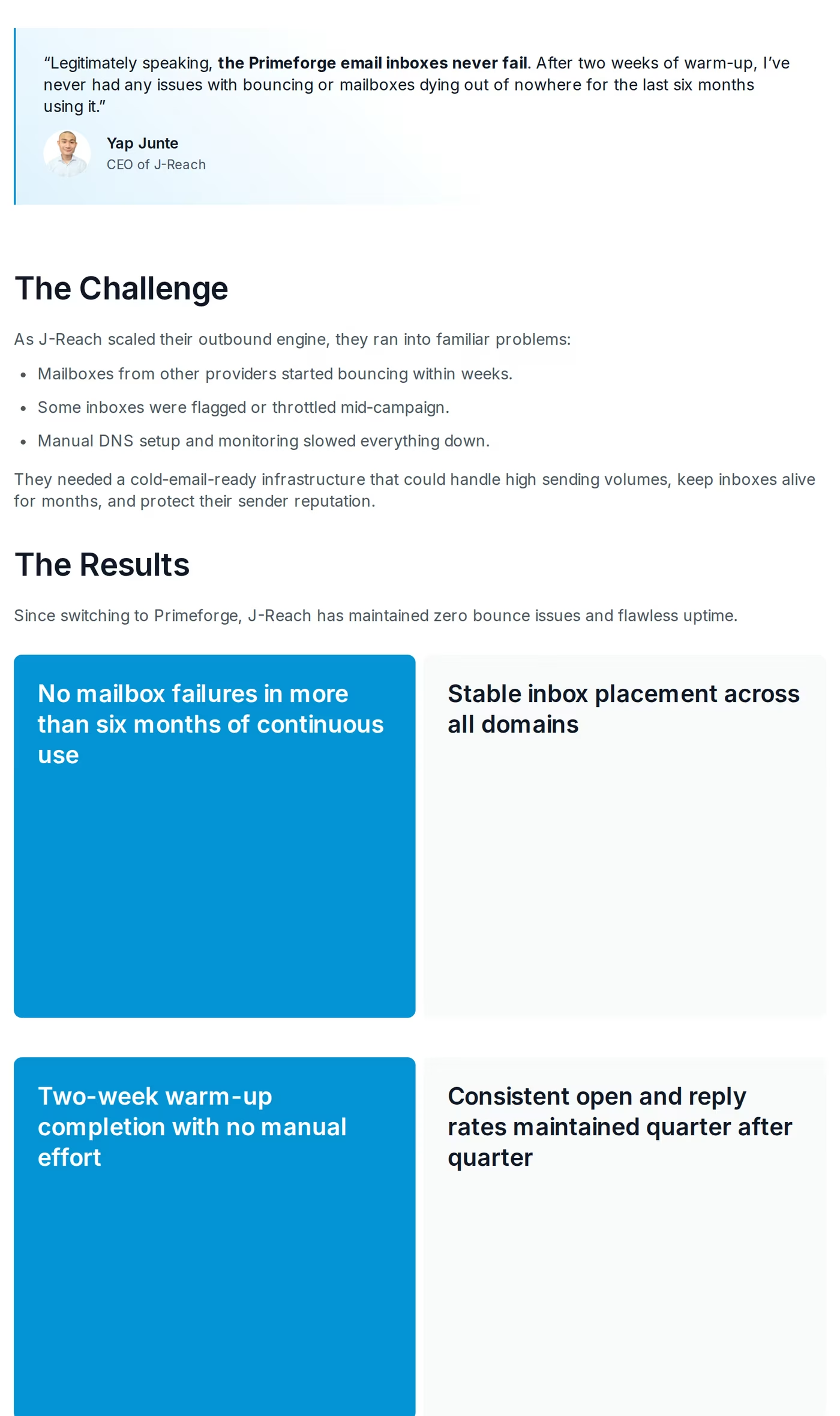
The clearest deliverability proof point I have seen for any provider in this comparison is the J-Reach case study. J-Reach runs 23 domains and 69 mailboxes on Primeforge for their own outbound pipeline. Yap Junte, the CEO, reports six months of uninterrupted sending with zero mailbox failures after the initial 2-week warm-up. His words: "the Primeforge email inboxes never fail."
That is a falsifiable claim with specific numbers attached. 23 domains. 69 mailboxes. 6 months. Zero failures. The case study is public.
What Trustpilot reviewers say
One 5-star Primeforge review stands out because it mirrors the agency use case exactly. Marc, a US reviewer running cold email for clients, posted this on January 27, 2026:
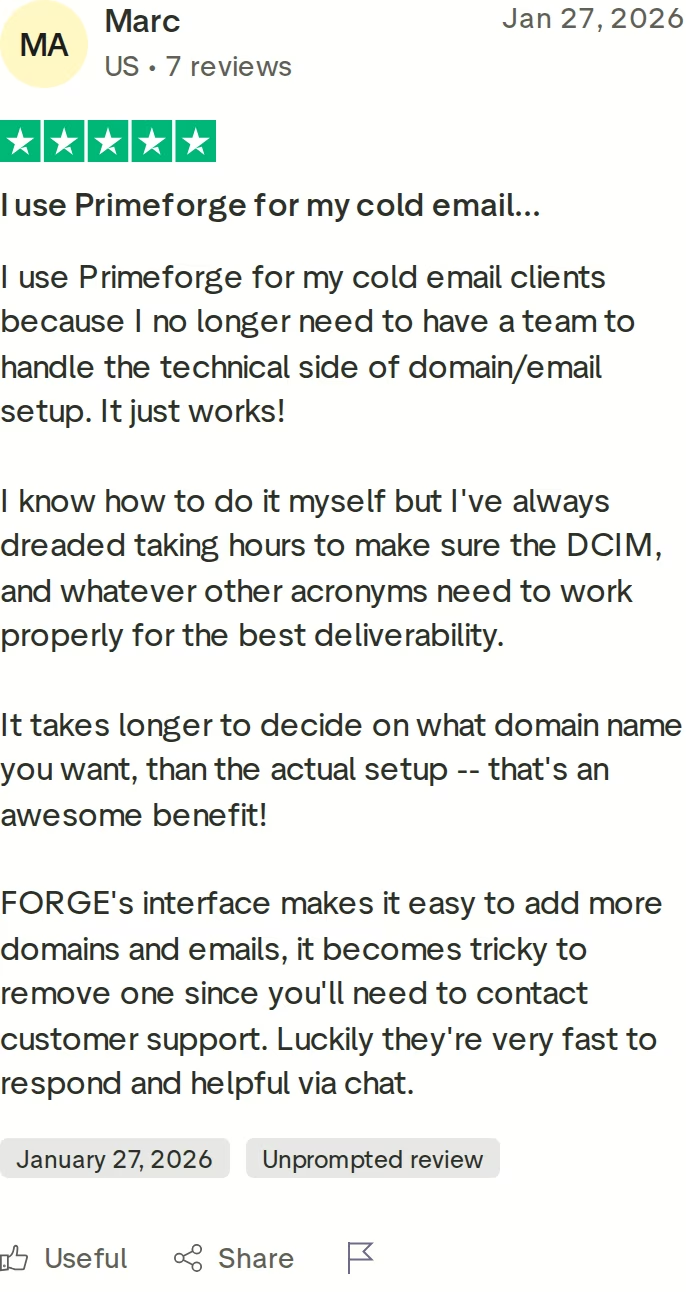
He also flags a real quirk: removing a domain requires contacting support. I would rather show you a review that includes the rough edge than one that reads like an ad.
Honest limitations
- No free trial. Primeforge is infrastructure - you purchase mailbox slots to use it.
- Minimum 10 mailbox slots, so the entry commitment is higher than Zapmail's $39 Starter plan.
- Setup takes around 30 minutes, longer than Zapmail's claimed 5-10 minutes. The tradeoff is a configuration that holds up at scale.
- You still need a sending tool and warm-up. Primeforge is the inbox layer, not the whole stack.
in Action

Head-to-Head Feature Comparison: Zapmail vs Mailscale
Mailbox legitimacy and ESP matching
This is the biggest decision in the comparison. Primeforge and Zapmail both sell real Google Workspace and Microsoft 365 mailboxes. Mailscale sells self-hosted SMTP. These are different categories of product.
When you send to a Gmail recipient from a real Google Workspace mailbox, the receiving server recognizes the sending domain as a Google tenant. That is the ESP match, one of the strongest primary-inbox signals in cold email today. SMTP relays do not get it. Mailscale's own marketing concedes the point by positioning against Google and Microsoft outright.
Within the ESP-matched pair, Primeforge covers Google and Microsoft on one plan structure, while Zapmail sells Microsoft as a separate purchase. I compared the wider field of Microsoft mailbox resellers separately if Outlook tenants are your priority.
Deliverability evidence
All three sites claim high deliverability. Marketing copy is not evidence. Here is what I actually trust:
- Primeforge: the J-Reach case study. 23 domains, 69 mailboxes, 6 months, zero failures. Named customer, named CEO, public page.
- Zapmail: 4.4/5 on Trustpilot with strong support reviews, against documented r/coldemail reports of M365 disconnects and disputed IP locations.
- Mailscale: a 95-100% guarantee in the FAQ, against 1 and 2 star reviews citing spam placement and a self-healing mechanism that did not work for at least one paying customer.
Whichever provider you pick, deliverability also depends on how you spread volume. My guide to IP rotation for high-volume campaigns covers that side of the equation.
Infrastructure stability at scale
Setup speed is a vanity metric. What matters is whether your mailboxes still work in month 3, month 6, month 12. The J-Reach result is the strongest longevity evidence across the three. Zapmail's negative reviews skew toward billing and migration friction rather than outright mailbox death, though the M365 disconnect reports are a stability flag for Microsoft tenants. Mailscale's stability rests on shared-IP pool reputation, which sits outside your control.
AI and personalization
None of the three are sending tools. Personalization happens in whatever sequencer you connect. Zapmail has the most polished AI workflow tools for naming domains, naming mailboxes, and generating profile photos. Primeforge puts its effort into the underlying mailbox quality instead of name-generation features. Mailscale offers neither - it hands you IMAP/SMTP credentials and steps back.
Inbox management and reply handling
Not a feature on any of the three - this is where all infrastructure products stop. If you want unified reply management across email and LinkedIn, you need a sending platform like Salesforge, whose Primebox™ inbox is included free and works natively with Primeforge mailboxes. Zapmail and Mailscale have nothing here, and neither does any other pure inbox provider.
Pricing scalability
The math changes with mailbox count:
- 10 mailboxes: Zapmail Starter is $39/mo. Primeforge is $45/mo monthly or $35/mo annual. Mailscale Solopreneur is $79/mo for up to 15.
- 50 mailboxes: Zapmail Growth plus extras is around $164/mo. Primeforge runs $175/mo annual. Mailscale Business is $119/mo flat.
- 100 mailboxes: Zapmail Pro is $299/mo. Primeforge runs $350/mo annual. Mailscale Enterprise is $249/mo for up to 200.
- 200+ mailboxes: Mailscale Enterprise wins on raw per-inbox cost, but you are buying SMTP, not Google or MS365. Different category, different outcome.
Integrations and compliance
All three plug into the major sequencers. Zapmail pushes 50+ OAuth integrations. Mailscale connects anywhere via IMAP/SMTP. Primeforge integrates natively with Salesforge and works with any tool via standard credentials, with an API on every plan rather than a top tier.
On compliance, Primeforge is SOC 2 compliant. Zapmail and Mailscale do not publish SOC 2 status. For agencies running outreach for clients with security questionnaires, that is a real difference, not a badge.
Pricing Comparison: What Cold Email Mailboxes Actually Cost
| Plan | Mailboxes | Monthly price | Effective per inbox |
|---|---|---|---|
| Primeforge (annual) | 10 (minimum) | ~$35/mo | $3.50 |
| Primeforge (monthly) | 10 (minimum) | ~$45/mo | $4.50 |
| Zapmail Starter | 10 Google | $39/mo (roughly $32.50/mo annual) | $3.90 (extras at $3.50) |
| Zapmail Growth | 30 Google | $99/mo (roughly $82.50/mo annual) | $3.30 (extras at $3.25) |
| Zapmail Pro | 100 Google | $299/mo (roughly $249/mo annual) | $2.99 (extras at $3.00) + API |
| Mailscale Solopreneur | Up to 15 SMTP | $79/mo | ~$5.27 |
| Mailscale Business | Up to 50 SMTP | $119/mo | ~$2.38 |
| Mailscale Enterprise | Up to 200 SMTP | $249/mo | ~$1.25 (extras at $1.50) |
The Zapmail annual figures are derived from their published "2 months free" yearly billing, since the pricing page displays monthly rates by default. Mailscale publishes flat monthly tiers with $1.50 extras above the Enterprise cap.
Real cost scenario: 50 mailboxes sending 1,500 cold emails per day
Sending 1,500 emails per day at 30 per mailbox means 50 active mailboxes, plus a few warming as replacements. Spreading that volume across enough domains matters as much as the mailbox count - my piece on how domain rotation improves deliverability covers the why.
- Primeforge, 50 mailboxes annual: $175/mo for mailboxes, plus around $20/mo amortized for 17 domains at $14/year. Roughly $195/mo for ESP-matched inboxes, with warm-up free via Warmforge.
- Zapmail Growth plus 20 extras: $99 + (20 × $3.25) = $164/mo on monthly billing. Warm-up not included; pre-warmed inboxes cost extra.
- Mailscale Business: $119/mo flat for up to 50 SMTP inboxes, plus around $10/mo amortized for in-app domains. Roughly $129/mo, but the product is SMTP, not Google or MS365.
If you optimize strictly on per-inbox dollars, Mailscale Business wins this scenario. If you optimize on the ESP-matched placement that actually moves reply rates, Primeforge and Zapmail are the real comparison, and Primeforge holds the stronger published evidence plus both ESPs on one plan.
Spin Up Real Google and MS365 MailboxesWho Should Use Which Cold Email Mailbox Provider
Three reader profiles, three different answers.
You might consider Zapmail if:
- You are a solo founder who wants the lowest entry price for real Google Workspace inboxes ($39/mo for 10).
- You only need Google mailboxes and accept that Microsoft 365 is a separate purchase.
- You can live without API access below the $299/mo Zapmail Pro tier, and you will verify IP location before committing annually.
You might consider Mailscale if:
- You explicitly want self-hosted SMTP rather than real Google or Microsoft mailboxes.
- Per-inbox cost is your dominant variable and you are sending at 200+ inbox scale.
- You are comfortable testing the cancellation flow during the 7-day trial before paying annually.
Choose Primeforge if:
- Your prospects sit on Google Workspace or Microsoft 365 (most B2B prospects do) and you want ESP-matched sending.
- You want documented deliverability evidence: the J-Reach case study is the strongest public proof point of the three.
- You want Google and MS365 mailboxes on one plan structure, with an API on every plan.
- You need SOC 2 compliance for client or enterprise contracts.
- You want infrastructure that plugs into a unified stack: free warm-up via Warmforge, plus Mailforge or Infraforge when you diversify. There are more providers in this category than these three - the sales tools directory lists the wider field.
Final Verdict: Which Cold Email Infrastructure to Choose
Zapmail is a competent Google Workspace reseller that wins on entry price for solo operators, with billing and migration friction documented in its critical reviews. Mailscale is a different category entirely: SMTP infrastructure that is cheaper per inbox at scale but never carries the ESP-match trust signal, with a cancellation flow worth testing before any money changes hands.
For cold outreach deliverability at scale, Primeforge is the stronger choice. Real Google Workspace and MS365 mailboxes, automated DNS, SOC 2 compliance, full domain ownership, and an API on every plan, at $3.50 to $4.50 per mailbox.
One falsifiable benchmark to hold me to: J-Reach has run 23 domains and 69 mailboxes on Primeforge for over six months with zero mailbox failures. Yap Junte, the CEO, put his name on that result. The case study is public.
 Get Your Mailboxes Ready in 30 Minutes
FAQ: Zapmail vs Mailscale vs Primeforge
Is Primeforge better than Zapmail and Mailscale for cold email?
For cold outreach where ESP-matched deliverability matters, Primeforge offers the strongest combination: real Google Workspace and MS365 mailboxes, SOC 2 compliance, an API on every plan, and the public J-Reach case study showing 6 months of zero failures across 69 mailboxes. Zapmail is a lower-priced Google-first entry point at $39/mo. Mailscale is a different category - self-hosted SMTP with different deliverability mechanics.
What is the main difference between Zapmail and Mailscale?
Zapmail resells real Google Workspace and Microsoft 365 mailboxes, so your sending carries the trust signals of those providers. Mailscale runs its own SMTP servers and IP pools - its inboxes are not Google or Outlook accounts at all. Zapmail starts at $39/mo for 10 Google inboxes. Mailscale starts at $79/mo for up to 15 SMTP inboxes with a 7-day trial.
Which is cheapest: Primeforge, Zapmail, or Mailscale?
At 200+ inboxes, Mailscale Enterprise is cheapest at around $1.25 per SMTP inbox. For real Google Workspace mailboxes, Zapmail Starter at $39/mo for 10 is the lowest entry. Primeforge runs $3.50 per mailbox annual or $4.50 monthly with a 10-slot minimum, competitive with Zapmail above the entry tier while covering both Google and Microsoft on one plan.
Does Mailscale offer real Google Workspace or Microsoft 365 mailboxes?
No. Mailscale states in its own FAQ that it owns the full infrastructure, including SMTP servers and IP pools, and its homepage positions directly against Google and Microsoft. If you need ESP-matched sending to Gmail or Outlook recipients, Mailscale is not the same product as Primeforge or Zapmail.
Can I switch from Zapmail or Mailscale to Primeforge easily?
Yes. Bring existing domains by updating nameservers at your registrar, then provision new Google Workspace or MS365 mailboxes inside Primeforge with automated DNS in around 30 minutes. Keep the old mailboxes running while the new ones complete a 2-week warm-up via Warmforge, then cut over campaign by campaign. One caveat from a public Zapmail review: one customer reported difficulty releasing a Google Workspace from Zapmail, so check your migration path early.
Which has better deliverability for cold email?
Deliverability depends on mailbox type, IP reputation, warm-up, and per-mailbox volume. Primeforge has the strongest published evidence: 6 months of zero mailbox failures across 23 domains and 69 mailboxes in the J-Reach case study. Zapmail has positive setup reviews alongside community reports of M365 disconnects. Mailscale advertises a 95-100% guarantee, but its 1 and 2 star Trustpilot reviews include spam-placement complaints.
Does Primeforge offer a free trial?
No. Primeforge is an infrastructure product, so mailbox slots are a per-month purchase rather than a trial feature. You can explore the app after signup before buying slots. Mailscale offers a 7-day trial on three plans. Zapmail offers no free trial.
Who is Zapmail best for?
Solo founders and freelancers who want the lowest entry price for real Google Workspace inboxes: $39/mo for 10 via Zapmail Starter. It suits teams that only need Google mailboxes, can skip API access (gated to the $299/mo Pro plan), and will verify IP location and Microsoft 365 stability before an annual commitment.
Who is Mailscale best for?
High-volume senders optimizing strictly on per-inbox cost who explicitly accept SMTP infrastructure instead of real Google or Microsoft mailboxes. The Enterprise tier at $249/mo for up to 200 inboxes is the cheapest option in this comparison. Before paying annually, test the cancellation flow during the 7-day trial - public reviews document exit friction. If you are weighing Mailscale against another SMTP-style provider, my Mailscale vs Maildoso comparison covers that matchup.