
Email deliverability can make or break your outreach campaigns. Even the best email content is useless if it lands in spam. Domain rotation - a method of sending emails from multiple domains - helps you avoid spam filters, improve email deliverability, and protect your sender reputation. Here’s how it works:
Bottom line: Domain rotation ensures better email performance, safeguards your reputation, and prevents campaigns from failing due to spam issues. Using tools like Primeforge can streamline the process for large-scale outreach.
Your sender reputation plays a crucial role in determining whether your emails land in an inbox or are banished to the spam folder. It’s a behind-the-scenes metric that email service providers (ESPs) like Gmail and Yahoo use to evaluate your email-sending habits. Domain rotation is a key strategy for ensuring these providers see your email patterns in the best possible light.
Email service providers use volume thresholds to detect potential spammers. If a single domain suddenly sends out a flood of emails - whether hundreds or thousands - it raises red flags, even if your content is legitimate. This is where domain rotation comes in. By spreading your email traffic across multiple domains, you keep the volume per domain low and natural-looking to ESPs.
And the results speak for themselves: campaigns that incorporate domain and IP rotation have seen open rates improve by 15–20% and bounce rates drop by almost 30%.
When you gradually warm up multiple domains, you’re building positive reputation scores with different email providers. Instead of putting all your eggs in one basket with a single domain, you create a network of trusted sending addresses. This strategy is especially important because email providers have varying placement rates, and diversifying your domains increases your chances of hitting inboxes across the board.
"Your sender reputation is a key factor that inbox service providers (ISPs) like Gmail and Yahoo use to determine inbox placement – whether or not to place your email message in your user's inbox or in their spam folder." - The Sinch Mailgun team
Additionally, having multiple domains with strong reputations acts as a safeguard against unexpected issues like blacklisting.
Using multiple domains isn’t just about improving deliverability - it’s also about protecting your email operation. If one domain gets flagged or blacklisted due to a complaint or technical hiccup, the rest of your domains can keep running smoothly. This built-in redundancy ensures that your campaigns don’t come to a halt.
(function(d,u,ac){var s=d.createElement('script');s.type='text/javascript';s.src='https://a.omappapi.com/app/js/api.min.js';s.async=true;s.dataset.user=u;s.dataset.campaign=ac;d.getElementsByTagName('head')[0].appendChild(s);})(document,372145,'wzqrljsrcet38mumssx2');
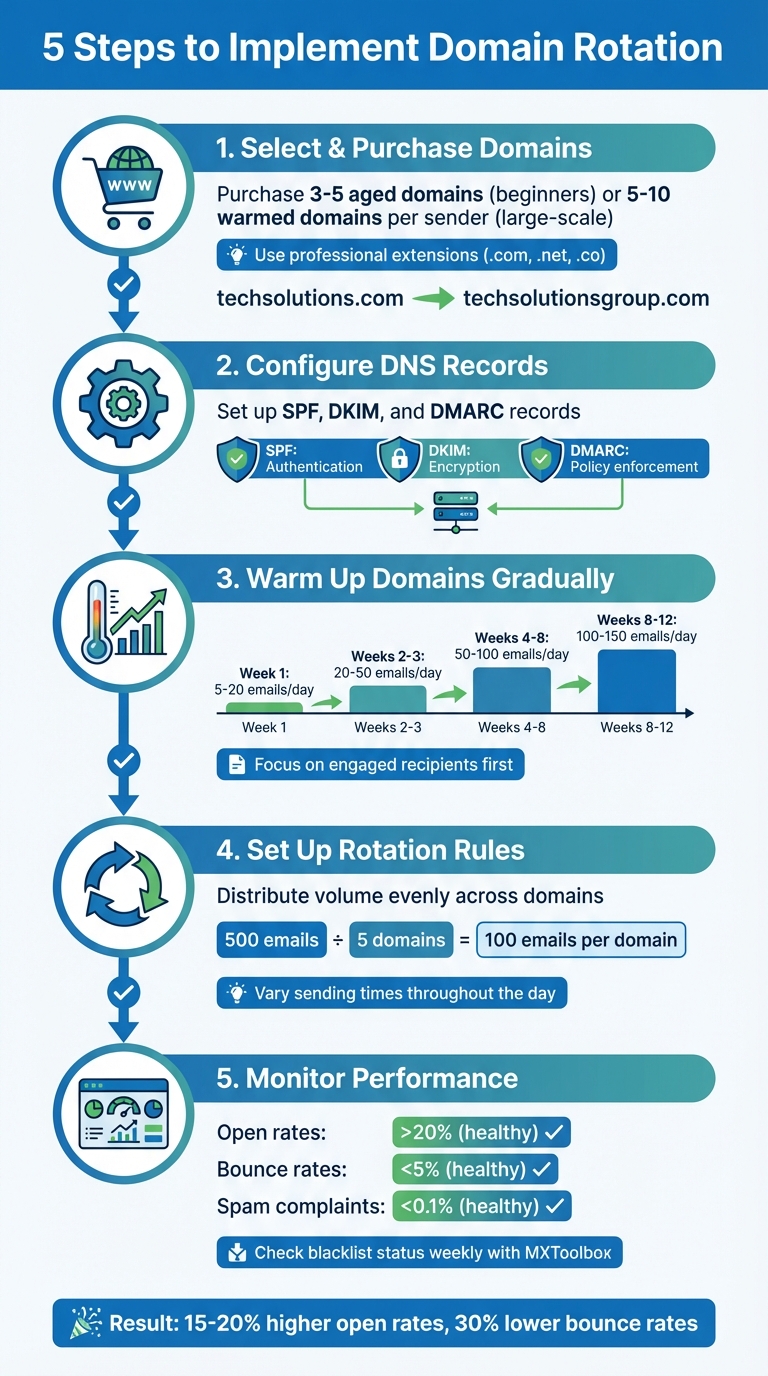
5-Step Domain Rotation Implementation Guide for Email Deliverability
Implementing domain rotation doesn’t have to be complicated. Here’s a clear breakdown of how to set up a reliable system.
Start by purchasing 3–5 aged domains if you’re new to this, or 5–10 warmed domains per sender for larger outreach efforts. The domain names you choose should feel professional and closely related to your brand, but still distinct from your main domain. For example, if your primary domain is "techsolutions.com", you might go with options like "techsolutionsgroup.com" or "techsolutionsteam.com." Stick to reputable extensions like .com, .net, or .co, and steer clear of names that might be confused with well-known brands.
Proper DNS configuration is critical to ensure your emails pass authentication checks. Set up SPF, DKIM, and DMARC records through your domain registrar. For example:
v=spf1 include:_spf.google.com ~allgoogle._domainkey with a public key value_dmarc with a policy like v=DMARC1; p=none; rua=mailto:[email protected]Platforms like Primeforge can simplify this process by automating DNS setup and managing records across multiple domains.
New domains need to be introduced slowly to avoid triggering spam filters. Start with a modest 5–20 emails per day, gradually increasing as engagement improves. By weeks 2–3, aim for 20–50 emails daily, always keeping a close eye on bounce rates. By weeks 4–8, you can scale up to 50–100 emails per day, eventually reaching 100–150 emails daily over an 8–12 week period. During this warm-up phase, focus on sending to recipients who are likely to open and engage with your emails to build a strong sender reputation.
To keep your domains under spam thresholds, distribute your email volume evenly. For example, if you’re sending 500 emails daily across five domains, allocate about 100 emails per domain. Additionally, vary your sending times by rotating which domains send emails at different hours of the day. Most email outreach tools let you set up rotation rules that automate this process, ensuring a natural and balanced distribution across your domain pool.
Keep a close eye on open rates, bounce rates, and spam complaints for each domain. Healthy metrics include open rates above 20%, bounce rates under 5%, and spam complaints below 0.1%. Use tools like MXToolbox to check your domains’ blacklist status weekly. If one domain starts showing poor performance, reduce its email volume immediately and investigate the issue. Tracking domain usage for each campaign can help you quickly identify and address problems.
Managing domain rotation manually can quickly become a nightmare. Configuring DNS records for even a single domain takes a few minutes, but when you're dealing with hundreds, those minutes snowball into hours of tedious, repetitive effort. Worse, staying within Google’s strict 0.3% complaint threshold is nearly impossible without automation.
Manual processes often lead to critical errors that harm your campaigns. Sending inconsistencies can trigger spam filters, insufficient warm-up periods can tarnish domain reputations, and unexpected volume spikes can land you on blacklists. For instance, sending more than 200–1,000 emails from a single domain in one day could derail your entire campaign. When you're scaling to thousands of emails daily, automation becomes indispensable. It ensures smooth volume distribution, real-time metric monitoring, and automatic pausing of underperforming domains to safeguard your sender reputation.
The sections below explore how Primeforge simplifies these tasks and delivers results that manual efforts simply can’t match.
Primeforge takes the hassle out of managing cold email infrastructure by automating time-consuming tasks. For example, the platform configures DNS and authentication records in just minutes - a process that would otherwise take hours. It also provisions legitimate Google Workspace and Microsoft 365 mailboxes for outreach in just 30 minutes, compared to the days it might take to do manually.
Primeforge's bulk DNS update feature allows users to modify records across multiple domains through a single interface, saving even more time. Agencies benefit from the ability to manage multiple workspaces, keeping domains organized by client or campaign. At $3.50 to $4.50 per mailbox per month, Primeforge offers a cost-effective alternative to native Google or Microsoft accounts, all while delivering superior management tools.
"It's basically 'cold email infrastructure as a service,' which saves a ton of time compared to managing dozens of inboxes manually." – Dominique W., Verified User
Primeforge is part of The Forge Stack, a suite of tools that includes Mailforge (shared infrastructure), Warmforge (email warm-up included free with Salesforge), Infraforge (private infrastructure), Salesforge (multi-channel outreach), and Leadsforge (lead generation). While these tools integrate seamlessly, they each require separate subscriptions.
Unlike alternatives such as Instantly.ai or Emailchaser, which focus primarily on inbox rotation and throttling, Primeforge stands out by emphasizing ESP matching. By sending emails from the same providers (Google/Microsoft) that your prospects use, it significantly increases the likelihood of landing in the primary inbox. One retailer who implemented proper domain rotation reported a 20% boost in open rates and a 15% increase in conversions.
Automating domain rotation doesn’t just save time - it ensures consistently higher inbox placement rates. Primeforge’s combination of automated provisioning, bulk management, and ESP matching makes it a standout choice for scaling cold outreach while maintaining the high deliverability rates of single-account setups.
Domain rotation transforms cold email campaigns into a dependable growth strategy. By spreading your email sends across multiple domains, you stay under critical thresholds - like Google’s 0.3% spam complaint rate (fewer than 3 complaints per 1,000 emails). This method reduces the risk of any single domain being blacklisted due to sudden spikes in email volume, as each domain maintains its own reputation independently.
The advantages are clear: higher open rates and better conversions. Many agencies have reported improved click-through rates and stronger ROI compared to relying on a single domain. Without proper deliverability measures, nearly half of outbound emails may never even land in inboxes. These results highlight why domain rotation is a game-changer for scaling email campaigns effectively.
Managing domain rotation manually can be tedious and prone to errors, especially when dealing with hundreds of domains. This is where automation becomes crucial. Tools like Primeforge streamline the entire process, from DNS setup (SPF, DKIM, and DMARC) to provisioning Google Workspace and Microsoft 365 mailboxes in about 30 minutes. They also allow for bulk updates across all domains through a single dashboard. By automating these tasks, you ensure consistent deliverability without the hassle of manual configurations.
Automation doesn’t just save time - it supercharges your email volume. By adding mailboxes at scale, you can increase your sending capacity 10x, 50x, or even 100x without overloading any single account. Primeforge further boosts deliverability with ESP matching, while pre-warmed backup domains ensure a smooth transition if any domain gets flagged. Plus, the platform offers enterprise-grade infrastructure at competitive pricing.
In short, automation takes the complexity out of domain rotation, letting you focus on crafting campaigns that convert while ensuring your emails consistently reach inboxes.
Domain rotation helps improve email deliverability by spreading your email traffic across several domains instead of relying on just one. When a single domain sends a large volume of emails, it can catch the attention of spam filters, potentially damaging its reputation or even leading to blacklisting. By rotating between multiple domains, each one handles a smaller, steady volume of emails, staying within the trust limits set by major providers like Gmail and Outlook. This reduces the chances of being flagged as spam and helps maintain a strong sender reputation.
For domain rotation to be most effective, it should be paired with good email practices. This includes using SPF, DKIM, and DMARC authentication, gradually warming up new domains, and maintaining consistent sending patterns. If one domain runs into trouble, the issue remains contained, safeguarding your overall email outreach. Tools like Primeforge make domain rotation easier by automating DNS setup, managing multiple mailboxes, and handling bulk domain updates. This takes the guesswork out of the process and helps ensure your deliverability stays on track without unnecessary manual effort.
To get a new domain up and running smoothly, the first step is setting up SPF, DKIM, and DMARC records. These are essential for building trust with email providers. Start small - send about 10–20 emails per day to a mix of internal and external recipients. Gradually increase the volume by 10–20% each week over a period of 4–8 weeks. The key here is consistency - keep your sending patterns steady and avoid any sudden spikes that could raise red flags.
Keep a close eye on your deliverability metrics, such as open rates, bounce rates, and spam complaints. Check these daily and address any problems as soon as they come up. Once your domain has built a solid reputation, you might want to explore domain rotation. This technique spreads out the sending load across multiple domains, helping to maintain credibility. Tools like Primeforge can automate much of this process, saving time and minimizing errors to make the warm-up phase easier and more efficient.
Automation plays a key role in domain rotation by streamlining the management of DNS updates across multiple domains. By removing the need for manual edits, it saves valuable time, minimizes the chances of configuration mistakes, and helps protect your sender reputation - an essential factor for maintaining strong email deliverability.
Using automation, large-scale operations become far easier to manage, ensuring DNS settings remain consistent and accurate. This approach not only improves efficiency but also reduces the risk of disruptions that could harm the success of your outreach campaigns.
