
Personalized Outbound Strategy
Get The Right Outbound Strategy In Minutes
Enter your email to get a custom plan & stack recommendation for your business
It's being carefully crafted by AI
Please check your mailbox in 5 minutes

Running cold email at scale breaks faster than most people expect. I’ve seen this happen when sending volume increases and deliverability starts dropping.
That’s where ScaledMail helps by providing pre-configured inboxes with automated DNS setup.It lets you send around 11,000 emails per month using multiple inboxes.
But once you try to scale further, some limitations start to show up.
You are tied to fixed inbox and domain setups, and flexibility can feel limited.
That is why many teams start looking for ScaledMail alternatives.
In this guide, I break down the 5 best options based on real scaling needs.
ScaledMail works well when you want to start sending cold emails quickly.
I’ve seen teams use it to launch campaigns without dealing with technical setup.
But once you try to scale or customize your setup, some limitations start to show.
This is why many teams switch to tools that give more control, flexibility, or full outbound workflows.
I looked at what goes wrong when you try to scale with ScaledMail.
Then I chose tools that fix those problems in a better way.
This way, each tool here solves a real problem you may face with ScaledMail.
You can choose based on how you want to scale your outbound.
| Tool | Best For | Core Strength | Setup Time | Pricing Model |
|---|---|---|---|---|
| Primeforge | Google & Microsoft mailboxes for cold outreach | ESP-matched deliverability + pre-configured mailboxes | ~30 minutes | $3.5–$4.5/mailbox |
| Mailforge | Fast, low-cost email infrastructure | Automated DNS + shared IP setup | ~5 minutes | $2–$3/mailbox |
| Saleshandy | Running cold email campaigns | Email sequences and outreach automation | No infrastructure setup needed | Subscription plans |
| Infraforge | Advanced deliverability control | Dedicated IP infrastructure | Ready in minutes | $3–$4/mailbox |
| Smartlead | Scaling outbound campaigns | Unlimited mailboxes + campaign automation | Start after connecting mailboxes | Starts at $39/month |

Primeforge is a cold email infrastructure tool that gives you real Google Workspace and Microsoft 365 mailboxes.
These are built for outreach.
I used it when I wanted better inbox placement without relying on shared systems.
The mailboxes are already configured, so I didn’t have to deal with setup issues.
Everything was ready to send in about 30 minutes, which saved a lot of time.
When I compared both, the difference came down to how the mailboxes are built.
ScaledMail gives you access to a large pool of pre-configured inboxes inside fixed plans.
Primeforge gives you fully owned Google Workspace and Microsoft 365 mailboxes.
This changes how deliverability works.
With Primeforge, I send from the same providers my prospects use.
This ESP matching improves inbox placement and reduces spam risk.
Setup is also more predictable.
ScaledMail depends on a white-glove process that takes a few days.
Primeforge prepares mailboxes automatically and gets them ready much faster.
| Feature | Primeforge | ScaledMail |
|---|---|---|
| Mailbox type | Google Workspace & MS365 | Pre-configured inbox pool |
| Ownership | Full ownership | Limited (plan-based) |
| Setup time | ~30 minutes | ~4 days |
| Scaling | Add mailboxes as needed | Fixed plans |
| Deliverability approach | ESP matching | High-volume infrastructure |
| DNS setup | Fully automated | Managed setup |
| Pros | Cons |
|---|---|
|
|
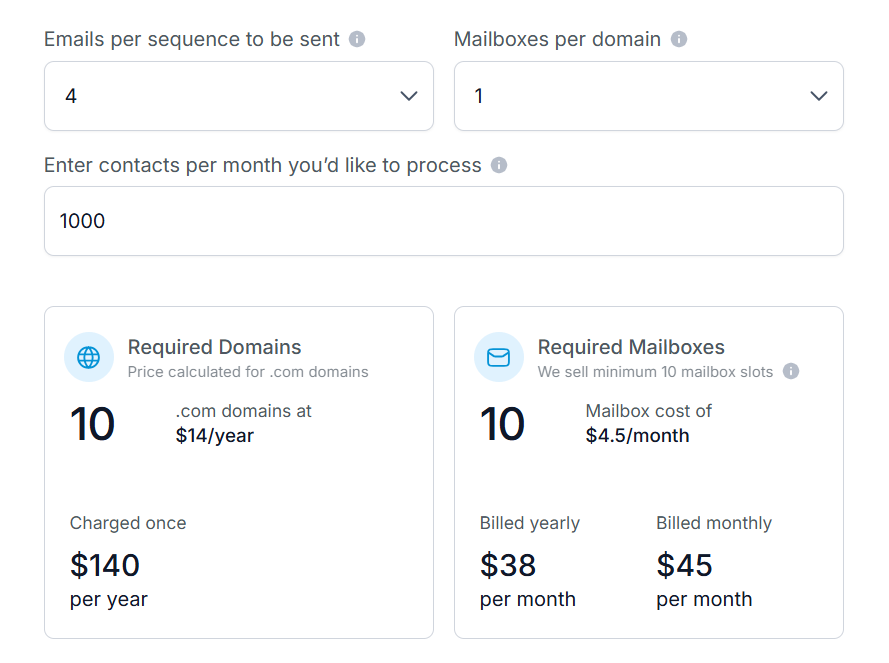
Primeforge pricing depends on mailbox usage.
I found this useful when deliverability mattered more than just sending volume.
Enter your email to get a custom plan & stack recommendation for your business
Please check your mailbox in 5 minutes

Mailforge is a cold email infrastructure tool built to get your sending setup ready fast.
When I used it, I did not have to deal with DNS, hosting, or mailbox setup.
I added domains, and Mailforge handled SPF, DKIM, and DMARC automatically.
Within minutes, I had mailboxes ready to send.
When I compared both, the difference came down to how you scale.
ScaledMail gives you predefined inbox setups.
Each plan includes a fixed number of domains and mailboxes.
Mailforge is more flexible.
I decide how many domains to add.
I increase mailbox slots based on how much I want to send.
There are no predefined packages to upgrade into.
Setup is also different.
ScaledMail takes a few days because of the white-glove setup.
Mailforge is automated.
I had everything ready in minutes.
| Feature | Mailforge | ScaledMail |
|---|---|---|
| Setup time | Minutes | Around 4 days |
| Inbox model | You create mailboxes | Pre-built inbox setups |
| Scaling | Flexible (based on usage) | Predefined packages |
| DNS setup | Automated | Included |
| Control | More flexible | Medium |
| Infrastructure | Shared IP (cold email focused) | Pre-configured inbox system |
| Pros | Cons |
|---|---|
|
|
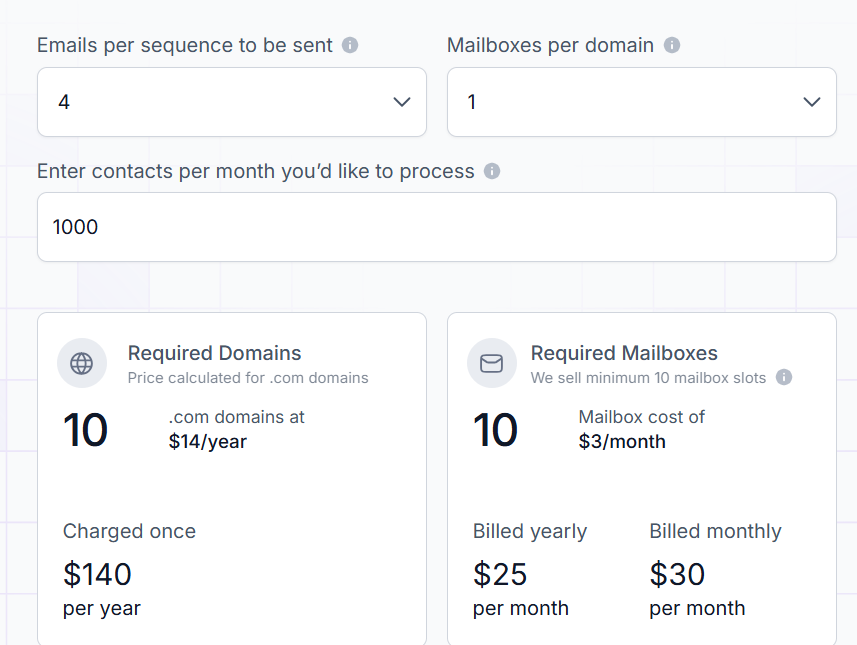
Mailforge uses usage-based pricing.
I found this useful because I could scale gradually instead of upgrading plans.
Saleshandy is a cold email outreach platform.
It helps you find leads, run campaigns, and manage replies in one place.
When I used it, I could search for prospects, create sequences, and track results without switching tools.
Everything is managed inside one dashboard, which makes it easier to run outbound daily.
When I compared both, the difference was in their role.
ScaledMail focuses on infrastructure.
It gives you pre-configured inboxes and handles setup for sending at scale.
Saleshandy works on top of that layer.
It helps you run campaigns, manage follow-ups, and track replies.
There is also a workflow difference.
With ScaledMail, I still need a sending tool to run campaigns.
Saleshandy lets me create and run email sequences directly inside the platform.
Scaling also works differently.
ScaledMail scales through fixed plans with a set number of inboxes and domains.
Saleshandy scales based on how many email accounts I connect and how I run campaigns.
| Feature | Saleshandy | ScaledMail |
|---|---|---|
| Core use | Outreach platform | Email infrastructure |
| Lead generation | Built-in | Not included |
| Email sending | Built-in | Needs external tool |
| Inbox setup | Connect your accounts | Pre-configured inbox setups |
| Scaling | Based on connected accounts | Fixed packages |
| Campaign management | Yes | No |
| Deliverability tools | Built-in tools | Infrastructure-focused |
| Pros | Cons |
|---|---|
|
|
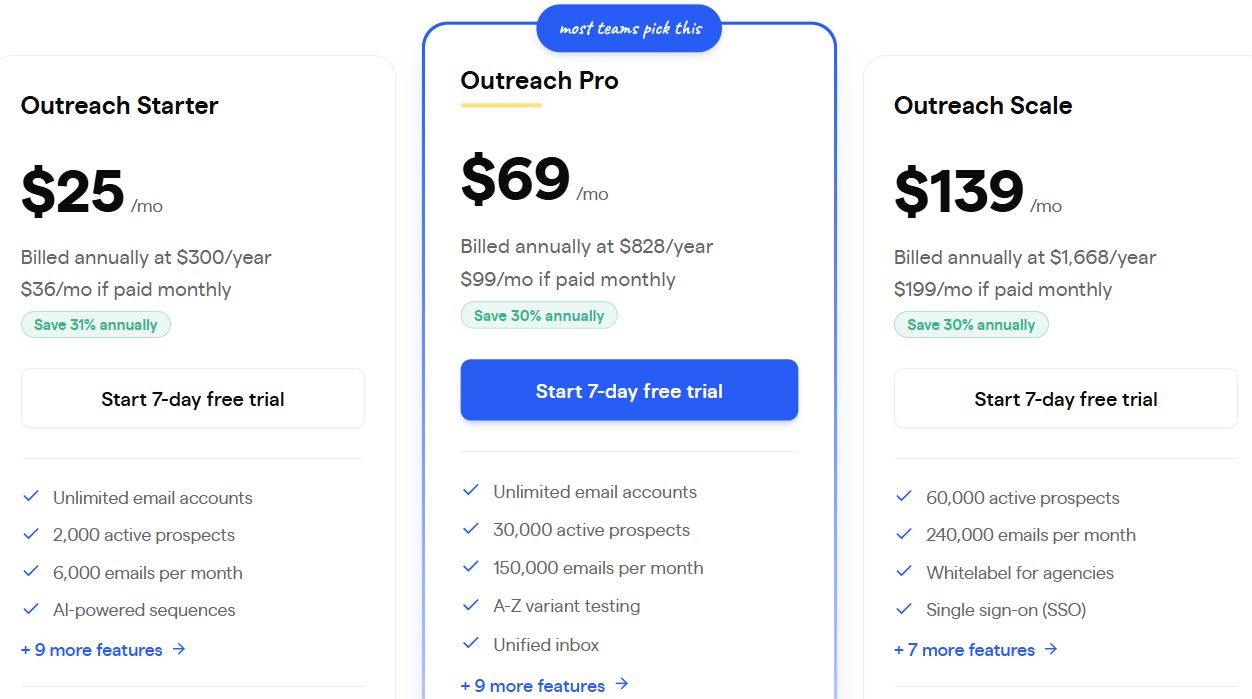
Saleshandy offers flexible pricing.
This works well if you want to manage outreach from one tool instead of using multiple tools.

Smartlead is a cold email tool used to run campaigns and manage replies.
I used it when I wanted one place to send emails and track conversations.
It is built to control how emails are sent and managed.
ScaledMail focuses on giving inboxes.
Smartlead focuses on using those inboxes to run campaigns.
I could create sequences, send emails, and track replies inside Smartlead.
With ScaledMail, I still need another tool for this.
Smartlead also handles sending better.
It rotates mailboxes inside campaigns, so sending stays stable.
| Feature | Smartlead | ScaledMail |
|---|---|---|
| Purpose | Run campaigns | Provide inboxes |
| Campaigns | Yes | No |
| Mailboxes | Unlimited connection | Fixed number |
| Replies | One inbox view | Not included |
| Warmup | Built-in | Optional |
| Setup | Quick to start | Takes few days |
| Pros | Cons |
|---|---|
|
|
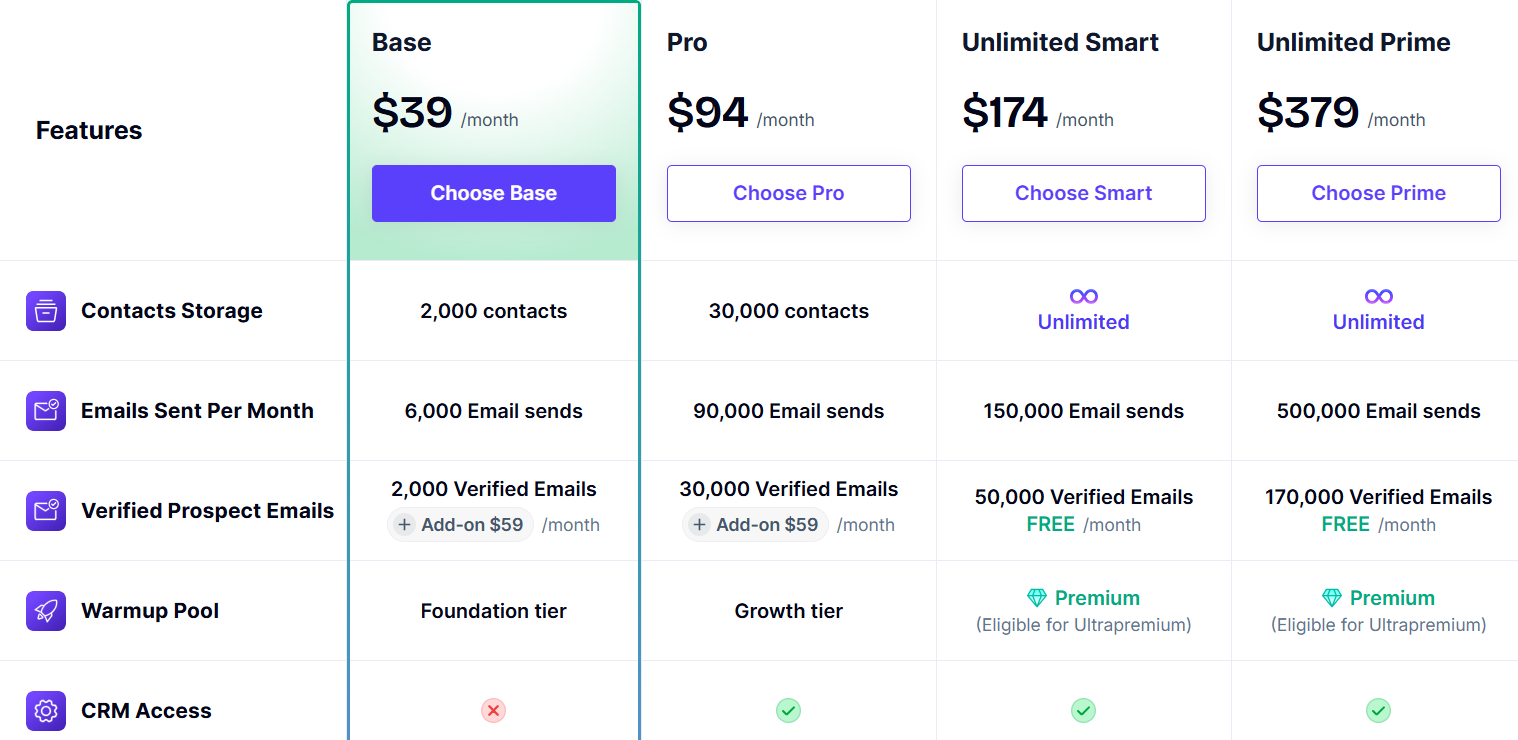
Smartlead has simple plans.
I found this helpful because I did not need to upgrade for more mailboxes.
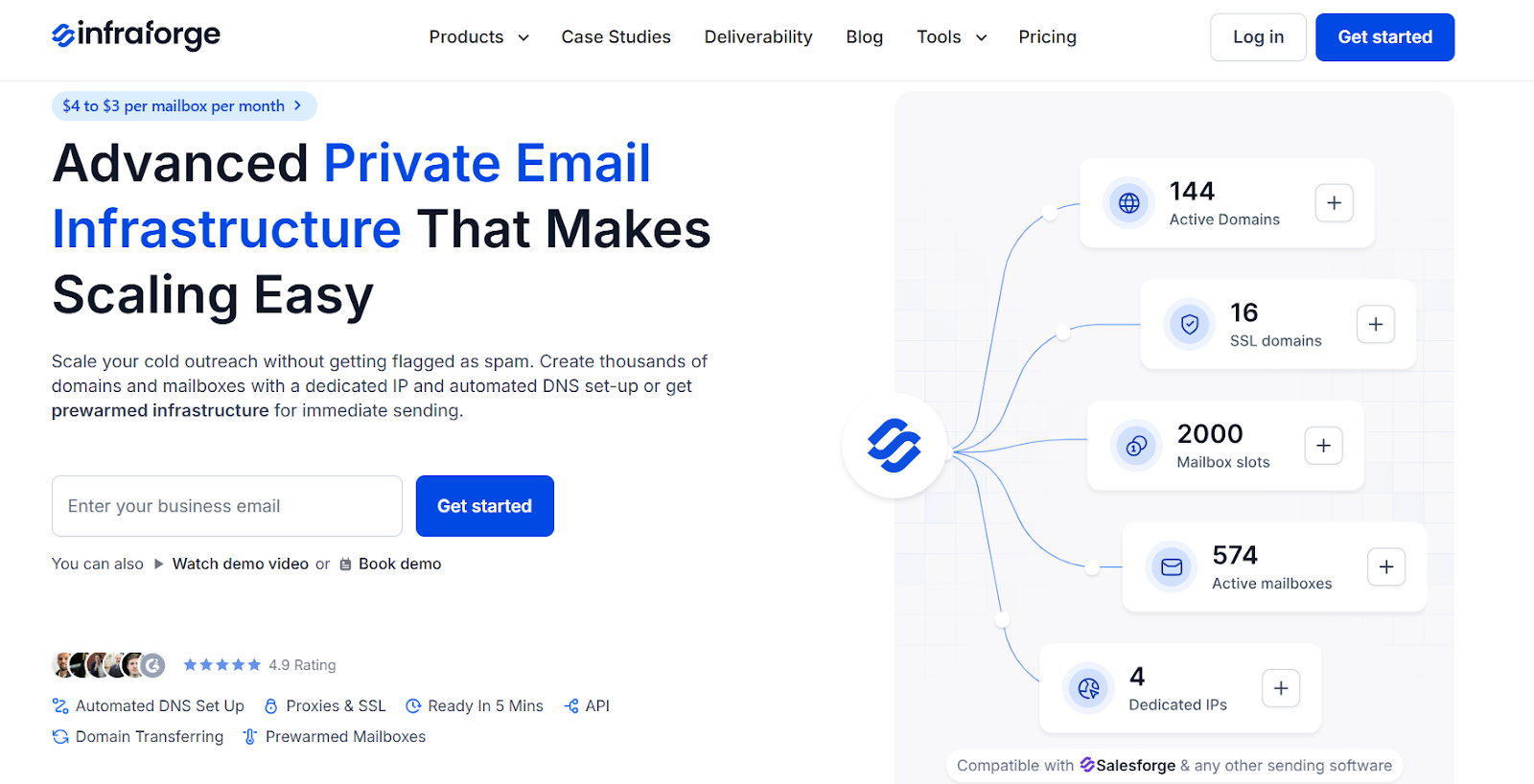
Infraforge is a private email infrastructure tool built for teams that want full control over sending.
It has a dedicated IP setup.
Each mailbox runs on its own infrastructure, so your reputation depends only on how you send.
It also comes with automated DNS and prewarmed options, so you can start faster.
ScaledMail gives you a ready setup with inboxes already created.
You get a fixed number of mailboxes and sending capacity based on the package.
Infraforge works in a more controlled way.
I create domains and mailboxes based on my sending plan.
Each mailbox runs on a dedicated IP, so no other sender affects my reputation.
There is also a difference in how sending starts.
ScaledMail lets you send fast, even from day one.
But warmup is still recommended for better results.
Infraforge gives prewarmed infrastructure or lets you warm up with built-in systems.
This makes it more suited for long-term deliverability.
| Feature | Infraforge | ScaledMail |
|---|---|---|
| Setup time | Minutes | 2–4 days |
| Inbox model | You create mailboxes | Pre-built inbox setups |
| Scaling | Based on domains + slots | Fixed packages |
| DNS setup | Automated | Managed for you |
| Control | Full control | Limited control |
| Infrastructure | Dedicated IP | Pre-built inbox setups |
| Sending start | Prewarmed or controlled warmup | Can send early, warmup recommended |
| Pros | Cons |
|---|---|
|
|
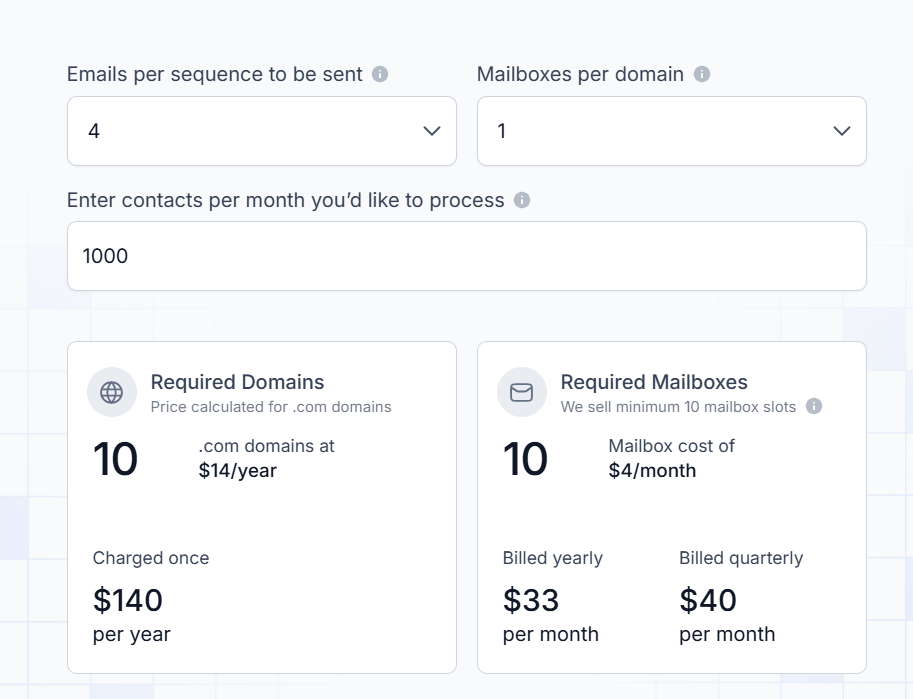
Infraforge uses usage-based pricing.
This works best when you care about control and long-term deliverability, not just quick setup.
Enter your email to get a custom plan & stack recommendation for your business
Please check your mailbox in 5 minutes
Choosing the right tool depends on what matters most, inbox type, control, setup speed, or deliverability.
Here’s how I would break it down:
From what I’ve seen, deliverability becomes the main issue when you scale.
If that’s your priority, Primeforge is the strongest ScaledMail alternative.
Get started with Primeforge and set up real mailboxes in about 30 minutes.