
Google Workspace's direct pricing looks reasonable at $7 per mailbox. Then you do the math for 30 mailboxes and realize you are at $210 a month before any cold email goes out.
That is the moment most cold email operators start hunting for a cheaper way to buy Google Workspace at scale.
If that is why you are here, you are in the right spot. This guide walks you through every real path to cheaper Google Workspace mailboxes for cold outreach in 2026.
Let's get into it.
| Ways to Get Cheaper Google Workspace | Starting Price | Cold Email Ready | Best For |
|---|---|---|---|
| Primeforge | $4.5 to $3.5/mailbox/month | Yes, out of the box | Cold email operators running 10+ mailboxes |
| Authorized Google Workspace resellers (Leads Monky, F60Host, Zapmail) | $2.50 to $3/user | No, license only | Regular business email at team scale |
| Google Workspace direct on annual billing | $7/user/month | No | 1 to 5 mailboxes, non-outreach use |
Before you can figure out the cheapest way to buy Google Workspace, you need to know what Google itself charges. That way you know exactly how much every other option is saving you.
Google Workspace has three main business plans, and each doubles roughly in price as you move up the tier.
Business Starter is the entry-level plan at $7 per user per month on annual billing, or $8.40 on monthly billing. You get a custom-domain email address, 30GB of pooled storage per user, and 100-participant video meetings. This is the plan most cold email operators buy because you are not using Drive or Meet on a cold email mailbox anyway. Storage and meeting features do not matter when the mailbox exists to send outreach.
Business Standard runs $14 annually or $16.80 monthly per user. The upgrade gets you 2TB of pooled storage per user, 150-participant meetings with recording, and the full Gemini AI suite across Docs and Gmail. For cold email use, none of that is worth the extra $7 per mailbox per month.
Business Plus sits at $22 annually or $26.40 monthly per user. You get 5TB of storage, 500-participant meetings, and enhanced security features like Google Vault for compliance archiving. Only worth it if your team has actual compliance requirements, which almost never applies to cold email mailboxes.
The prices come from workspace.google.com/pricing at the time of writing. Verify them before you commit, because Google has raised prices twice since late 2024. For a full plan-by-plan breakdown, I wrote a separate Google Workspace review that goes deeper on each tier.
Here is where the sticker price starts to hurt. Cold email at any real volume needs at least 10 mailboxes. Most serious setups run 20 to 50.
And that is just the mailbox layer. It does not include the domains you need to buy, the DNS setup time, the warmup tools, or the mailbox replacements when ones burn. Those costs stack on top and often double the total you thought you were paying.
That is the math that pushes most operators to hunt for a cheaper path. And the cheaper paths exist, but they are not all built the same way.
Here is where a lot of cold email operators trip themselves up. They compare Google Workspace providers on the sticker price per mailbox and pick the cheapest one. Then they burn twice what they saved in setup time, warmup delays, and mailbox replacements over the next three months.
The per-mailbox price is only one line of the real cost. There are five more you need to price in before you decide what is actually cheap.
Every domain you send cold email from needs SPF, DKIM, and DMARC records configured correctly. Skip the setup and your emails land in spam by default. Configure the records wrong and you risk getting flagged as a spoofer. Do it right manually and each domain takes 20 to 40 minutes assuming you know what you are doing.
Running 10 domains with 3 mailboxes each means 3 to 6 hours of setup work before you send a single email. If your time is worth $50 an hour, that is $150 to $300 in labor before the first cold email goes out. Providers that pre-configure DNS for you are essentially selling you those hours back at a lower price than doing it yourself. For the technical walkthrough on getting DNS right, see my DMARC guide for Google Workspace and Microsoft 365.
A brand new Google Workspace mailbox sending 50 cold emails on day one is one of the fastest ways to burn it. Google will flag the sudden volume, your emails will land in spam, and the mailbox picks up a bad reputation you cannot easily reverse.
The standard fix is to run new mailboxes through a warmup service for around 14 days. It exchanges emails with other seed inboxes to build a natural sending pattern before real cold outreach starts.
Warmup either costs you time or costs you money. Standalone warmup tools run $15 to $30 per mailbox per month. Multiply that by 20 mailboxes and warmup alone is another $300 to $600 a month on top of your Google Workspace bill. Cold-email-focused providers usually bundle warmup, which is why their sticker prices look higher but their total cost is often lower.
Cold email mailboxes burn. It is a normal cost of doing outbound, not a sign you did something wrong. Recipients mark you as spam, bounce rates climb, deliverability drops, and eventually you need to rotate that mailbox out and replace it.
The question is: who pays for the replacement, and how fast do you get it?
Generic Google Workspace resellers usually make you buy replacements at full price. Cold-email-focused providers often include mailbox replacements in the plan, because they know you will need them. A realistic burn rate for cold email is 10 to 15 percent of your mailboxes per month. On a 30-mailbox setup, that is 3 to 5 replacements every 30 days. At $7 per mailbox from Google direct, that is another $21 to $35 a month you were not budgeting for.
This one gets missed until it hurts. Some cheap Google Workspace providers do not give you full admin console access on their entry plans. What you are really buying is a rented seat inside their tenant, not your own workspace.
That matters for three reasons:
Cheap does not stay cheap when you are forced to rebuild everything six months in. Always ask for admin console access and a clean offboarding path before you commit.
Every email that lands in spam is money you spent and got nothing back. That is the biggest hidden cost in cold email, and most operators do not price it in.
If you pay $2 per mailbox but land half your emails in spam, your real cost per delivered email is double what the sticker says. A $4 mailbox with 90 percent inbox placement is often cheaper on a per-delivered-email basis. The sticker price and the real cost are almost never the same number.
Now that you know what actually drives cost, here are the four real paths to cheaper Google Workspace mailboxes for cold outreach. I ranked them by the situation each fits best, not by sticker price alone. Because as you just saw, sticker price is a partial answer at best.
Best for: 1 to 5 mailboxes, testing cold email at small scale.
If you only need one or two Google Workspace mailboxes for cold outreach, buying direct on annual billing is genuinely fine. Business Starter at $7 per user per month is not going to break you at that scale. You just have to set up DNS yourself, warm the mailbox yourself, and monitor deliverability yourself.
The catch is scale. The moment you go past 5 mailboxes, setup time and warmup runway start to matter more than the $1 to $2 per mailbox you might save on sticker price. Both eat into any savings you get from annual billing. If you are running cold outreach seriously, you almost certainly need more than 5 mailboxes anyway. That is the minimum to hit send volumes that make outbound work.
Buy direct if you are testing cold email with a small setup. Move to a specialized provider the moment you are ready to scale.
Best for: regular business email at team scale, not cold outreach.
This is the path most "cheapest Google Workspace" articles point you to, and for regular business use it is a good answer. Authorized resellers like Leads Monky, F60Host, and Zapmail buy Google Workspace licenses in bulk and pass 40 to 60 percent of the savings on to you. Prices typically start around $2.50 to $3 per user per month for Business Starter, versus $7 direct from Google.
Here is where it gets tricky for cold email. What you are getting from a general reseller is a Google Workspace license and, at best, basic DNS configuration. What you are not getting is:
If your goal is to move your team's daily business email to Google Workspace, an authorized reseller is the right answer. If your goal is cold email, keep reading. I covered the full Google Workspace reseller comparison in a separate post if you want the deeper breakdown.
Best for: cold email operators running 10 or more mailboxes.
This is the category built for what you are actually trying to do. Providers like Primeforge, Puzzle Inbox, Maildoso, and Mailreef sell you real Google Workspace mailboxes that come pre-configured for cold email. DNS is set up, IPs are the right kind, and mailboxes often come pre-warmed. Everything is optimized for inbox placement instead of general business use.
Prices sit between $3 and $4.50 per mailbox per month depending on the provider. On paper that is more expensive than a $2.50 Leads Monky reseller license. In practice, once you price in the DNS setup time, warmup runway, and mailbox replacements, the specialized provider works out cheaper. You would need to buy those pieces separately anyway.
The differences between providers in this category come down to three things:
I broke down pre-warmed Google Workspace mailbox providers if you want the full comparison.
Best for: high-volume senders where Google branding does not matter.
Here is a question worth asking before you commit to Google Workspace at all. Do you actually need the Google name on your mailbox, or just mailboxes that deliver?
If deliverability is the goal and Google branding does not matter, you have cheaper options:
Mailforge handles the shared IP path in the Forge stack. Infraforge handles the dedicated IP path. Both are meaningfully cheaper than Google Workspace at scale, and both are built purely for cold email.
The trade-off is that you lose the Google Workspace brand recognition in the "sent from" field. For most B2B outbound that does not matter. For some buyer personas, particularly enterprise buyers who scrutinize sender infrastructure, it can. Only you know which side your ICP sits on.
Primeforge is the cheapest Google Workspace setup that actually holds up for cold email. You get real Google mailboxes starting at $3.50 each, pre-configured for outbound and ready to send in 30 minutes. The math works when you price in what you would spend on setup time, warmup tools, and mailbox replacements everywhere else.
Here is what you are actually getting for that $3.50 per mailbox per month.
These are legitimate Google Workspace accounts, not EDU tricks or workaround infrastructure that Google patches every quarter. That matters because loophole mailboxes have a habit of getting suspended without warning. You wake up to find 20 mailboxes offline mid-campaign, and you have no recourse because the provider was never authorized to sell them in the first place.
SPF, DKIM, and DMARC are configured automatically the moment you point your domain nameservers at Primeforge. That saves you the 20 to 40 minutes per domain you would otherwise spend on manual configuration. On a 10-domain setup, that is 3 to 6 hours of work you do not have to do.
Empty sender avatars trigger spam filters faster than most people know. Primeforge mailboxes come with profile pictures configured out of the box, which is the kind of small deliverability detail that separates cold-email-ready mailboxes from generic Google Workspace accounts.
Every Primeforge mailbox is warmed through the Warmforge integration in the background. You do not have to configure warmup, buy a separate tool, or wait weeks before sending. Mailboxes are pre-warmed and ready to send by the time you get access. That alone saves you $15 to $30 per mailbox per month you would spend on standalone warmup tools.
Twenty Google Workspace mailboxes on Primeforge runs you $70 a month. The same 20 mailboxes direct from Google costs $140 to $180 a month depending on billing cycle. And that price does not include DNS setup, warmup, or the cold email specific configuration you would need to add on top.
On a per-mailbox basis, Primeforge is cheaper than direct. On a per-hour-of-your-time basis, it is not close.
For the technical comparison of Google Workspace mailboxes versus running your own private SMTP, I broke that down in a separate post.
If you have decided Primeforge is the right fit, here is exactly how to get your Google Workspace mailboxes set up and sending. The whole process takes around 30 minutes from signup to ready-to-send inboxes, and you do not need to be technical to get through it.
Before you sign up, figure out your target send volume. The safe rule for cold email deliverability is 30 to 50 sends per mailbox per day. Work backwards from there:
Also plan for 3 mailboxes per domain. That gives you the sender rotation cold email needs without over-loading any single domain. Sending 150 emails a day from a single domain is a fast way to burn it, even with good deliverability infrastructure.
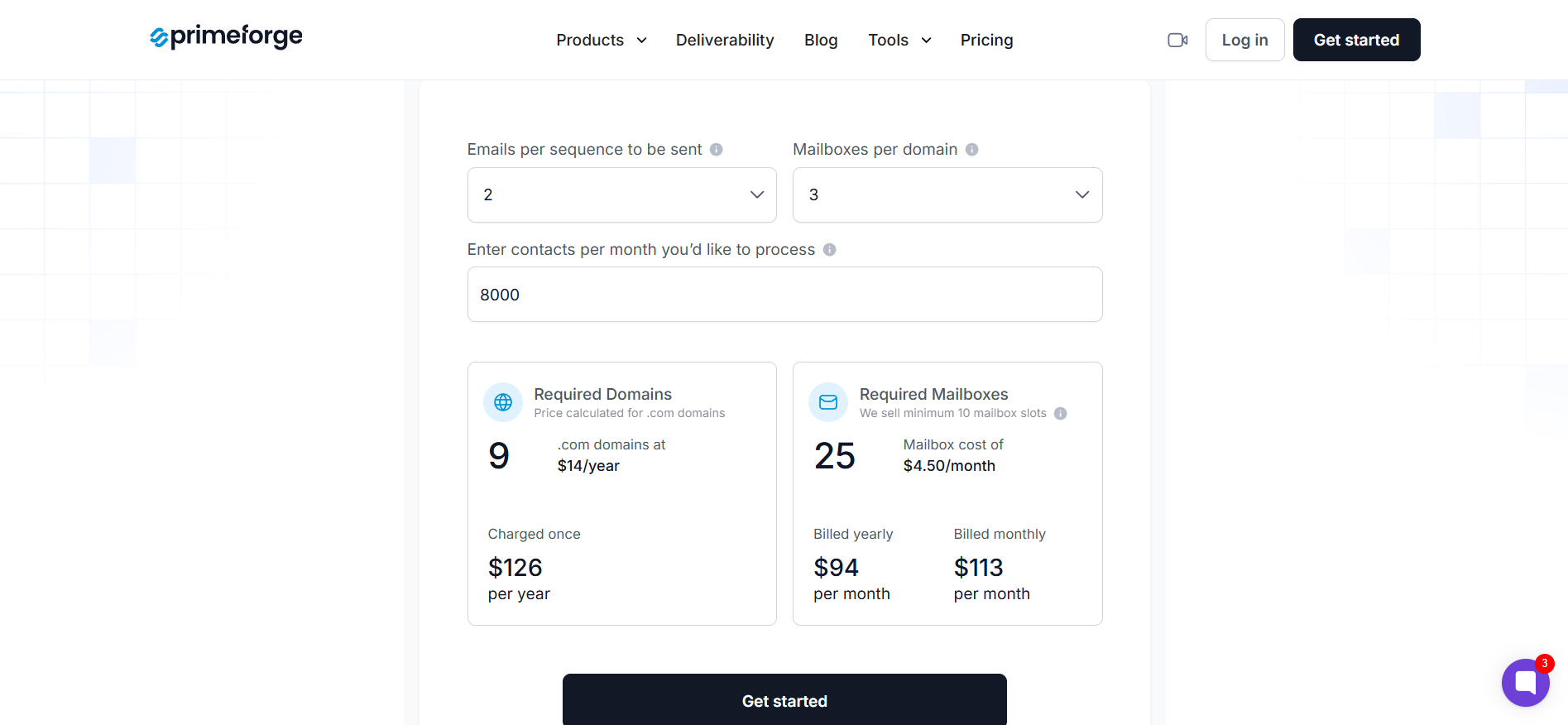
Primeforge has a mailbox calculator on the pricing page if you want the numbers done for you. Punch in your daily send target and it tells you how many mailboxes and domains to buy.
Head to Primeforge and create your account. Pricing starts at $3.50 per mailbox per month when you buy in bulk, and scales down further as you add more mailboxes. There is no per-seat pricing on the outreach side, so you are only paying for the mailboxes themselves.
Pick the mailbox count based on Step 1. You can always add more later as you scale, so start with what you need for the next 60 days rather than trying to buy for the whole year upfront.
You have two paths here. Bring your own lookalike domains that you have already purchased, or buy them fresh through the Primeforge flow. Lookalike domains are variations of your main company domain. If your main domain is company.com, lookalikes might be:
Never send cold email from your primary business domain. If deliverability tanks or you get blacklisted, your main email goes down with it. That is the single most common expensive mistake in cold outreach.
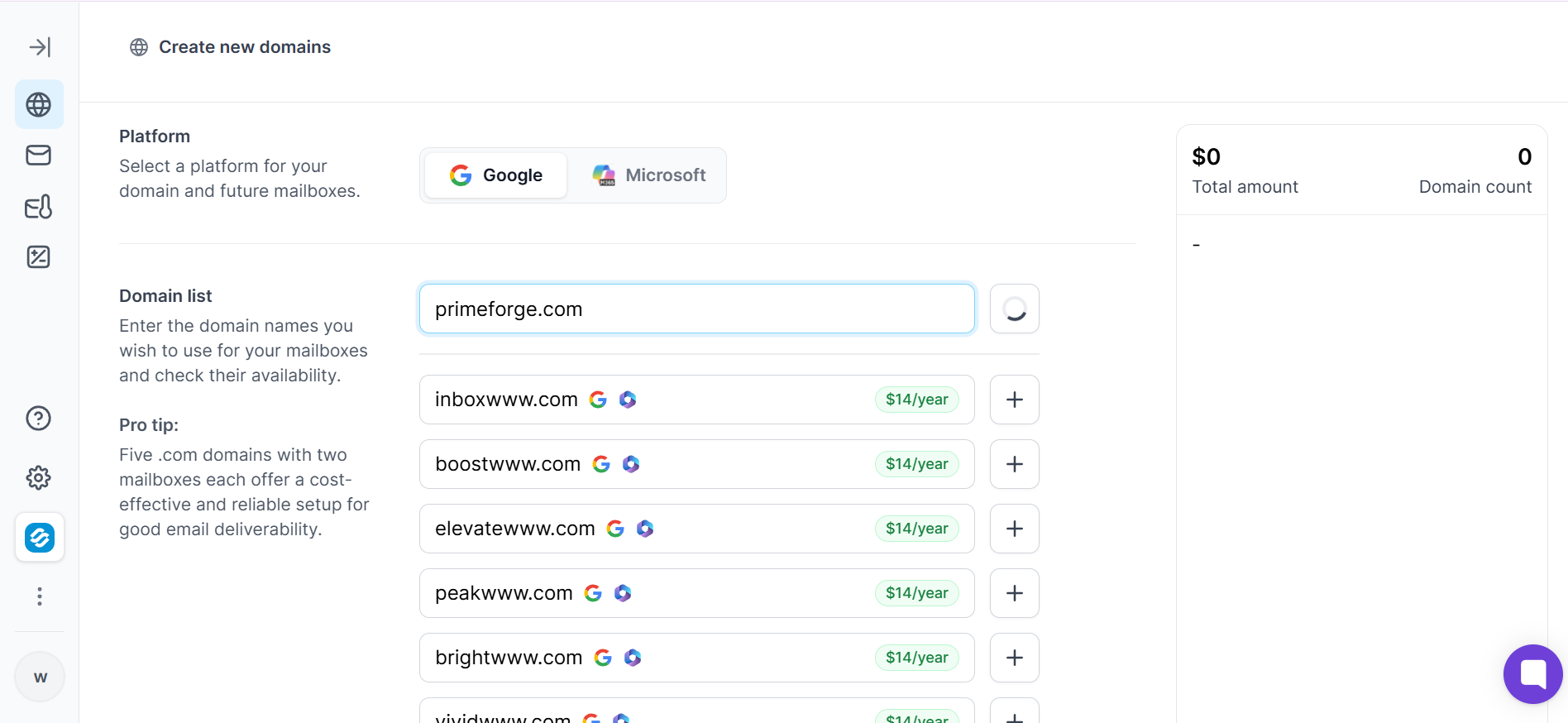
If you are buying domains yourself, go to a registrar like Namecheap or Cloudflare. Aim for .com variants first, then .co and .io if .com is taken. Check the domain age and blacklist history before you commit. A domain with a bad history costs you deliverability from day one, and no amount of good infrastructure fixes it.
Once you have your domains, you need to point them to Primeforge so it can provision the mailboxes and configure DNS. In your domain registrar's dashboard, update the nameservers to the ones Primeforge gives you during onboarding.
This is the only technical step in the whole process, and it takes about 5 minutes per domain. Once the nameservers propagate (usually within an hour), Primeforge takes over. It sets up SPF, DKIM, and DMARC automatically. This is the part that would take you 20 to 40 minutes per domain if you were doing it manually.
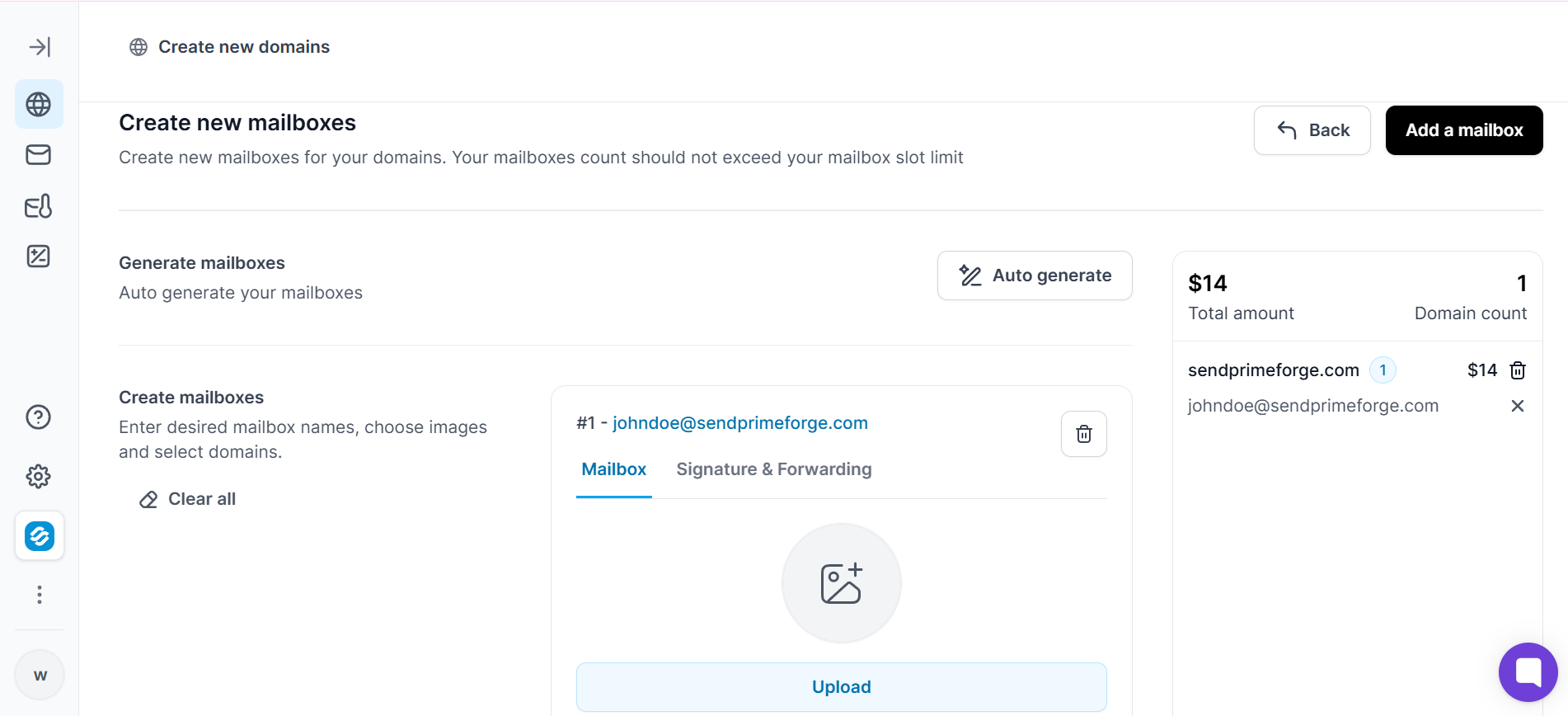
New Google Workspace mailboxes should not send real cold outreach on day one. They need a warmup period to build sender reputation, and skipping it is how mailboxes burn fast.
Primeforge handles warmup through the Warmforge integration in the background. Your mailboxes get warmed automatically for around 14 days before you start sending real campaigns. You do not have to configure anything or buy a separate warmup tool. This is one of the biggest hidden savings in the Primeforge pricing because standalone warmup tools run $15 to $30 per mailbox per month elsewhere.
Once warmup completes, connect your Primeforge mailboxes to your outreach platform of choice. Primeforge works with any cold email tool that supports Google Workspace mailboxes, including Instantly, Smartlead, and Salesforge.
If you are already using Salesforge as your outreach layer, the Primeforge connection is one-click. Unlimited senders are supported, so you can plug in 10 or 100 mailboxes without hitting seat limits. From here you upload your prospect list, write your sequence, and launch.
Cold email mailboxes have a lifecycle. Even with perfect setup, expect to rotate 10 to 15 percent of your mailboxes every month as they naturally burn from cold outreach volume. That is normal, not a failure mode.
Watch heat scores in the Warmforge dashboard. When a mailbox drops below 70, pull it out of rotation and warm it back up or replace it. Primeforge makes replacements easy so you are not stuck buying fresh mailboxes at full retail every time one burns.
→ Get real Google Workspace mailboxes for cold email from $3.50, ready in 30 minutes
If you are researching Google Workspace for your team's daily email and not cold outreach, most of this guide is not for you. Here is the short version anyway.
But if you are here because you need mailboxes for cold outreach, none of that helps. Go back to the sections above for the paths that actually fit your use case.
Cheapest is not one answer. It depends on three questions, and once you have your answers the right path is usually obvious.
If it is cold outreach, everything in this guide about DNS, warmup, and deliverability applies. Sticker price is not the metric to optimize for. Total cost of a working setup is.
If it is regular business email, ignore all of that and go straight to the reseller section. Leads Monky or an equivalent authorized reseller will save you 60 percent versus buying direct from Google.
If your ICP does not care whether the email came from a Google-hosted mailbox, you have more options and most of them cost less than Google Workspace at scale. If your ICP does care, particularly enterprise buyers who look at sender infrastructure, Google Workspace mailboxes are worth the premium.
For cold email operators running 10 or more mailboxes in 2026, the cheapest Google Workspace setup that actually holds up is Primeforge. You get real Google mailboxes at $3.50, pre-configured DNS, warmup handled, and setup done in 30 minutes instead of days.
On a sticker price basis, cheaper resellers exist. On the total cost of getting a cold email setup live and delivering, Primeforge stops costing you money elsewhere.
→ Get Google Workspace mailboxes for cold email starting at $3.50
1. What is the cheapest way to get Google Workspace for cold email in 2026?
The cheapest Google Workspace setup that actually works for cold email is a cold-email-focused mailbox provider like Primeforge. It starts at $3.50 per mailbox per month. It includes pre-configured DNS, warmup, and mailbox replacements. Cheaper generic resellers exist, but they leave you to handle cold email setup yourself. That usually costs more in time and burned mailboxes than you save on sticker price.
2. Can I use my regular Google Workspace account for cold email?
Technically yes, but it is a bad idea. Cold email volumes and reply patterns are very different from normal business email. Sending outreach from your primary company mailbox risks damaging your main domain's sender reputation. If those emails start hitting spam or getting complaints, your team's regular email deliverability drops with it. Always use separate lookalike domains and dedicated mailboxes for cold outreach.
3. Is buying Google Workspace from a reseller safe for cold outreach?
Buying from an authorized Google Workspace reseller is safe from a licensing perspective, since these are legitimate Google Workspace accounts. What is not safe is assuming a general reseller sets up your mailboxes for cold email. Most general resellers give you a license and basic DNS, not the cold-email-specific configuration, warmup, and IP setup that outreach needs. Ask specifically about cold email support before buying, or go with a provider built for cold outreach from the start.
4. How long does it take to set up Google Workspace mailboxes with Primeforge?
Setup runs around 30 minutes from signup to ready mailboxes. That covers account creation, domain configuration, and DNS setup handled automatically by Primeforge. After that, mailboxes go through a 14-day warmup period before you start sending real cold outreach. Skipping warmup is how mailboxes burn fast, so this runway is built into the process on purpose. Total time from signup to your first cold email campaign is around two weeks.
5. What is the difference between Google Workspace resellers and cold email mailbox providers?
Google Workspace resellers sell you a discounted Google Workspace license and usually handle basic setup. Cold email mailbox providers sell you a full cold email setup on top of a Google Workspace mailbox. That includes pre-configured DNS, warmup, mailbox profile pictures, and often mailbox replacements when ones burn. Resellers are cheaper on sticker price. Cold email providers are cheaper on total cost when you are running outbound.
6. Can I get Google Workspace for free?
Not for a for-profit business. Google retired the free legacy edition of Google Workspace in 2022. Accredited schools and registered nonprofits still qualify for free or heavily discounted tiers, but every commercial business now needs a paid plan. Any provider offering "free" Google Workspace accounts to for-profit businesses is either using EDU workarounds that Google is cracking down on, or is not what they claim to be.
