
You are here because Smartlead is on your shortlist and you want a review that actually opened the tool.
Most Smartlead reviews on the first page of Google are affiliate roundups with a pricing table stapled on. Nobody logged in. Nobody hit a real friction point. Nobody said what the lead finder actually looks like when you open it for the first time.
I ran Smartlead for three weeks across 26 mailboxes and used every feature that ships on the Pro plan plus the SmartSenders and SmartDelivery add-ons.
Below is the feature-by-feature read, the G2 review pattern I saw across 421 reviewers, the real pricing math once the add-ons stack, and where Salesforge closes the gaps Smartlead leaves open.
The Smartlead review pattern is unusually consistent. Reviewers who reach proficiency love the product. Reviewers who quit early consistently name the same first-week friction. Below are the seven G2 reviewers whose comments matched what I saw in my own testing.
Matt runs cold email across a large number of sending domains and still keeps inbox placement steady even when pushing serious daily volume. That lines up with what I saw. Smartlead's warmup network and mailbox rotation genuinely hold up when the volume climbs, and it is the single most consistent theme in the positive review pattern.
Tim built and launched his first campaign without long onboarding or documentation digging. My read is that this is true, but only after you know the map. The first two hours are not fast. The first two hours after that are.
Paul had two minor technical questions and got prompt helpful assistance within 24 hours, even over a weekend. Worth noting that Paul is a 5-star reviewer whose support experience was clean. Other reviewers describe longer resolution paths, which suggests the 24-hour response window holds for simple issues and stretches for anything that needs partner-provider escalation.
Frederik has generated over 10,000 positive replies and $30M in revenue using Smartlead. That is the case for teams already running high-volume outbound where the unlimited mailbox model compounds. Smartlead's economics reward volume and punish light users.
George's exact complaint is the top recurring theme in the entire review pattern. The interface feels dated in parts. Menu locations are not always where you would expect them. This is the friction that filters out reviewers before they reach proficiency, and Smartlead has not solved it as of my June 2026 test.
Basit flags open and click rates that do not always seem accurate. This matched my test. Reported open rates drifted upward past 60% on a couple of campaigns in ways that did not track with reply volume. Not a dealbreaker, but for mid-market teams making decisions on those numbers, it is worth calibrating against independent placement tests.
Arne is direct about SmartProspect being thin. Result counts come back low and coverage feels shallow compared to dedicated sourcing tools. I saw the same thing on niche filter combinations. If you already have a lead source, SmartProspect is not a reason to switch. If you were counting on it, plan a second sourcing layer.
For a broader read on how Smartlead's AI features stack up against six other cold email AI platforms in 2026, this Cold Email AI comparison covers Smartlead alongside its closest AI-native competitors.
I opened Smartlead on day one with no shortcut. Fresh signup, fresh onboarding, and then I walked through every feature in the order a real operator would touch them across three weeks and 26 mailboxes.
Here is what actually happened, feature by feature.
The first thing I built was a live sequence, because this is what Smartlead is genuinely known for and I wanted to see whether the reputation holds up.
The builder is visual and drag-and-drop, and I had a three-branch sub-sequence running in about 15 minutes without touching the documentation once.
The three branches were shaped around behavior: prospects who opened but did not reply went into a nurture branch, prospects who replied but were not interested went into a circle-back-in-three-months branch, and non-openers went into a subject-line-swap branch.
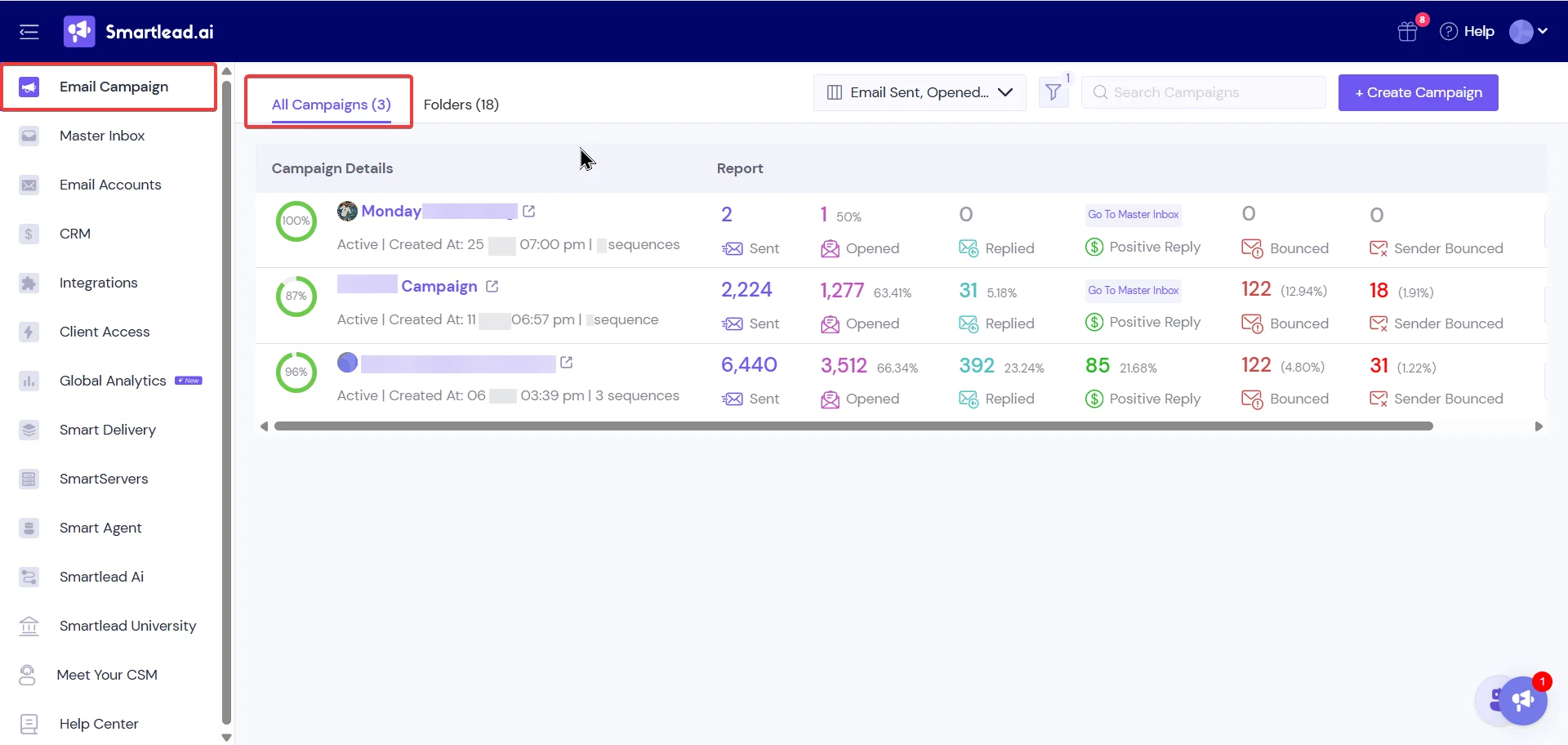
Conditional steps triggered exactly as designed, and prospects moved between branches cleanly based on what they did.
The branch-by-branch analytics were genuinely useful because I could see which branch was pulling and which one was flat, rather than looking at a single blended reply rate that hides the underlying pattern.
Spintax and the SmartAI writer both did what they claim. The AI drafts needed light editing rather than a full rewrite, which is more than I can say for most in-platform AI writers I have tested.
The hard limit is that every sequence is email-only, and there is no way to add a native LinkedIn touchpoint, an SMS follow-up, or a phone step inside the sequence itself. If your outbound motion is multichannel, you feel this gap the moment you start building.
My take: Best-in-class sequence builder if your motion is email-only. A dealbreaker if it is not.
Once the sequence was ready, I opened SmartProspect to pull my first list, and the experience was noticeably different from the rest of the platform.
The interface is a plain filter panel with the fields you would expect: job title, company size, industry, location, department, and a handful of enrichment toggles.
What immediately struck me is what is missing, because Smartlead markets AI aggressively across every other feature but SmartProspect itself has no AI in it at all.
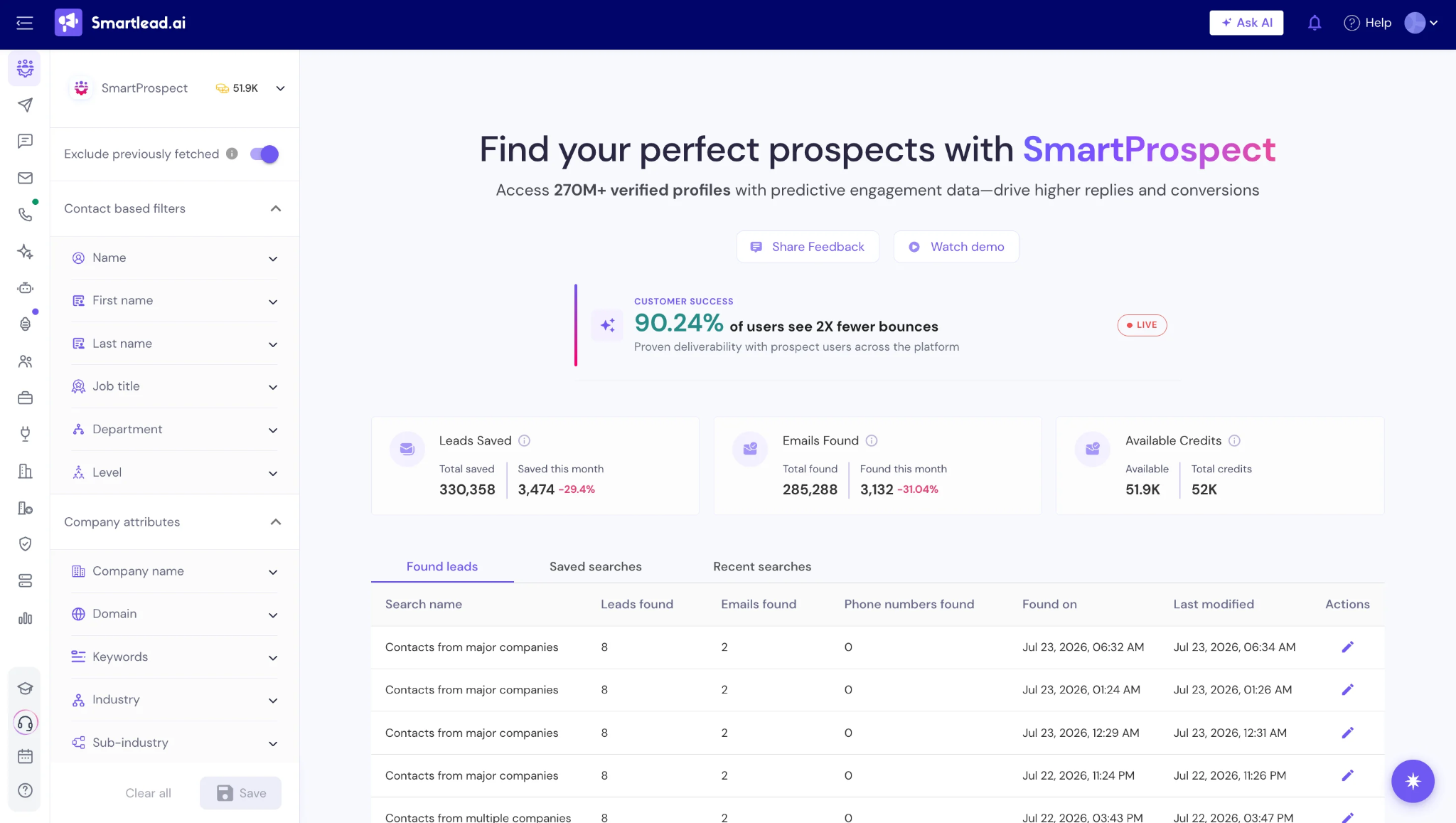
There is no natural-language ICP search, no AI-assisted lookalike expansion, and no conversational lead building. It is a static database with a search filter on top, sitting inside a platform that talks about AI on almost every other page.
I built three ICP lists to test coverage across different profiles. SaaS founders at 10-50 employees returned usable results with roughly 70-75% verified email hit rate on the LinkedIn URLs I sampled. Marketing directors narrowed to the DACH region came back thin. Ecommerce ops managers landed somewhere in the middle.
Phone number coverage was noticeably weaker than email coverage across all three lists, which matters if you plan to layer in cold calling.
My take: Fast search UX, but it is not a replacement for a purpose-built sourcing tool like Leadsforge or Clay if you need coverage beyond the most common ICP profiles.
You cannot send anything without mailboxes, so SmartSenders was next. This is Smartlead's done-for-you mailbox provisioning, and the important thing to understand is that it runs on partner infrastructure rather than mailboxes Smartlead owns end-to-end.
The pricing sits across three provider tiers on the SmartSenders tab of the pricing page. Fresh Google or Outlook mailboxes on Zapmail run $4.50 per mailbox per month plus $13 per domain per year.
Fresh Outlook on InfraInbox runs $5 per mailbox per month plus $16 per domain per year. Fresh SMTP mailboxes on Mailreef run $3.99 per mailbox per month plus $19 per domain per year. Pre-warmed Google or Outlook mailboxes on Zapmail jump to $9 per mailbox per month plus $18 per domain per year.
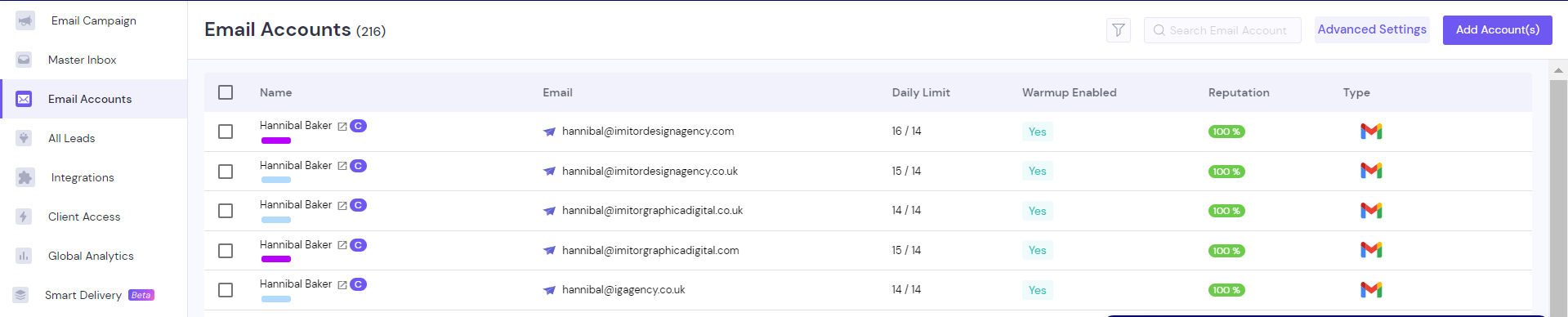
I ordered 8 mailboxes across the Zapmail Google tier and the InfraInbox Outlook tier, and they came online within 30 to 45 minutes with SPF, DKIM, and DMARC already configured. Zapmail Google mailboxes held their heat score consistently across the full three weeks.
The friction showed up in two places. Two of the eight mailboxes disconnected mid-campaign during week three and needed manual reconnection through the account settings.
And because SmartSenders is partner-provisioned, when something breaks, the resolution path runs through Smartlead support to the partner provider and back, which added latency I did not want on a live campaign.
The other thing worth naming is that Zapmail and InfraInbox are cold email infrastructure providers, not Google Workspace or Microsoft 365 resellers.
The mailboxes work for cold sends, but they are not real Google Workspace or Microsoft 365 accounts with the full inbox reputation weight that comes with mainstream provider infrastructure.
For teams that specifically want real Google Workspace or Microsoft 365 mailboxes, the 5 best prewarmed MS365 mailboxes for cold outreach.
My take: Fast provisioning bundled inside the Smartlead UI, but partner-provisioned infrastructure adds resolution latency when something breaks and the mailboxes lack the reputation weight of real Google Workspace or Microsoft 365 accounts.
Before I sent anything to a real prospect, I ran all 26 mailboxes through the full 14-day standard warmup that Smartlead recommends.
Heat scores climbed steadily across those two weeks. By day 12, every mailbox hit the 85+ target that most warmup benchmarks call healthy, and I felt confident starting live sends.
I then switched six mailboxes to the premium warmup pool to compare heat score progression against the standard pool over weeks two and three.
The premium pool mailboxes trended 2 to 3 points higher on heat score than the standard pool mailboxes across that window.
That is a real delta, but it is not dramatic, and my read is that premium warmup starts to matter more when you are running above 15 mailboxes. Below that threshold, standard warmup is usually sufficient.
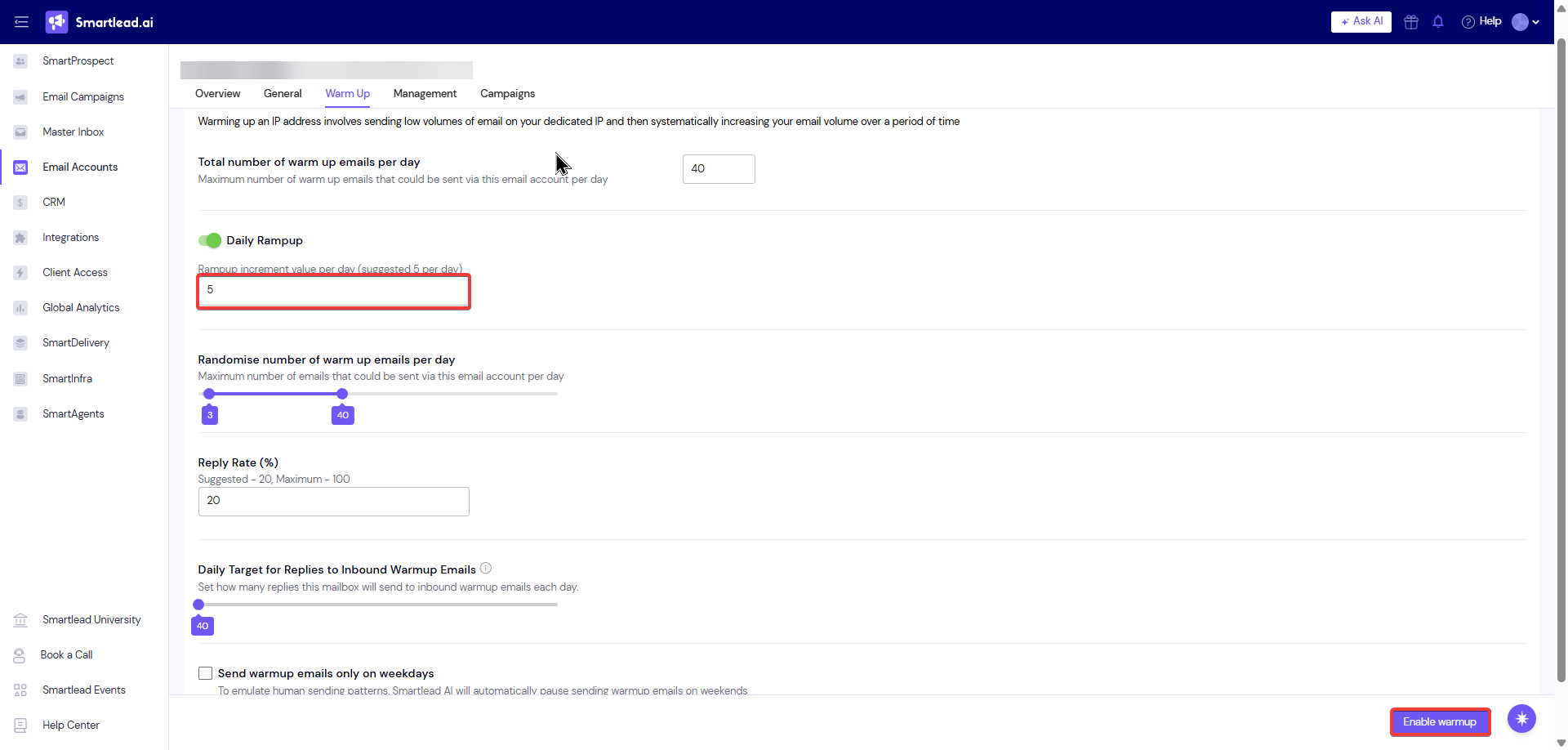
The confusing part of Smartlead's warmup story is the pricing. The homepage says warmup is built-in and included, which is true for standard warmup.
The pricing page shows the premium warmup pool as free only on the Unlimited Smart and Unlimited Prime tiers, which means Base and Pro buyers who assumed premium warmup was included get a $59 per month add-on surprise once they try to enable it.
The other friction point I hit was silent pauses.
Warmup paused itself on one mailbox for roughly 36 hours before I noticed it in the settings view, and I only caught it because I was actively checking.
The pause itself was a minor issue, but the lack of any notification was the actual problem because inconsistent warmup breaks the reputation curve if you do not catch it early.
My take: Standard warmup at scale genuinely works, but the pricing story is inconsistent between the homepage and pricing page, and silent pauses need better alerting.
Once sends went out, Master Inbox is where I lived for most of week two.
Every reply across every connected mailbox lands in one triage flow, and the AI reply categorizer sorts replies into Interested, Out of Office, and Not Now buckets in real time.
Across roughly 400 replies during week two, categorization accuracy sat around 85% on the Interested versus Not Now split, which lines up with what G2 reviewers describe.
Consolidating replies from 20 mailboxes into one triage view removed the tab-hopping that a plain Gmail-per-mailbox setup demands, and Out of Office detection caught most auto-responders reliably enough that I did not have to manually filter them.
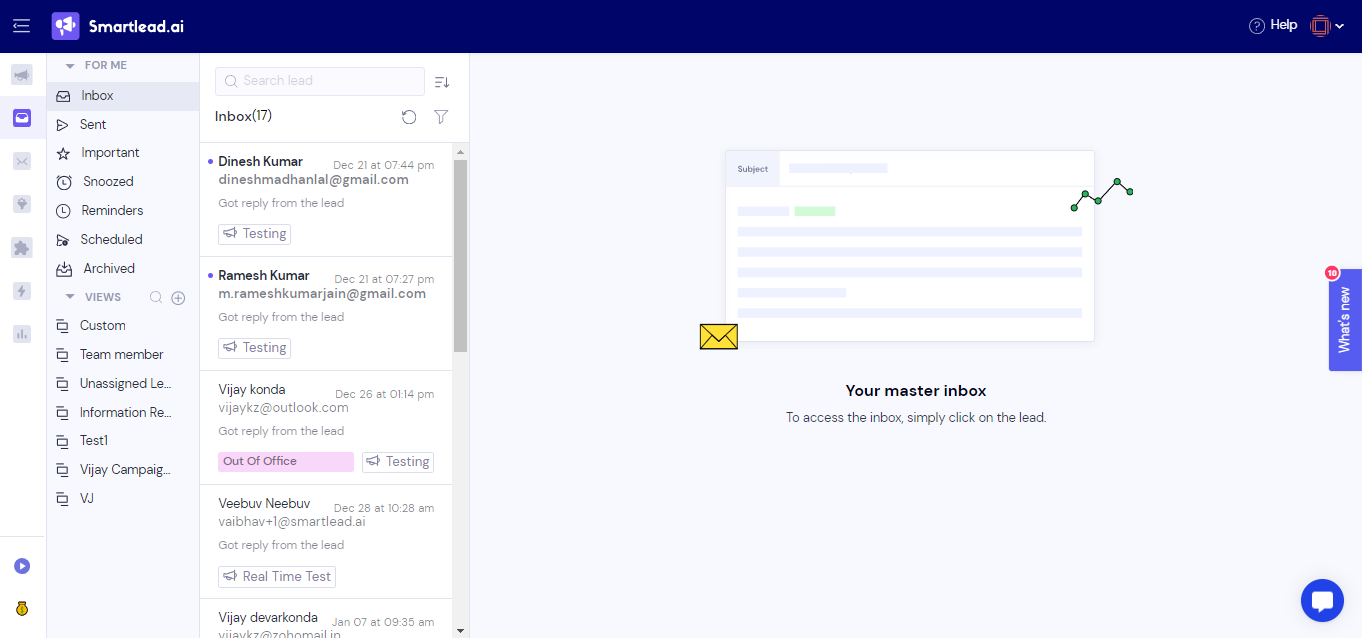
The friction appeared past 300 replies per day. On the highest-volume day of the test, roughly 450 replies came in, and reply-lag ran past 20 minutes.
A reply that hit the underlying Gmail inbox at 10:02am was not surfaced in Master Inbox until 10:24am. That is fine for weekly triage where you batch-process everything at once, but it becomes a real problem if your motion depends on same-day replies to interested prospects.
My take: Genuinely useful for teams handling under 300 daily replies. Starts to slow visibly past that ceiling and reply-lag becomes a real workflow issue.
SmartAgents launched in 2026 as Smartlead's no-code autonomous workflow builder. Think of it as their answer to Clay or n8n, but native inside the platform.
I built two workflows to test it. The first auto-classified replies and pushed Interested prospects into a new sub-sequence automatically. The second auto-enriched inbound signups from a Typeform integration and routed them into a Smartlead campaign without me touching anything.
Both workflows ran reliably. The no-code builder is easy to pick up, and non-technical users can wire up a basic workflow in under 15 minutes because the template library ships genuinely useful starters for the most common outbound patterns.
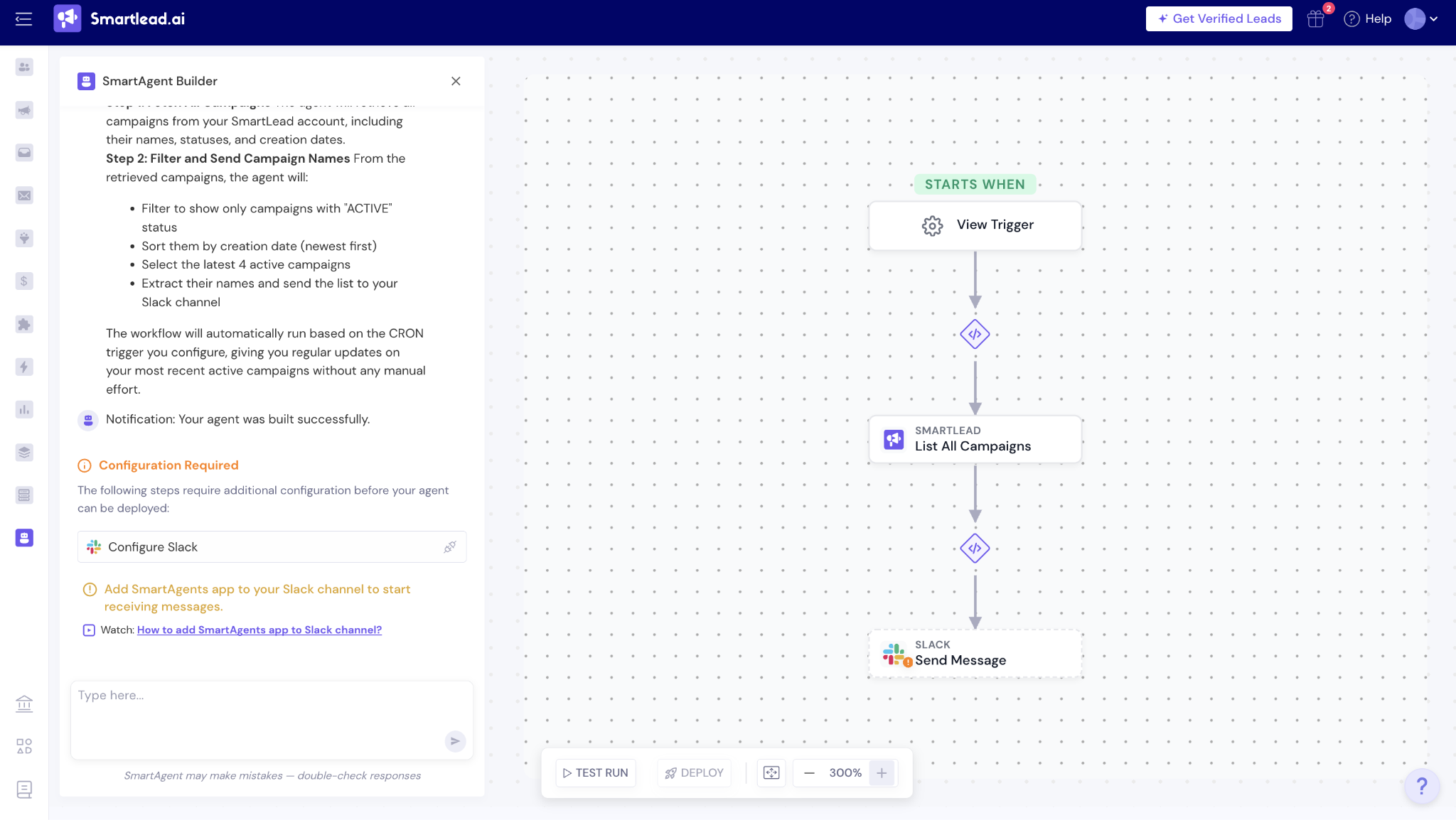
The ceiling shows up when you try to build anything more complex.
Trigger conditions and branching logic feel shallow compared to purpose-built workflow tools, and I found myself wanting more granular control for anything beyond the simplest reply-classification-to-sequence pattern.
Teams already running Clay, Make, or n8n will find SmartAgents redundant because the deeper workflow control lives in those tools already.
My take: Useful for teams that do not have an ops person and want reply-triage automation working out of the box. Redundant for anyone already invested in a proper workflow tool.
For a broader read on how Smartlead's AI stack compares to purpose-built AI personalization tools, this comparison of the top AI tools for cold email personalization covers where the AI-native tools genuinely differ.
SmartDelivery is Smartlead's inbox placement testing product, priced between $49 and $599 per month depending on the tier.
Most cold email platforms bundle basic placement testing into paid plans at no extra cost, and Smartlead is one of the few that unbundles it as a separate line item.
I ran weekly placement tests across both scenarios for three weeks and the reports themselves are detailed. Per-ESP inbox placement percentages come with drill-downs into subject-line and domain factors, which gives real diagnostic value when placement drops and you need to figure out why.
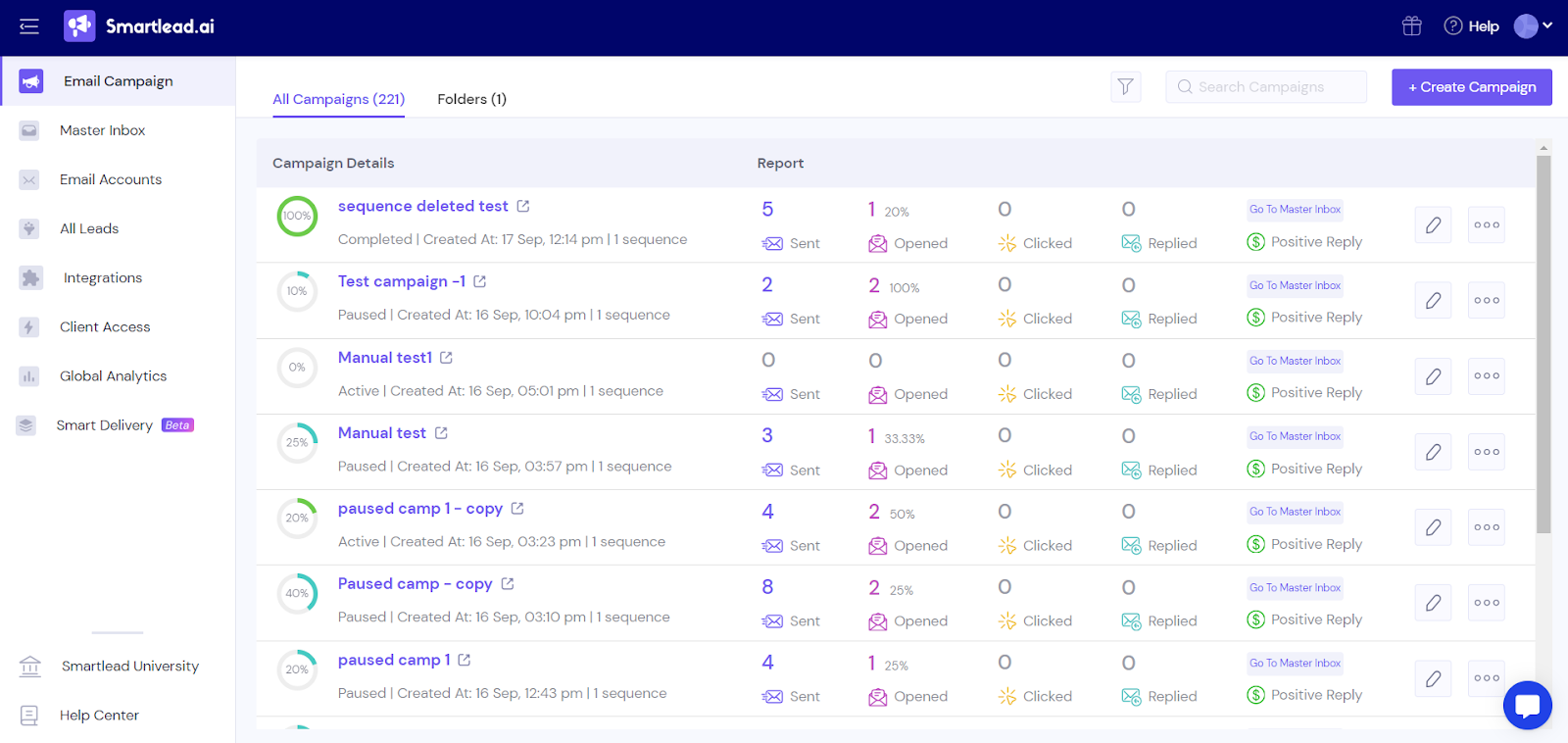
Google Workspace placement held above 85% on premium warmup during my test window, and Outlook placement lagged behind by roughly 10 to 15 points, which matches the industry-wide Outlook pattern rather than being anything specific to Smartlead.
The product itself is genuinely good and placement testing is competitive intelligence rather than a nice-to-have.
The pricing decision is separate from the product quality, because mid-tier SmartDelivery at $174 per month is a meaningful line item on top of Pro plus premium warmup, and total spend adds up quickly once you stack everything.
My take: Genuinely good placement testing product, but its being paid separately rather than included is one of the recurring add-on-creep complaints across the G2 review pattern.
SmartDialer is one of Smartlead's newer 2026 launches. It is a native power dialer with call recording, transcription, and coaching analytics bolted onto the email sequences.
I did not run SmartDialer as heavily as the email features because my test scenarios were email-focused, but what I saw was functional. Local presence dialing worked as advertised, real-time transcription generated usable text, and call recordings synced back to prospect records without any configuration on my end.
For teams already running Smartlead who want to add a calling layer without switching platforms, SmartDialer is a reasonable addition to the stack. The recordings and transcripts syncing to prospect records means the caller does not lose context between the call and the sequence.
Worth noting that SmartDialer is calling, not LinkedIn. If your multichannel motion needs LinkedIn alongside email in the same sequence, SmartDialer does not close that gap because it sits alongside the sequences as a separate module rather than as a native sequence step.
My take: Reasonable addition for teams that want to layer calls on top of email without switching platforms. Does not solve the LinkedIn gap that Smartlead sequences leave open.
Last, I connected the MCP Server. Smartlead ships 116+ tools for Claude, Cursor, Windsurf, and other AI clients, which is one of the largest MCP surfaces in the cold email category.
I connected Claude Desktop to the Smartlead MCP server and ran three workflows to test it. The first was bulk campaign status checks across all 26 mailboxes. The second was prospect list enrichment via chat prompts. The third was analytics summarization from natural-language questions about campaign performance.
The 116-tool coverage genuinely spans every major Smartlead endpoint, and bulk operations that would normally take multiple UI clicks executed in a single chat prompt. For teams already working through AI clients as their primary interface, this is a real productivity gain and one of the areas where Smartlead's 2026 expansion is meaningfully differentiated from competitors.
The friction is depth per tool. Some tools return rich structured data that answers the question in one call, and others return summaries that require follow-up calls to get to the actual answer. Documentation could be tighter on canonical patterns for the most common workflows so first-time users know which tools to reach for.
My take: Genuinely broad MCP surface and worth using if AI-agent workflows are core to how your team operates. Tool depth is inconsistent, which shows up as extra prompts to complete simple tasks.
Smartlead runs four tiers with roughly 17% off annual billing.
Prices below are the annual-billed monthly equivalent, verified against the Smartlead pricing page at the time of writing. Verify current pricing on the official page before purchase.
If Smartlead's pricing model, missing LinkedIn sequencing, or add-on stack is what pushed you to look elsewhere, Salesforge is where most switchers land.
Both platforms treat cold email as a scale problem.
Salesforge folds LinkedIn into the same native sequence, includes unlimited Warmforge warmup free on every plan, and prices flat at $40 or $80/month billed annually with no add-ons for warmup, deliverability testing, or whitelabel.
Smartlead is two bets in one product.
Bet one: your outbound stays email-first. If you need native LinkedIn sequencing alongside email, Smartlead does not solve that.
Bet two: your team can absorb the first-week UI curve and the add-on stack without either becoming a blocker. If your team wants plug-and-play with flat pricing, Smartlead is not that.
For agencies willing to take both bets, Smartlead holds up. The deliverability at volume is real. The unlimited mailbox model is generous. The Master Inbox saves triage time.
For everyone else, Salesforge at $40 or $80/month billed annually is where most switchers land. Native LinkedIn, free Warmforge included, flat pricing that does not stack.
Start the 14-day free trial with no credit card required and compare inbox placement against your Smartlead setup before you renew.
1. What is Smartlead AI used for?
Smartlead is a cold email software and outreach platform used for lead generation and cold email campaigns. Unlimited mailboxes, an integrated warmup network, sub-sequence branching, and a Master Inbox for reply management. Most commonly used by agencies and SDR teams running email as their primary outbound channel.
2. Is Smartlead AI free?
Smartlead offers a 14-day free trial on Base and Pro. There is no permanently free tier. Paid pricing starts at $32/month billed annually on Base.
3. How much does Smartlead really cost for an agency?
Sticker starts at $32/month billed annually. Real agency cost typically runs 3 to 5 times higher once SmartSenders mailboxes, SmartDelivery, premium warmup pool, verification credits, and $29 per client whitelabel are stacked. A 5-person agency at scale often pays $500 to $600 per month.
4. What is the biggest complaint about Smartlead on G2?
First-week UI friction and onboarding curve. Four separate G2 reviewers flagged this independently in my sample, making it the single most repeated complaint theme. Smartlead rewards operators who persist through the first week. Reviewers who expected plug-and-play consistently name the interface as their reason for dropping off.
5. Does Smartlead do LinkedIn outreach?
Not natively. Smartlead's sequences are email-only at every tier. LinkedIn is handled through an Aimfox partner integration rather than native sequence steps. Teams needing native multichannel outreach usually stack a second tool or move to a multichannel platform like Salesforge.
6. What is the best Smartlead alternative in 2026?
For teams wanting the same unlimited mailbox model plus native LinkedIn sequencing, free deliverability tooling, and flat pricing without add-ons, Salesforge is the closest structural alternative at $40 or $80/month billed annually, with a 14-day free trial and no credit card required.
