
Scaling cold email requires more than just sending messages - it’s about protecting your sender reputation and ensuring your emails land in inboxes. The key? Use multiple email accounts and domains to spread out risk, maintain deliverability, and avoid penalties from email providers.
By spreading email volume across multiple accounts, setting up proper authentication, and monitoring performance, you can scale cold outreach effectively while safeguarding your brand’s reputation.
Your sender reputation works on two levels: the individual mailbox and the overall domain. Email providers keep a close eye on both. If one mailbox racks up spam complaints or high bounce rates, it can affect every account tied to that domain.
Start small with a new mailbox - around 20–50 emails per day - and gradually increase your sending volume over one to two weeks. Sending 200+ emails right out of the gate can raise red flags with email providers. The idea is to mimic natural email patterns instead of creating sudden spikes that look suspicious.
Another factor that boosts deliverability is matching your email service provider (ESP) to your audience. For example, sending emails from Google Workspace to Gmail users or from Microsoft 365 to Outlook users can improve inbox placement. This is because you're using the same infrastructure as your recipients. Many teams use a mix of providers for this reason, rather than relying on just one platform.
Once you’ve set your volume limits, it’s time to figure out how many mailboxes you’ll need.
Here’s how to calculate: Suppose you need to send 10,000 emails per month. If each mailbox can safely handle about 40 emails per day (roughly 800 emails per month), you’ll need around 12–13 mailboxes. To protect your domain’s reputation, distribute these emails across multiple domains. Using secondary domains for cold outreach helps shield your primary company domain from any potential issues if a campaign runs into trouble.
A good setup might include 2–3 secondary domains, each with 4–5 mailboxes. This way, if one domain’s reputation takes a hit, your other domains can keep running without disruption. For example, Primeforge offers mailbox slots priced between $3.50 and $4.50 per month, while .com domains start at about $14 per year. Their pricing page even includes a calculator that factors in your monthly contact volume and emails per contact, making it easier to determine how many mailboxes and domains you’ll need.
Once you’ve mapped out your mailbox distribution, the next step is securing your domains with proper authentication.
Email authentication is absolutely critical. Without properly configured SPF, DKIM, and DMARC records, your emails are much more likely to land in spam folders. These three protocols are the backbone of email deliverability.
Manually setting up these records across multiple domains can be a tedious and error-prone process. That’s where Primeforge steps in. They automate the setup of SPF, DKIM, and DMARC, authenticating your mailboxes in just 30 minutes - a huge time-saver compared to the 24+ hours manual setup usually takes.
"What stands out is how hands-off the setup is. Primeforge takes care of all the technical deliverability details - SPF, DKIM, DMARC, domain warm-up, and DNS records - without me needing to touch anything."
If you’re managing multiple domains, Primeforge’s bulk DNS update feature lets you make authentication changes across all domains at once. This simplifies the process and makes scaling much easier.
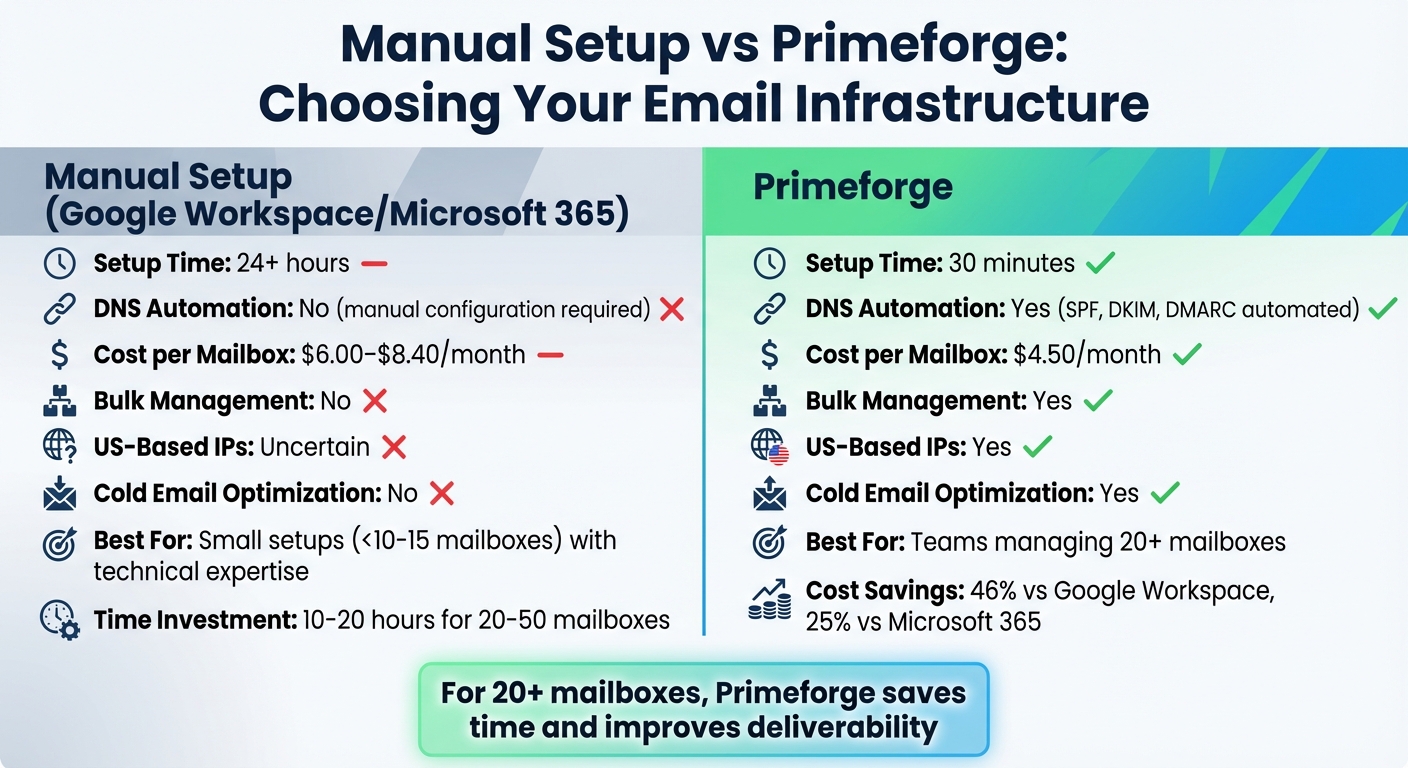
Manual Setup vs Primeforge: Email Infrastructure Comparison
When it comes to setting up multiple cold email accounts, you have two main choices: a manual setup with Google Workspace or Microsoft 365, or using a specialized platform like Primeforge.
For smaller setups (fewer than 10–15 mailboxes) and teams with someone technically skilled, a manual setup works. This involves buying domains, configuring them yourself, and creating mailboxes through admin centers like Google Admin or Microsoft 365. The cost per mailbox typically falls between $6.00–$8.40 per month. However, the process is time-consuming - expect to spend 10–20 hours setting up 20–50 mailboxes across various domains. On top of that, you'll need to handle ongoing maintenance whenever domains are added or shifted.
Primeforge, on the other hand, simplifies the process. It provides mailboxes optimized for cold outreach on Google Workspace and Microsoft 365, with automated DNS setup and centralized management. Mailboxes are ready in just 30 minutes, compared to the 24+ hours manual setup often takes. At $4.50 per mailbox per month (with a 10-mailbox minimum), Primeforge is more affordable - saving 46% compared to Google Workspace and 25% compared to Microsoft 365. Beyond cost, it minimizes configuration errors that could harm deliverability and drastically cuts down admin time, particularly for setups exceeding 20 mailboxes.
| Feature | Manual Setup | Primeforge |
|---|---|---|
| Setup Time | 24+ hours | 30 minutes |
| DNS Automation | No | Yes (SPF, DKIM, DMARC) |
| Cost per Mailbox | $6.00–$8.40/month | $4.50/month |
| Bulk Management | No | Yes |
| Cold Email Optimization | No | Yes |
For teams in the U.S. managing 20 or more mailboxes, the time saved and improved deliverability make Primeforge a clear choice.
Once you've decided to go with Primeforge, the next step is setting up your mailboxes through its streamlined process.

Primeforge makes provisioning mailboxes simple and removes much of the manual work. Here’s how to get started:
Once your mailboxes are set up, you can integrate them with other tools to maximize efficiency. Primeforge is part of The Forge Stack, which offers a suite of tools to create a seamless workflow:
After setting up your mailboxes, linking them to your sending platform is a simple process. Primeforge mailboxes are compatible with all major cold email tools, including platforms like Salesforge, Smartlead, and Lemlist. You can authenticate them using OAuth or direct credentials. Plus, Primeforge takes care of DNS authentication automatically, saving you from manual configurations or troubleshooting.
If you're using Salesforge (part of The Forge Stack), the integration is seamless. You can easily connect multiple accounts and set up mailbox rotation within your sending platform to distribute the workload evenly. This approach helps prevent overloading any single mailbox and ensures smooth scaling. For instance, connecting 10 mailboxes and setting each to send 50 emails per day allows you to reach 500 prospects daily without risking deliverability issues.
"Our Gmail accounts are created in Primeforge and warmed up in Warmforge, then connected to Kommo and in-house automation scripts - and they just run smoothly. We send both CRM follow-ups (for leads who didn't finish onboarding) and separate campaigns to new businesses using our own Python script and Google Sheet. Integration is simple, deliverability is very high, and support is flexible and responsive when we need help. For us, Primeforge became a reliable hub for automated communication at scale." - Yuri L., CTO at Rippla
Once your mailboxes are connected, it's important to organize them thoughtfully to support team workflows effectively.
When managing multiple clients or campaigns, having a well-structured workspace is essential. Primeforge’s Multiple Workspaces feature lets you create separate environments tailored to each client, campaign type, or business unit. This keeps data isolated and makes billing and performance tracking much easier.
Within each workspace, you can assign team members specific permission levels. For example, junior SDRs might only access their assigned mailboxes and campaigns, while managers can oversee analytics across all workspaces. This setup reduces errors, like sending emails from the wrong account, and ensures clear accountability. When onboarding new team members, it’s a good idea to grant them access only to the relevant workspace and periodically rotate assignments to spread out reputation risks.
With a well-organized structure, managing campaigns and team workflows becomes much smoother.
Centralizing replies from various mailboxes ensures that no response slips through the cracks. Many platforms, such as Smartlead, provide a unified inbox (like their "unibox") to consolidate all replies in one place. This allows your team to focus on engaging with prospects rather than switching between accounts.
To streamline CRM integration, configure your sending platform to automatically log outgoing emails and replies into systems like HubSpot or Salesforce. A bidirectional data flow ensures that when a prospect replies to any mailbox, the response is logged in the CRM, complete with the context of the original campaign. Including metadata that identifies which mailbox sent the email helps with proper attribution and prevents duplicate records. Additionally, forwarding rules can route replies to shared team inboxes or specific representatives based on campaign type or territory, ensuring timely follow-ups for every conversation.
Once your accounts are set up, the next step is to gradually build a strong sender reputation. When adding new mailboxes, it's important to warm them up slowly. Start by sending 10–20 emails per day during the first week. From there, increase the volume by 5–10 emails daily each week until you hit your target. To maintain a healthy reputation, keep each mailbox sending no more than 40–60 emails per day.
Tools like Warmforge can make this process seamless. It automates the warm-up by sending emails that mimic natural conversations - these emails are opened, replied to, and even moved out of spam folders, which creates positive engagement signals. To get the best results, connect each new Primeforge mailbox to Warmforge right away. Use separate warm-up profiles for each domain, stagger the start dates, and enable automatic monitoring. This way, the system can throttle or pause activity if it detects issues like increased spam placements or bounce rates.
When your accounts are fully warmed up, you can begin scaling your email volume. However, limit increases to 10–20% per week to avoid triggering spam filters. Distribute the sending load across multiple mailboxes to ensure no single address is overused. Keep an eye on key metrics like bounce rates (stay under 2%), spam complaints (well below 0.1%), and open rates (aim for 30–50%) to maintain strong performance in B2B outreach.
Keeping track of the right metrics across all your mailboxes is crucial for avoiding deliverability problems. Start by setting up Google Postmaster Tools for each sending domain. This will help you monitor domain and IP reputation, spam rates, delivery errors, and feedback loop data. Make it a habit to check these dashboards weekly. If your reputation drops from "High" to "Medium" or "Low", take immediate action - reduce your sending volume, clean up your email lists, and refine your messaging.
Pair Postmaster's domain-level insights with Warmforge's mailbox-level metrics for a more detailed view. Track key performance indicators like bounce rates (keep them under 2%), spam complaints (below 0.1%), open rates (healthy B2B rates are 30–50%), and reply rates (aim for 3–10%+ depending on your offer). If a mailbox shows declining open rates or rising bounces, pause its activity and reintroduce warm-up measures. Consistent monitoring helps protect your brand reputation and keeps your campaigns running smoothly.
Solo founders often manage 2–4 Primeforge mailboxes on a secondary domain, mixing platforms like Google Workspace and Microsoft 365 to minimize risk. This setup allows them to send 80–160 cold emails per day. With Primeforge mailboxes costing around $6–$12 per month each and a starter Salesforge plan priced between $50–$150 per month (which includes Warmforge at no extra cost), the total monthly cost ranges from $75–$200. This budget is enough for consistent outbound efforts without jeopardizing the primary domain.
Agencies with 5–10 reps typically assign 3–5 mailboxes per rep, resulting in 15–50 mailboxes in total. These are divided by client or region, with each mailbox sending 40–50 emails daily. Primeforge's multiple workspaces and bulk DNS tools simplify client onboarding and segmentation. Monthly costs for mailboxes range from $90–$600, while Salesforge and other Forge Stack tools add $200–$600+. This brings the total infrastructure budget to $300–$1,200 per month, supporting scalable outreach for multiple clients.
Enterprise teams often operate on a much larger scale, managing 100–300+ Primeforge mailboxes across multiple secondary domains. Strict naming conventions and access policies help maintain organization. At $6–$12 per mailbox per month, 200 mailboxes cost around $1,200–$2,400 monthly. Add in higher-tier Salesforge and Forge Stack plans, and the total can reach the low-to-mid four figures per month, depending on seat count and service-level agreements. This setup supports tens of thousands of compliant, high-deliverability emails each month. For even more control, teams may integrate Infraforge, which provides private email infrastructure with dedicated IPs and enhanced compliance measures. Warmforge and Salesforge remain essential for warm-up, outreach, and AI SDR capabilities. Regular monitoring is critical to ensure deliverability stays strong as you scale.
Scaling cold email success boils down to four key elements: setting up your infrastructure, choosing the right mailboxes, integrating tools effectively, and keeping deliverability on point. Start by setting realistic daily targets - typically 30–50 cold emails per mailbox - and spread that volume across authenticated secondary domains and professionally managed mailboxes. Use a unified stack like Primeforge to connect your outreach and CRM tools, and expand your setup by adding domains and mailboxes instead of overwhelming a single inbox.
A strong technical backbone is essential. Secure your domain with proper DNS authentication. Tools like Primeforge's automated DNS setup and bulk updates help prevent silent misconfigurations that can hurt deliverability, no matter how good your content is.
Simplify mailbox provisioning with Primeforge. It offers pre-optimized Google Workspace and Microsoft 365 mailboxes designed for cold outreach, featuring automated DNS configurations and multiple workspace options to keep your team or client accounts organized. These mailboxes integrate seamlessly with any sending platform. Since Primeforge is part of The Forge Stack, you can combine it with tools like Salesforge for multi-channel outreach, Warmforge for reputation management, and Leadsforge for lead generation - each aligning with the strategies outlined here.
Focus on the right metrics: aim for bounce rates under 2%, spam complaints below 0.1%, and open rates between 30–50% for B2B campaigns. Use tools like Google Postmaster Tools to monitor domain reputation and combine it with mailbox-level data from your deliverability tools. If performance dips, pause the mailbox, rewarm it, and only then scale back up. Tracking these metrics ensures your campaigns stay on course.
When scaling, take it slow and steady - increase volume by 10–20% per week, warm up new accounts over 2–4 weeks, and balance the workload across accounts. This deliberate approach, reinforced throughout this guide, protects your campaigns from spam traps. Whether you're a solo entrepreneur managing a handful of mailboxes or part of a large team running hundreds, the strategy remains the same: build a solid foundation, automate the technical details, keep a close eye on performance, and scale methodically. A strong infrastructure is the key to ensuring your emails land in inboxes where they belong.
To safeguard your sender reputation while scaling cold email campaigns, it's important to spread out your email infrastructure. Tools like Primeforge can make this process smoother by offering automated DNS setup (covering DKIM, SPF, and DMARC) and support for multiple workspaces. This approach helps prevent putting too much strain on a single system, ensuring more consistent email deliverability.
On top of that, opt for dedicated mailboxes from reliable providers such as Google Workspace or Microsoft 365. Stick to key practices like gradually warming up new accounts, keeping an eye on engagement metrics, and steering clear of content that might trigger spam filters. These measures go a long way in protecting your reputation and boosting your campaign's effectiveness.
Using several domains for cold email outreach is a smart way to safeguard your sender reputation and boost email deliverability. When you distribute your campaigns across multiple domains, you lower the chances of email providers marking your messages as spam, which means more of your emails land directly in your prospects' main inboxes.
Another advantage is the ability to customize campaigns for specific industries or audience segments. This makes your outreach more focused and impactful. Plus, spreading the load across different domains prevents any single domain from being overwhelmed, helping you maintain a solid foundation for future growth.
Primeforge simplifies managing multiple email accounts by automating key setup tasks such as DMARC, SPF, DKIM, and custom domain tracking. It also offers bulk DNS updates and organizes accounts into workspaces, making it easier to handle large-scale cold outreach campaigns.
With smooth integration with Google Workspace and Microsoft 365, Primeforge delivers dependable performance while ensuring high email deliverability. These features make scaling your email campaigns efficient and stress-free.
