
Sending generic cold emails rarely works - only 4.1% get replies. Personalizing emails using buyer personas can drastically improve results. Here’s the key takeaway: tailor your messages to specific roles, industries, and pain points, and you'll see higher engagement and response rates. For example, personalized subject lines can boost open rates by 50%, and targeted follow-ups can increase responses by 140%.
Key Steps to Personalizing Cold Emails:
Personalization isn’t about adding a name to an email - it’s about showing you understand the recipient’s challenges and offering timely, relevant solutions.
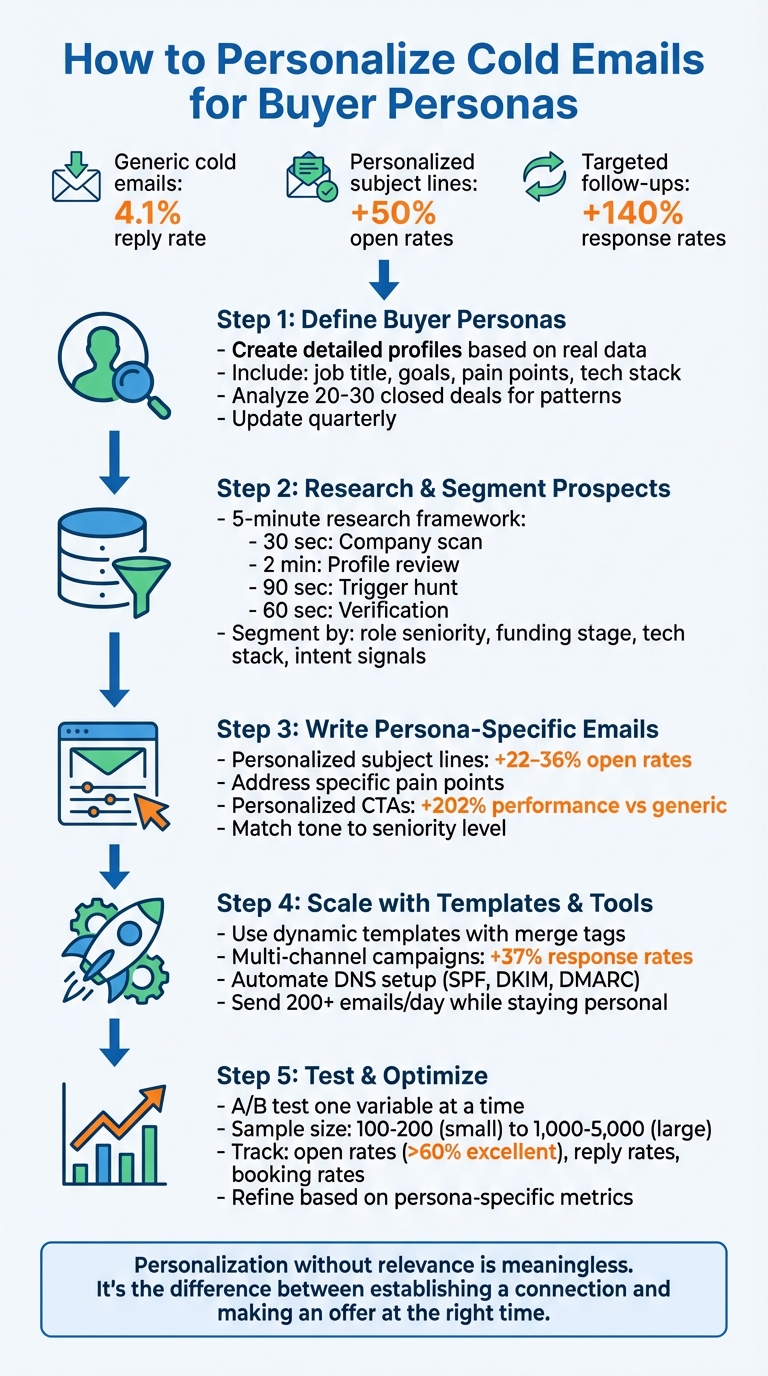
5-Step Process to Personalize Cold Emails for Buyer Personas
A buyer persona is essentially a detailed profile of your ideal customer, built from real-world data. It includes key details like demographics (age, location), professional information (job title, company size), and psychographics (goals, motivations, and decision-making styles). Think of it as more than just a description - it’s a tool that helps you understand not just who your customer is but also why they make certain decisions and what challenges they face.
Unlike a generic target like "marketing managers", a well-crafted buyer persona digs deeper, outlining specific roles, challenges, and objectives. This level of detail is invaluable in shaping email strategies. As SalesHive succinctly puts it:
"If your persona doesn't help an SDR write a better subject line and first sentence, it isn't a persona - it's a slide."
Now, let’s explore how to create these personas using real, actionable data.
To start, dive into your CRM data. Analyze 20–30 closed-won and closed-lost deals to identify patterns among the customers who helped move deals forward. Look for shared traits like job titles, company size, industry, and the challenges that motivated them to buy. This ensures your personas are grounded in actual customer behavior, not guesswork.
Next, validate these findings by conducting interviews with customers, sales reps, and support teams. Tools like LinkedIn Sales Navigator can help you analyze target job titles and review relevant job postings for additional insights. Social listening tools are also helpful for identifying interests and pain points that might not surface in surveys. Offering incentives, such as gift cards or discounts, can encourage more people to participate in surveys.
A complete buyer persona should include:
Don’t overlook the importance of defining negative personas - profiles of individuals or roles that are unlikely to convert. This helps your team focus on high-value leads instead of wasting time on poor fits. Lastly, keep your personas relevant by updating them at least quarterly to reflect changes in the market and buyer behavior.
(function(d,u,ac){var s=d.createElement('script');s.type='text/javascript';s.src='https://a.omappapi.com/app/js/api.min.js';s.async=true;s.dataset.user=u;s.dataset.campaign=ac;d.getElementsByTagName('head')[0].appendChild(s);})(document,372145,'wzqrljsrcet38mumssx2');
Once you’ve outlined your buyer personas, the next step is diving into targeted research to identify and validate potential prospects. This is where a quick and efficient research framework comes into play. Many successful teams rely on a 5-minute process that delivers valuable insights without wasting time. Here’s how it breaks down:
For deeper insights, tools like LinkedIn Sales Navigator (around $79.99/month) remain a go-to for professional intelligence, offering advanced filters and real-time updates. Apollo.io is another excellent resource, providing access to over 273 million verified contacts, with a free tier and a Chrome extension for instant data enrichment. If you need to understand a prospect’s current tech stack, BuiltWith can help pinpoint technology gaps that your solution might fill.
This quick research process equips you with the intel needed for precise segmentation.
With your research complete, the next step is grouping prospects into segments based on persona-specific traits. This allows you to tailor your outreach effectively. Here are some common ways to segment:
Tools like Clay can simplify this process by pulling data from job boards, news sites, and LinkedIn to generate enriched lead lists based on real-time triggers. Platforms like lemlist and Hunter Campaigns take it a step further, letting you personalize email sequences with persona-specific variables using custom merge tags.
The goal? Create segments that feel personal yet broad enough to scale your outreach.
"Research isn't about gathering more information, it's about finding the right triggers that make prospects think 'this person actually understands my situation.'" – Introwarm
This segmentation approach sets the foundation for crafting highly targeted email campaigns in the next step.
Your subject line is the gateway to getting your email opened. A personalized subject line can boost open rates by 22–36%. To make it feel like a personal message, keep it short - around 3–4 words - and use lowercase, similar to an internal email. For example, try something like "product launch roadblock" or "question about series a".
Another effective strategy is using signal-based subject lines that tie into real-world events. For instance: "Saw [Company] just raised a Series A" or "Question about [Specific Tech Stack]". This taps into what’s called "information scent" - the subject line hints at valuable information, and your opening line delivers on that promise. For example, if your subject is "Feedback on [Post_Title]", your opening line should directly address that post.
When writing opening lines, consider the "Waterfall Method": start with a nod to the company (e.g., their latest achievement), then mention relevant case studies or blog posts, and finally include a personalized detail from their LinkedIn profile. Tailor your tone and content based on the recipient’s seniority. For instance, C-level executives may appreciate insights tied to their specific initiatives, while mid-level managers might respond better to actionable tips.
Once you’ve captured their attention, focus on making the email body relevant to their challenges.
The body of your email should show that you understand the recipient’s unique challenges and how your solution fits into their world. Instead of listing features, connect the dots between their pain points and your offering. For example, a VP of Sales at a Series B company might be grappling with scaling outreach while maintaining personalization. Meanwhile, a Marketing Coordinator at a startup might be struggling with a tight budget for lead generation tools.
Use recent triggers to highlight their challenges. For instance, "I noticed [Company] is hiring three SDRs - sounds like you're scaling fast." This not only demonstrates that you’ve done your research but also makes your outreach timely and relevant.
Your value proposition should align with the recipient’s role. A technical buyer might care about how your solution integrates with their existing tools, while an executive will likely focus on ROI and overall impact. Avoid overwhelming the recipient with technical jargon if their primary concern is cost efficiency.
Proof points help build trust and reduce doubt. Tailor these examples to your audience. If you’re emailing a SaaS founder, highlight results you’ve delivered for a similar-sized company. For a healthcare administrator, reference outcomes specific to their industry. Be as specific as possible. Instead of saying, "We help companies grow", try something like, "We helped [Similar Company] increase reply rates by 40% within their first quarter using persona-based segmentation."
Your call-to-action (CTA) should reflect both the recipient’s seniority level and their stage in the buying process. Research shows that personalized CTAs perform 202% better than generic ones. Executives often prefer concise, value-driven asks like, "Would you be open to a 5-min video audit?" On the other hand, mid-level managers might respond better to simpler requests like, "Can I send over that case study?".
Here’s a quick breakdown of CTA types:
| CTA Type | Friction Level | Best Persona Match | Example |
|---|---|---|---|
| Interest-Based | Low | All / Cold Leads | "Interested in seeing how we do it?" |
| Resource-Based | Low | Managers / Researchers | "Can I send over that case study?" |
| Value-First | Medium | Decision Makers | "Would you be open to a 5-min video audit?" |
| Time-Based | High | Warm Leads / Executives | "Are you available for a brief call next week?" |
Interest-based CTAs are particularly effective for creating a sense of connection and encouraging engagement. For example, instead of saying, "Free tomorrow at 2 PM?" try, "If this sounds relevant, I'd love to share how [Similar Company] tackled this." This approach respects the recipient’s time and autonomy while still keeping the conversation moving forward.
Once you've established persona-specific messaging, it’s time to scale your outreach while keeping it personal. The trick? Use dynamic email templates that can automatically populate recipient-specific details like {{first_name}}, {{company}}, or {{pain_point}}. This allows you to maintain consistency in your messaging without losing that personal touch.
Here’s how to strike the right balance: combine manual personalization with template efficiency. For example, you can craft a custom opening line referencing something recent - like a LinkedIn post or a company milestone - then let the rest of the email follow a standardized structure. An opening might say, "I saw that {{company}} recently expanded into healthcare", while the body and call-to-action (CTA) remain consistent. This hybrid approach makes it possible to send 200+ emails a day without sounding robotic.
To further refine your strategy, segment your prospects by factors like industry, job title, or company size. This way, you can create tailored templates for each group. For instance, a VP of Sales at a Series B SaaS company would receive a different email than a Marketing Coordinator at a startup, even if both emails share the same overall framework. By building a baseline sequence and tweaking it for each persona, you save time while keeping your messaging sharp and relevant.
When crafting your emails, avoid using bullet points in the initial message. Bullet points can make your email feel like a mass marketing pitch. Instead, focus on short, conversational paragraphs that naturally weave in your value proposition. And if you’re using AI to generate personalized details - like referencing LinkedIn updates or company news - make sure to double-check for accuracy before hitting send.
Once your templates are ready to go, the next step is ensuring your emails actually land in the inbox.
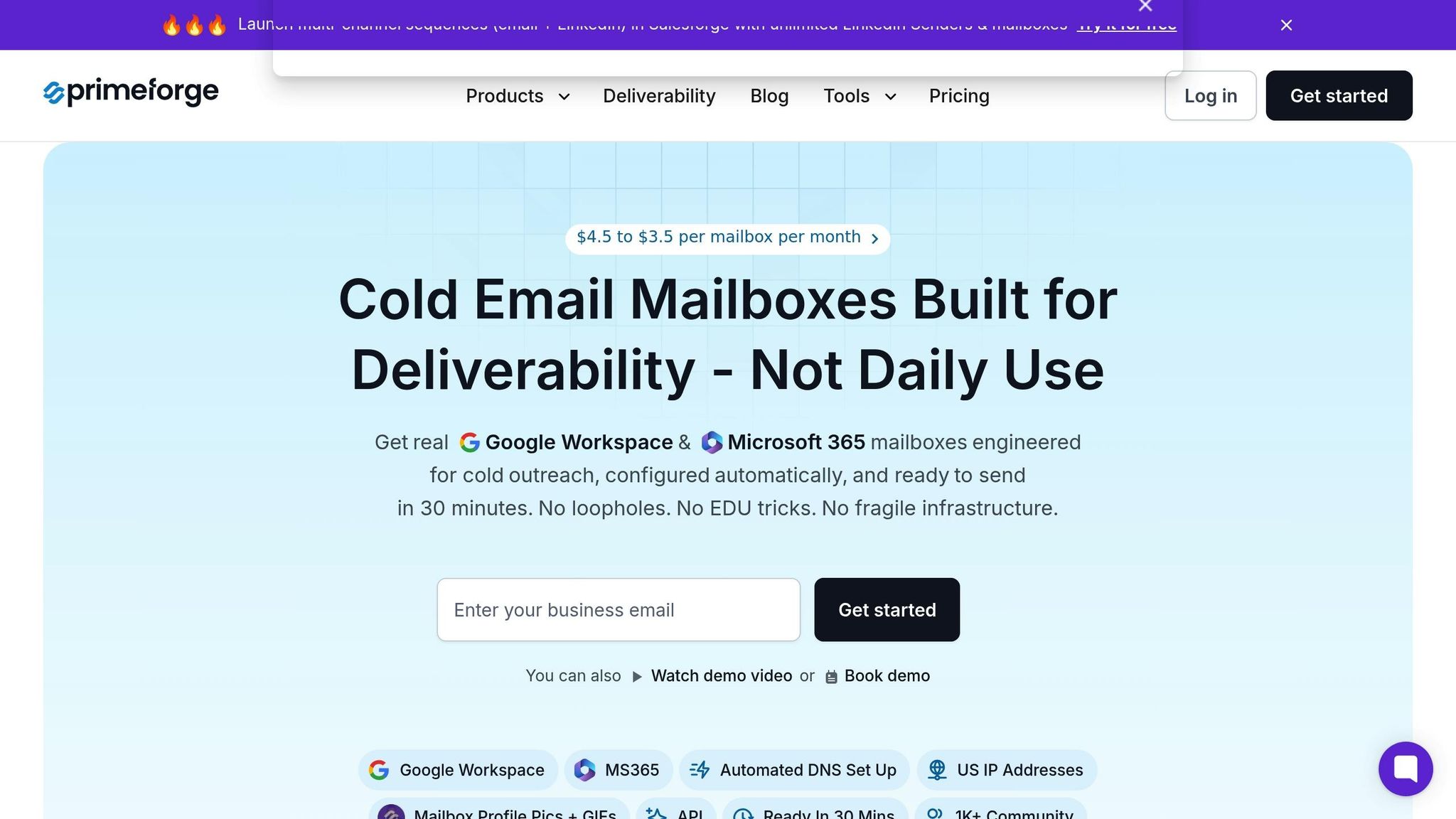
To maximize the impact of your outreach, you need a reliable infrastructure that ensures your emails avoid spam filters. That’s where Primeforge comes in. It offers Google Workspace and Microsoft 365 mailboxes specifically designed for cold email campaigns, complete with automated DNS setup (SPF, DKIM, DMARC) to improve inbox placement.
Why is this important? Proper DNS records signal to email providers that your messages are legitimate. Without them, even the most carefully personalized email could end up flagged as spam. Primeforge takes care of this setup automatically, eliminating the need for manual configuration. Plus, it allows you to manage multiple workspaces and handle bulk DNS updates across numerous domains - perfect for scaling campaigns or testing different sender identities for each persona.
Primeforge also integrates seamlessly with other tools in The Forge Stack, such as Salesforge for multi-channel outreach (email, SMS, social) and Warmforge for email warm-up, which is included free with any Salesforge subscription. Multi-channel campaigns, which combine email with other communication methods, have been shown to boost response rates by 37% compared to email-only campaigns. Since Primeforge works with any sending software, you can incorporate it into your existing workflow without needing to switch platforms.
Pricing starts at $45 per month for 10 mailbox slots (or $38 per month with an annual plan), with a minimum of 10 slots. Domain costs vary depending on the extension - for example, five .com domains are priced at $70 per year. To estimate costs based on your campaign size, you can use Primeforge's pricing calculator. For teams sending 500+ emails daily across multiple personas, this setup not only improves deliverability but also saves significant time on manual tasks.
To fine-tune your email campaigns, test one variable at a time - like subject lines, openings, or CTAs (calls-to-action) - and see what resonates most with your audience. For example, in 2025, a SaaS company experimented with two subject lines: "Boost Your Productivity with [Tool Name]" versus "Struggling with Time Management? Try This." The second option outperformed the first by increasing open rates by 25% and replies by 20%.
Pay special attention to high-impact elements. Personalized subject lines, for instance, can boost open rates by 26%, while tweaking CTAs has been shown to increase click-through rates by an impressive 127%. When running these tests, make sure your sample size is large enough: for smaller tests, aim for 100–200 prospects, while larger campaigns should involve 1,000–5,000 recipients. Allow 24–72 hours for responses to roll in before analyzing results to get an accurate picture.
Keep track of all your experiments in a detailed log. Document variables, results, and dates to avoid repeating tests and to measure the overall return on investment (ROI) over time.
"Email marketing A/B testing has so many benefits, such as solving user problems and improving UX, driving growth and business impact, optimizing content for diverse audience segments as well as gaining insight and learnings you can apply to future campaigns." - Rob Gaer, Senior Software Engineer, Miro
Once you’ve identified what works, shift your focus to monitoring performance metrics.
Tracking metrics is essential to validate your email strategy and guide future improvements. Keep an eye on key performance indicators like open rates, reply rates, and booking rates to assess your campaign's effectiveness. For reference, an open rate above 60% is excellent, while anything below 40% suggests you need to revisit your subject lines. You should also verify your email deliverability to ensure your messages aren't landing in spam.
Look at how metrics connect. For example, high open rates paired with low reply rates could mean your subject line is setting up expectations that your email body doesn’t meet - this is known as weak "information scent". Consider the example of Lifesize, which partnered with Adobe to segment 300,000 leads into seven categories and created tailored drip sequences in five languages. Their efforts led to a 57% increase in open rates, an 82% jump in response rates, and a 31% year-over-year revenue boost.
Break your metrics down by persona. Different roles respond to different approaches: a VP of Sales might engage more with ROI-driven messaging, while a Marketing Coordinator might prefer creative problem-solving angles. Personalized CTAs work especially well, performing 202% better than generic ones. Test varying levels of CTA friction - like asking for a meeting versus offering a free resource - to see what each persona prefers.
Use these insights to refine your messaging and improve your campaigns over time.
While metrics provide valuable insights, they don’t tell the whole story. Pay attention to replies to spot recurring questions or concerns, and adjust your messaging accordingly. Sales team feedback can also help you fine-tune templates. Before implementing major changes, aim for a 95% confidence level in your adjustments. Negative responses, though unpleasant, often highlight areas where your messaging can improve.
Take Revnew’s June 2023 campaign as an example. They tested subject line variations for a B2B client targeting 1,328 contacts, incorporating elements like prospect names, industry stats, and pain points. The optimized campaign achieved an 80% open rate, a 19% reply rate, and a 0% unsubscription rate. Similarly, in January 2025, Margaret Sikora of Woodpecker targeted 22 industry experts she found via Quora and blogs. By crafting personalized introductions like "I liked your post BECAUSE..." and appealing to their expertise, she achieved a 50% reply rate with entirely positive feedback.
The goal isn’t to achieve perfection right away. Instead, focus on building a system that learns and improves with each campaign.
Personalizing cold emails starts with truly understanding your buyers. It’s about identifying their specific challenges and finding how your solution fits seamlessly into their world. By segmenting prospects based on shared pain points, technology stacks, or growth stages - instead of relying on broad demographics - you can create messages that genuinely resonate.
As we’ve seen, adding personalized elements can significantly boost engagement. This highlights the importance of constant testing and fine-tuning. Antonio Gabrić, Outreach Manager at Hunter, explains it well:
"Personalization without relevance is meaningless. It's the difference between establishing a connection and making an offer at the right time".
Scaling personalization, however, requires the right tools and infrastructure. Solutions like Primeforge simplify the technical side of cold email campaigns by automating DNS setup and enabling bulk DNS updates. For instance, Primeforge cuts DNS setup time from 24 hours to just 30 minutes, while improving deliverability.
At its core, effective personalization relies on a timeless truth:
"A person's name is to him or her the sweetest and most important sound in any language".
Incorporate this principle throughout your emails - from subject lines to calls-to-action - to foster real connections. Keep testing, learning, and adapting based on your results. This thoughtful approach ensures your outreach not only connects but also converts.
Crafting effective cold emails starts with building a strong buyer persona. Why? Because understanding who your audience is, what challenges they face, and how your solution fits into their world is the foundation of meaningful outreach. Start by gathering demographic and firmographic data - job titles, company size, industry, and location - using tools like LinkedIn or lead-generation platforms. Then, dig deeper into psychographic insights, such as their responsibilities, goals, and pain points. Customer interviews, surveys, and even publicly available content can help you uncover what drives their decisions and what obstacles they’re trying to overcome.
Once your persona is ready, use it to segment your email list by key attributes like role or industry. Personalization is critical here. Use dynamic fields to include details like the recipient’s name, company, or a recent milestone they’ve achieved. Your subject line should grab attention by addressing a specific pain point or celebrating an accomplishment. Keep your email short and to the point: clearly communicate your value and include one actionable CTA - whether it’s scheduling a call or replying to the email. Avoid vague personalization; referencing something specific, like a recent product launch, can make a world of difference in engagement.
Finally, ensure your emails actually reach inboxes. Reliable email infrastructure is a must - think automated DNS setup and deliverability monitoring. Tools like Primeforge can help you scale persona-driven campaigns while keeping your sender reputation intact, making it easier to fine-tune and improve your outreach strategy.
Personalizing cold emails starts with efficient and targeted prospect research. Start by exploring LinkedIn - look for recent posts, job changes, or shared connections that you can reference. To find verified email addresses, job titles, and company details, tools like Snov.io are incredibly useful. For a deeper dive, BlazeSQL allows you to ask natural-language questions to uncover details like a company’s recent funding rounds, product launches, or key industry trends.
You can also gather valuable insights by reviewing the prospect’s company website, blog, or press releases. These often highlight milestones or challenges you can mention in your email. Even their job board can provide clues - like hiring for specific roles - which may indicate growth areas or buying intent. The best part? All of this research can be done in just a few minutes.
Once you’ve collected your insights, tools like Primeforge make it simple to send personalized emails at scale. With features like Google Workspace and Microsoft 365 mailboxes and seamless integrations with platforms like Salesforge and Warmforge, Primeforge ensures your outreach is both effective and highly deliverable.
To measure how well your personalized cold email campaigns are performing, keep an eye on essential metrics such as open rates, reply rates, click-through rates, conversion rates, and bounce rates. For a well-targeted campaign, you should aim for open rates above 20% and response rates in the range of 7–10%.
It's also important to keep track of your sender reputation, as it plays a big role in ensuring your emails actually reach recipients' inboxes. Tools like Primeforge offer an integrated dashboard that simplifies tracking these metrics, helping you fine-tune your approach and achieve better outcomes over time.
