
DMARC alignment ensures that emails are authenticated by matching the visible "From" domain with the technical domains used for SPF and DKIM. This protects your emails from being flagged as suspicious or blocked due to spoofing attempts.
Here’s the quick difference:
mail.example.com) to match the main domain (example.com). It’s more forgiving and works well for setups with multiple tools or subdomains.For most cold email campaigns, relaxed alignment is better. It balances security and deliverability, especially when using third-party tools or subdomains. Strict alignment is ideal for environments where security is the top priority, like finance or healthcare, but it’s less flexible for complex setups.
| Aspect | Relaxed Alignment | Strict Alignment |
|---|---|---|
| Domain Matching | Matches organizational domains, including subdomains | Requires an exact domain match |
| Security Level | Protects against most spoofing attempts | Provides tighter anti-phishing control |
| Deliverability | Reduces false positives | Higher risk of blocking legitimate emails |
| Configuration | Easier to manage | Requires precise setup |
| Best For | Multi-domain setups, third-party tools | Single-domain setups with strict control |
If you’re starting out, use relaxed alignment (aspf=r; adkim=r) for smoother email delivery. Gradually tighten policies after reviewing DMARC reports to ensure alignment issues are resolved.
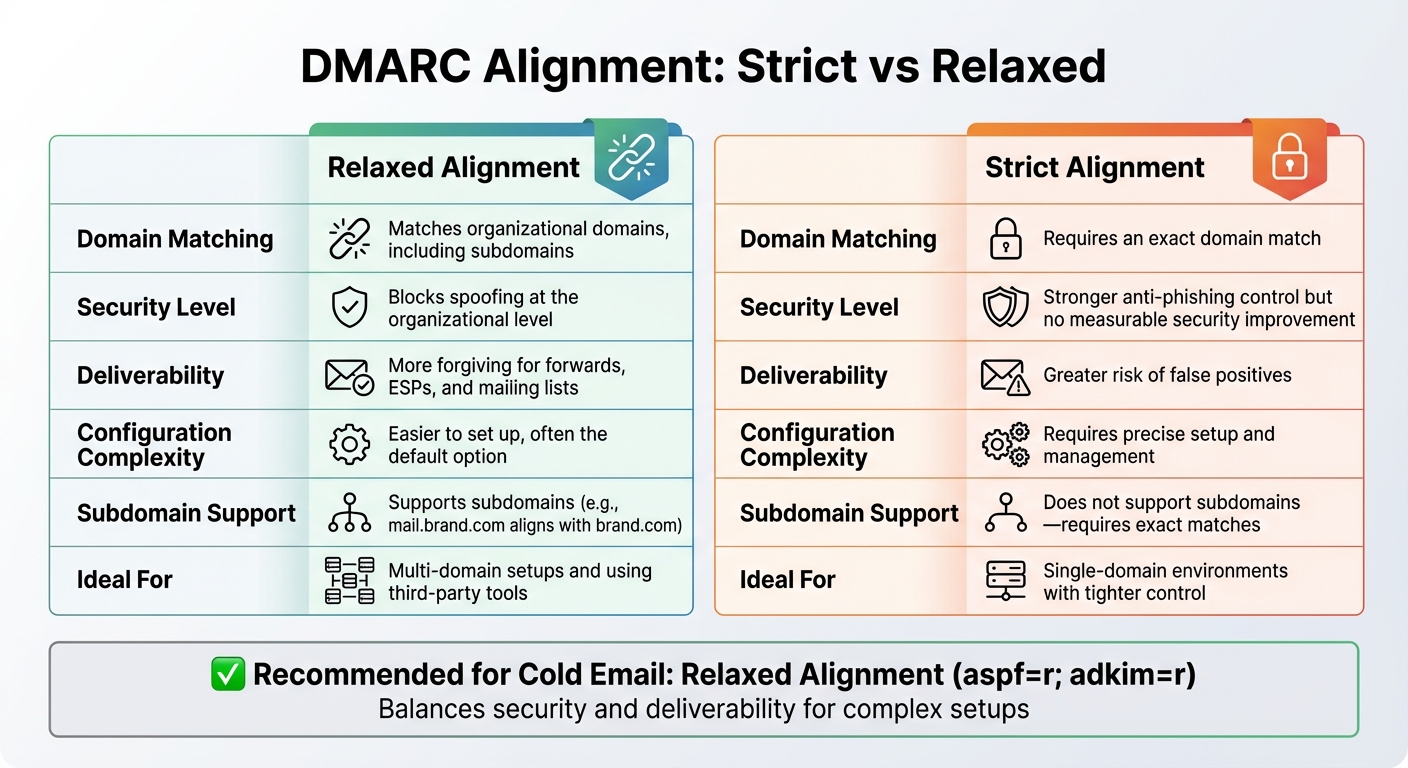
DMARC Strict vs Relaxed Alignment Comparison Chart
DMARC relies on identifier alignment to authenticate emails, and relaxed alignment offers a more practical approach for complex setups.
With relaxed alignment, the organizational domain in the From address only needs to match the domain used for SPF or DKIM authentication - it doesn’t have to be an exact match. For instance, an email with From: [email protected] would meet relaxed alignment if the SPF Return-Path is [email protected] or the DKIM signing domain is outreach.example.com, as they all share the same organizational domain: example.com.
For SPF in relaxed alignment (aspf=r), the Return-Path domain must simply belong to the same organizational domain as the From address. Similarly, for DKIM in relaxed mode (adkim=r), the signing domain (defined in the d= tag) can either match the From domain exactly or be a subdomain of it.
This flexibility makes relaxed alignment particularly effective for diverse email environments.
Relaxed alignment simplifies email management when dealing with multiple ESPs, subdomains, or third-party tools. According to Valimail, there’s "no discernible increase in protection by using Strict mode", and they recommend relaxed alignment because strict alignment "makes configuration and management…more difficult."
This mode is especially useful in scenarios like cold outreach, marketing campaigns, and CRM integrations, where emails are often sent from subdomains or through third-party platforms. By allowing subdomain variations, relaxed alignment minimizes false positives and ensures legitimate emails aren’t mistakenly blocked.
It also handles forwarded emails and mailing list traffic better. Even if headers are altered during forwarding or by list managers, DKIM can still align under relaxed rules. This reduces the risk of legitimate emails being flagged simply because they passed through an intermediary system. For U.S.-based sales teams managing hundreds of mailboxes across multiple domains and subdomains, relaxed alignment offers scalability. It allows you to add new subdomains or integrate additional tools without constant reconfiguration.
These advantages make relaxed alignment a practical choice for managing email campaigns in real-world scenarios.
Relaxed alignment is a great fit for cold outreach campaigns, especially when using dedicated subdomains like outreach.example.com or sales.example.com to separate campaign traffic from your primary domain. It’s also ideal for agencies managing multiple brands, where each client may use several sending domains or subdomains.
If your setup involves third-party services that rely on subdomains for authentication - such as ESPs like Postmark - strict alignment can become impractical. In these cases, the envelope or DKIM domain rarely matches the root From domain exactly. Relaxed alignment allows you to manage multiple subdomains or third-party ESPs effectively. Once legitimate sources are aligned, you can enforce stricter DMARC policies (like p=quarantine or p=reject) without risking deliverability issues. This approach strikes a balance between strong enforcement and the operational flexibility needed to maintain high inbox placement rates on platforms like Google Workspace and Microsoft 365.
Strict DMARC alignment requires the From address to exactly match both the SPF Return-Path and the DKIM signing domain.
For SPF in strict mode (aspf=s), the Return-Path domain must be identical to the From domain. Similarly, for DKIM in strict mode (adkim=s), the DKIM signing domain must match the From domain exactly. For instance, a DKIM signature from d=outreach.example.com won't align with a From address like [email protected] under strict alignment rules.
To enable strict alignment, you include aspf=s and adkim=s in your DMARC record. Here's an example:
v=DMARC1; p=reject; rua=mailto:[email protected]; aspf=s; adkim=s.
An email will pass DMARC if at least one of these conditions is met:
You don’t need both SPF and DKIM to align for every message, but at least one must meet the strict criteria.
This exact matching is what provides the benefits - and challenges - of strict alignment.
Strict alignment offers stronger protection against spoofing by blocking attackers from using lookalike subdomains to bypass DMARC. This can help reduce brand impersonation and makes it easier to identify unauthorized third-party services in DMARC aggregate reports.
However, strict alignment is less forgiving with common email flows. Forwarding services and mailing lists often modify the Return-Path or re-sign emails with their own DKIM domain, which can break strict alignment and cause legitimate emails to fail DMARC. Similarly, many email providers authenticate subdomains like d=mg.example.com or Return-Path: bounce.mg.example.com, which won’t align with a From address such as [email protected] unless configurations are adjusted.
Valimail points out that there is "no discernible increase in protection" for most senders when using strict alignment, but it does make configuration and management more complex.
This added complexity can lead to higher support costs and more time spent fine-tuning deliverability, especially for teams managing multiple mailboxes or platforms.
Strict alignment works best in specific scenarios where anti-spoofing is a top priority.
It’s most effective in controlled environments with minimal subdomain usage and centralized email management. Industries like financial services, healthcare, government, and critical infrastructure often prioritize spoofing prevention over flexibility, making strict alignment a practical choice.
Strict alignment is also suitable when all production email comes from a small set of domains, and you can ensure that every provider and system uses the same domain for the From, Return-Path, and DKIM signing domain. For example, cold outreach teams using dedicated tools like Primeforge can simplify strict alignment. Primeforge automates DNS and email authentication for Google Workspace and Microsoft 365 mailboxes to ensure consistent domain configurations.
Before implementing strict alignment, it’s important to take these steps:
p=none) to an enforcement policy (p=reject).This careful preparation can help minimize disruptions while taking advantage of the tighter security strict alignment offers.
Here’s a quick comparison of strict and relaxed alignment:
| Aspect | Relaxed Alignment | Strict Alignment |
|---|---|---|
| Domain Matching | Matches organizational domains, including subdomains | Requires an exact domain match |
| Security Level | Blocks spoofing at the organizational level | Stronger anti-phishing control but no measurable security improvement |
| Deliverability | More forgiving for forwards, ESPs, and mailing lists | Greater risk of false positives |
| Configuration Complexity | Easier to set up, often the default option | Requires precise setup and management |
| Subdomain Support | Supports subdomains (e.g., mail.brand.com aligns with brand.com) | Does not support subdomains - requires exact matches |
| Ideal For | Multi-domain setups and using third-party tools | Single-domain environments with tighter control |
Strict alignment enforces exact domain matches, which can disrupt legitimate email delivery when subdomains or third-party services are involved. Below, we’ll explore how these differences affect email campaign performance.
In U.S.-based cold email outreach, the alignment mode you choose directly impacts inbox placement. Relaxed alignment boosts deliverability by minimizing DMARC failures across subdomains, CRMs, and outreach platforms. This makes it easier for emails sent through various hosts to be authenticated and trusted by receiving ISPs.
For instance, sales teams using addresses like outreach.brand.com, sales.brand.com, or events.brand.com can align all outgoing emails with the main domain (brand.com) without triggering DMARC issues. On the other hand, strict alignment limits scalability. Any inconsistency - such as a third-party tool signing emails with its own domain - can lead to DMARC failures, throttling, or emails ending up in spam. Tools like Primeforge simplify DNS setup for Google Workspace and Microsoft 365, enabling relaxed alignment across multiple sending domains. This reduces configuration errors and ensures better deliverability. Ultimately, this trade-off highlights the need to balance security with operational efficiency.
Choosing between strict and relaxed alignment often comes down to balancing security needs with operational flexibility. While strict alignment enforces exact domain matches, it doesn’t significantly improve security in most real-world scenarios compared to relaxed alignment.
For organizations managing multiple brands or domains, relaxed alignment offers a better balance by allowing a broader range of legitimate emails to pass authentication while still blocking most spoofing attempts. For high-security communications like payment or login notifications, stricter policies can be applied to specific domains. Meanwhile, marketing or outreach domains can use relaxed alignment to maintain deliverability and adaptability.
This strategy ensures strict controls are applied where they’re most critical, without unnecessarily limiting the effectiveness of large-scale outreach or brand-awareness campaigns.
Start by setting SPF and DKIM to relaxed alignment (aspf=r; adkim=r) and using a DMARC policy of p=none. This setup is ideal for high-volume cold email campaigns - especially those sending over 10,000 emails daily with varying Return-Path domains. It minimizes deliverability issues while providing flexibility. Once DMARC reports consistently show over 98% alignment with very few false negatives, you can switch DKIM alignment to strict mode (adkim=s). However, enforcing strict alignment too early can lead to a 20–30% drop in deliverability, so timing is key.
For added efficiency, automated tools like Primeforge can simplify the setup process.
Primeforge offers a streamlined way to handle DNS configurations by automatically publishing SPF, DKIM, and DMARC records for Google Workspace and Microsoft 365 mailboxes. What typically takes over 24 hours to do manually can be completed in about 30 minutes. Primeforge also optimizes alignment modes specifically for cold outreach campaigns.
If you're managing a large number of domains - say, 100 or more - Primeforge's bulk DNS update feature can save significant time. Additionally, with pre-warmed mailboxes, it provides a solid foundation for strong deliverability from day one.
"Primeforge takes care of all the technical deliverability details - SPF, DKIM, DMARC, domain warm-up, and DNS records - without me needing to touch anything." - Dominique W.
Once your setup is complete, ongoing monitoring is crucial to maintain high performance. Regularly review DMARC aggregate reports sent to your rua address to identify alignment issues. For instance, if around 15% of emails fail due to ESP subdomains not matching your From domain, switching to relaxed SPF alignment can help reduce false positives.
To achieve optimal results, aim for inbox placement rates above 90%, bounce rates below 2%, and spam complaints under 0.1%. If DKIM alignment drops below 80%, it’s often a sign of subdomain configuration problems that need to be fixed.
When fine-tuning your DMARC policy, take a gradual approach. Start with p=none to gather data, then move to p=quarantine at around 25% enforcement, and finally transition to p=reject once legitimate alignment consistently surpasses 95%. This step-by-step method ensures you maintain deliverability while refining your cold email system.
For most cold email operations, relaxed alignment is the smarter choice. It works seamlessly with today’s email infrastructure - think multiple ESPs, subdomains, forwarding services, and third-party tools - while maintaining strong security. When paired with a p=reject policy, relaxed alignment (aspf=r; adkim=r) effectively blocks spoofing attempts without jeopardizing the delivery of legitimate emails.
On the other hand, strict alignment demands an exact match between the "From" header and the SPF and DKIM domains. While this sounds appealing in theory, it often complicates email management without offering much additional protection. For instance, emails from subdomains like marketing.yourdomain.com might fail authentication under strict alignment, even when they’re fully legitimate.
For cold outreach, relaxed alignment strikes the right balance. Its flexibility reduces the risk of false positives, which is crucial in complex, high-volume campaigns. Strict alignment, by contrast, can be overly rigid and harm deliverability.
If you’re managing cold email infrastructure manually, start with relaxed alignment and monitor your DMARC reports for several weeks (two to four is a good range). Once you’re confident that false positives are minimal, you can tighten the alignment for domains where you control all sending sources. For those using Primeforge, the platform simplifies this process with automated DNS and alignment configurations, taking the guesswork out of the equation and ensuring your emails land where they’re supposed to.
Relaxed DMARC alignment offers a more lenient approach to email authentication, making it especially suited for campaigns involving multiple domains or third-party services. This method minimizes the chances of emails being rejected, helping more messages land in recipients' inboxes.
With relaxed alignment, emails can still pass authentication even if SPF and DKIM alignments aren't exact matches. This flexibility ensures smoother communication, which can boost engagement and improve outreach efforts. Primeforge's email infrastructure is built to support this setup, simplifying cold email campaigns with tools like automated DNS configuration and enhanced deliverability features.
Strict DMARC alignment plays a key role in email deliverability by demanding a precise match between the sender's domain and the domain displayed in the "From" header. This approach strengthens email security and minimizes the risk of spoofing. However, even small mismatches can result in legitimate emails being blocked or flagged as spam.
This strict mode can be particularly tricky for businesses that rely on third-party email services or run cold outreach campaigns, as these often involve domain inconsistencies. In such cases, opting for relaxed alignment might strike a better balance, helping to preserve email deliverability while still maintaining a reasonable level of security.
Switching to strict DMARC alignment can significantly boost your email security by making it harder for attackers to spoof your domain or execute phishing schemes. This method is particularly helpful if your domain is frequently targeted or if you want tighter control over your email deliverability.
Before implementing strict alignment, double-check that your SPF and DKIM records are properly set up and that your email systems are running smoothly. While strict alignment provides stronger safeguards, it may also require extra vigilance to ensure legitimate emails don’t get mistakenly blocked.
