
DKIM ensures your cold emails land in inboxes instead of spam. It authenticates emails by adding a digital signature, proving they’re untampered and from a verified sender. Without DKIM, your campaigns risk higher bounce rates (up to 19%) and lower engagement. Starting February 2024, Google and Yahoo will require DKIM for bulk senders exceeding 5,000 daily emails. Setting it up involves generating keys, updating DNS records, and enabling DKIM in your email platform. Tools like Primeforge simplify this process, saving time and ensuring consistent email deliverability. Secure DKIM now to improve your outreach success.
DKIM, or DomainKeys Identified Mail, works by adding a digital signature to every email you send. Your server uses a private key to sign the message headers and body, embedding the signature into the email header. When the recipient's server receives the email, it retrieves the corresponding public key from your domain's DNS (usually at a selector like s1._domainkey.yourdomain.com) and uses it to verify the signature.
If the signature aligns and the email content hasn't been altered during transmission, the receiving server marks the email with "dkim=pass" in the headers. This verification increases the trustworthiness of your message, improving its chances of landing in the inbox. While this process happens behind the scenes, major providers like Google and Microsoft heavily rely on it to assess spam risks and deliverability.
DKIM works hand-in-hand with SPF (Sender Policy Framework) and DMARC (Domain-based Message Authentication, Reporting, and Conformance). Together, they authenticate your emails, protect against tampering, and signal legitimacy to email providers. For cold email campaigns, having this setup is critical for maintaining strong inbox placement and protecting your domain's reputation.
Now that we’ve covered how DKIM works, let’s dive into why it’s so beneficial for cold outreach.
By requiring a private-key signature, DKIM makes it much harder for attackers to spoof your domain. In fact, organizations using DKIM report a 90% reduction in successful phishing attempts.
For cold email campaigns, proper email authentication is essential. Without it, domains can face bounce rates as high as 19%. On the other hand, authenticated domains often see reply rates climb to around 22%. Moreover, emails with valid DKIM are 30% less likely to be altered during transmission, which not only protects your message but also improves inbox placement and engagement.
| DKIM Impact | No DKIM | DKIM Enabled |
|---|---|---|
| Spam Labeling | High Risk | Low Risk |
| Inbox Placement | Often Spam | Mostly Inbox |
| Recipient Trust | Low | High |
Before setting up DKIM, you need full control over your domain and its DNS records. This means having access to your registrar or DNS hosting service, such as GoDaddy, Cloudflare, or Namecheap, to manage TXT and CNAME records.
Your domain should already have functional MX records and a properly configured DNS setup. Additionally, you’ll need to verify domain ownership within your email platform before enabling DKIM. This step ensures that your domain is ready for secure email authentication.
If you're running campaigns across multiple domains, manually editing DNS records can lead to errors. Tools like Primeforge simplify this process by automating the setup of DKIM, SPF, and DMARC. This can cut setup time drastically - from over 24 hours to just about 30 minutes. For U.S.-based teams managing numerous sending domains, this efficiency ensures consistent configuration and better email deliverability.
Once domain access is secured, the next step is to focus on generating and managing your key pair.
For optimal security, always opt for 2048-bit RSA keys. Both Google and Microsoft endorse 2048-bit keys as they align with current security standards and signal compliance with best practices to mailbox providers.
However, some older DNS providers may have limitations that require splitting a 2048-bit public key into multiple quoted strings within a TXT record. Automated tools can handle this formatting seamlessly, ensuring no performance issues arise. For teams scaling cold outreach efforts, platforms that automate DKIM provisioning not only handle these technical details but also ensure that 2048-bit keys are properly formatted and deployed across all domains. This reduces manual errors and helps maintain a strong email authentication setup.
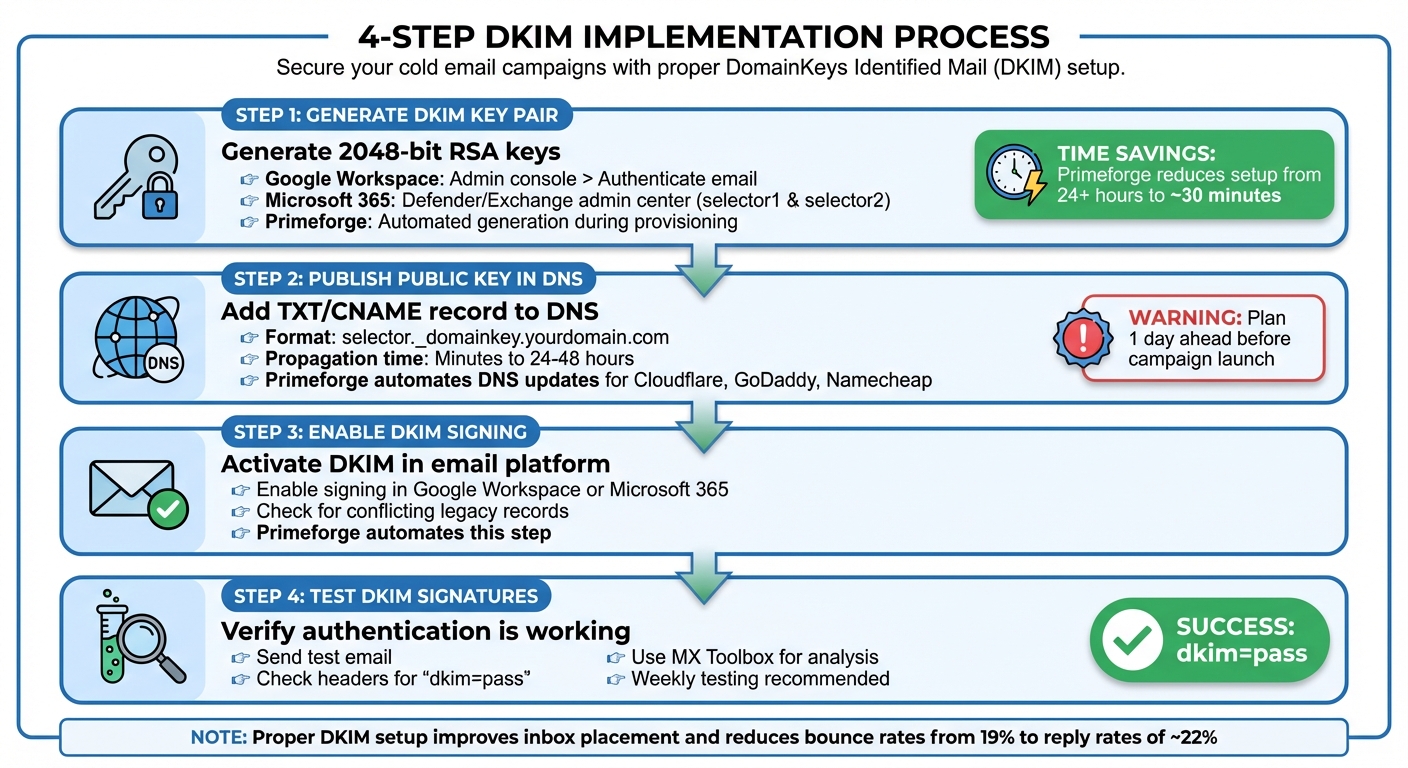
DKIM Setup Process: 4-Step Implementation Guide for Cold Email Campaigns
Start by generating a DKIM key pair. If you're using Google Workspace, head to the Admin console, navigate to Gmail under Google Workspace > Authenticate email, select your domain, and click "Generate new record." This will create a DNS TXT record (usually named google._domainkey.yourdomain.com) that contains your DKIM public key. For Microsoft 365 users, the process is similar - access the Defender or Exchange admin center, where Microsoft automatically provides two selectors, selector1 and selector2, to support automatic key rotation.
If you're using Primeforge, the process becomes even simpler. It automates key generation for both Google Workspace and Microsoft 365 mailboxes, creating properly formatted 2048-bit keys during mailbox provisioning. This reduces setup time dramatically, cutting it down from over 24 hours to just about 30 minutes.
Once you've generated the keys, the next step is to publish the public key in your DNS.
Add the public key to your DNS as a TXT or CNAME record, making sure to follow the specific format required by your DNS provider. While DNS propagation is often completed within minutes, it can sometimes take up to 24–48 hours, depending on your provider and TTL (Time to Live) settings. To avoid delays, plan ahead and set this up at least a day before launching any email campaigns.
Primeforge simplifies this step by automating the DNS setup process. It pushes the required records directly to popular DNS providers like Cloudflare, GoDaddy, and Namecheap. This not only saves time but also minimizes manual errors, ensuring consistent formatting across all your domains.
Once the DNS records are updated and propagated, you’re ready to enable DKIM in your email platform.
After successfully generating the keys and updating your DNS records, the next step is enabling DKIM signing in your email platform. Both Google Workspace and Microsoft 365 provide straightforward procedures for this. If you're using Primeforge, it automates this process as well, while also checking for any conflicting legacy DKIM records left over from previous providers.
Finally, verify that everything is working correctly by sending a test email. Check the email headers to confirm they show dkim=pass and that the selector matches your domain. Tools like MX Toolbox can help analyze the headers. To view the authentication results, click on the menu icon in your email client and select "Show original." If you encounter issues like dkim=fail, "no signature", or a domain mismatch, revisit your configuration to address the problem.
For ongoing reliability, it's a good idea to send weekly test emails and review the headers, especially after making any changes to your DNS or email infrastructure. This proactive approach ensures you catch and resolve DKIM issues before they impact your campaigns.
Primeforge simplifies DKIM setup for cold email campaigns by automating the entire process. When you set up a Google Workspace or Microsoft 365 mailbox through Primeforge, the platform takes care of everything: it generates 2048-bit DKIM keys, updates your DNS records, and configures SPF and DMARC. This automation not only strengthens email deliverability but also makes life easier for teams handling multiple domains.
One standout feature is Primeforge's bulk DNS update capability, which allows you to manage DKIM, SPF, and DMARC updates across dozens - or even hundreds - of domains from a single dashboard.
Because Primeforge integrates seamlessly with other tools in The Forge Stack, like Salesforge (for outreach campaigns) and Warmforge (for email warm-up), it creates an all-in-one system. This means you can manage your email infrastructure, warm-up process, and outreach campaigns in one place. By doing so, you avoid the common issue of outdated keys or misaligned records that can quietly harm cold email performance over time.
In short, Primeforge doesn't just automate email authentication - it also saves time, improves scalability, and helps you get the most out of your budget.
Primeforge offers slot-based pricing, starting at $45 per month for 10 mailbox slots (or $38 per month when billed annually). Domain costs depend on the top-level domain (TLD); for instance, five ".com" domains cost $70 per year as a one-time charge. This pricing model makes it easy to manage costs in U.S. dollars, especially as you scale from a handful of inboxes to managing dozens. With SPF, DKIM, DMARC, and DNS automation included in every mailbox slot, it’s a cost-effective solution for growing businesses.
Adding new domains - whether for testing, brand separation, or higher sending volumes - remains predictable and affordable. This is especially appealing for agencies and fast-growing startups. Primeforge also offers up to 46% savings compared to native Google Workspace accounts and 25% savings compared to native Microsoft 365 accounts. Even better, it reduces setup time from over 24 hours to just about 30 minutes. For teams that need to scale quickly while maintaining deliverability, Primeforge delivers a smart, efficient solution.
| Feature | Primeforge | Native Google/MS365 |
|---|---|---|
| Price per Mailbox | $4.50 | $6.00–$8.40 |
| Setup Time | ~30 minutes | 24+ hours |
| DNS Setup | Automated | Manual |
| IP Reputation | Stable IPs | Variable |
| Bulk Management | Easy bulk tools | Difficult/Manual |
To keep your cold email campaigns running smoothly, it's essential to stay on top of DKIM performance. Regular monitoring is key, and DMARC aggregate reports (RUA reports) are your best friend here. These reports provide a clear picture of which emails pass or fail DKIM authentication, which IPs are sending on your behalf, and whether any unauthorized sources are misusing your domain. For cold email campaigns, this level of insight is crucial - small missteps can quickly affect your inbox placement.
Make it a habit to review DMARC reports weekly. If you notice your DKIM pass rate slipping - say, from above 98% to below 95% - or a sudden increase in DKIM and DMARC failures from your outreach platform's IP, it’s time to investigate. Common issues include DNS records that didn’t propagate as expected, selectors pointing to the wrong domain, or misaligned "From" addresses. Use filters in your DMARC data to analyze sending IPs or providers, ensuring your cold outreach system consistently passes DKIM checks and avoids throttling by mailbox providers.
Additionally, run a quick weekly inbox test across platforms like Gmail, Outlook, and Yahoo. Check the email headers for dkim=pass. This simple step takes just a few minutes and can help you catch and fix problems before they disrupt your campaigns. Solid authentication is a cornerstone of better deliverability.
Once you’ve confirmed stable DKIM performance, the next step is to focus on securing and aligning your keys.
Maintaining DKIM security involves more than just monitoring - it requires regular key rotation and proper alignment. Rotate your DKIM keys every 6–12 months, particularly for domains handling high-volume cold outreach. This minimizes the risk of compromised keys. The process is straightforward: create a new 2048-bit key pair, publish the new public key in your DNS under a fresh selector (e.g., selector2._domainkey), update your email platform to use the new selector, and monitor results for a few days to confirm everything works as expected. Once you're sure all emails are signed with the new key, remove the old selector from your DNS.
Equally important is DKIM alignment. Alignment ensures that the domain in your DKIM signature (the d= value) matches the domain in your visible "From" address. Mailbox providers rely on this match to verify your email’s legitimacy. For cold outreach, use a dedicated sending domain (e.g., outreach.example.com) and make sure the DKIM d= domain aligns exactly with it. Avoid mixing multiple brands or unrelated domains under a single DKIM key - this creates confusion for receivers and can harm your deliverability.
If you manage multiple domains, manually handling key rotations and alignment checks can quickly become overwhelming. Tools like Primeforge simplify this process with features like bulk DNS updates and centralized dashboards, allowing your team to focus on crafting effective campaigns instead of wrestling with DNS records. Combine these tools with weekly header tests and monthly DMARC reviews to keep your email system running smoothly and your messages reaching inboxes where they belong.
In today’s email landscape, DKIM has become a non-negotiable for cold email campaigns. With major email providers enforcing stricter authentication standards, skipping DKIM can result in emails being blocked, delayed, or flagged as spam. For U.S.-based businesses running outbound-heavy campaigns, configuring DKIM properly can make all the difference - helping achieve reply rates of 20–22% instead of facing bounce rates as high as 19%.
But DKIM isn’t just about deliverability - it’s also about protecting your sending domain as a long-term asset. Maintaining a strong domain reputation is critical in a market dominated by Gmail, Outlook, and corporate filters. A damaged reputation could lead to costly resets and harm your brand’s credibility. That’s why DKIM, when paired with SPF and DMARC, acts as a simple yet powerful safeguard for both your primary and dedicated cold-email domains, ensuring they remain reliable as your outreach scales.
To maximize results, use 2048-bit keys, align DKIM with your "From" address, and regularly monitor DMARC reports to keep your emails landing in inboxes. For teams managing multiple domains or mailboxes, tools like Primeforge can simplify DNS setup and help maintain a strong reputation - all in about 30 minutes. This efficiency strengthens your overall email strategy while saving time.
Make sure DKIM is enabled for your sending domain, complete the setup if it’s missing, and send a test email to confirm the headers display "dkim=pass." As discussed, solid DKIM practices not only protect your outreach efforts but also preserve your sender reputation. Taking a few minutes to configure DKIM today ensures your cold email campaigns remain effective - especially when paired with quality contact lists, consistent sending patterns, and reasonable volumes. Secure DKIM now to set your email strategy up for long-term success.
DKIM, or DomainKeys Identified Mail, is a key player in ensuring the success of cold email campaigns. It works by verifying that your emails are genuinely sent from your domain, which helps establish trust with email providers. This verification reduces the risk of your messages being flagged as spam, boosting your chances of landing in your recipients' inboxes.
Setting up DKIM not only improves email deliverability but also safeguards your domain's reputation. For businesses relying on cold outreach, tools like Primeforge make the process easier by automating DNS configuration and providing a strong email infrastructure - helping your campaigns achieve better results.
Primeforge makes setting up DKIM, DMARC, and SPF records incredibly simple by automating the entire process. In just a few clicks, you can align your email setup with industry standards, minimizing the chances of your emails landing in spam folders.
By taking the hassle out of manual DNS updates, this automation not only saves you time but also helps improve the deliverability of your cold email campaigns while keeping them secure.
Using 2048-bit RSA keys for DKIM significantly boosts email security by making it far more challenging for attackers to forge or alter your messages. This stronger layer of cryptographic protection ensures your emails are properly authenticated, which helps minimize the likelihood of them being flagged as spam.
For cold email campaigns - where getting your message delivered is absolutely crucial - this added security does more than just protect your sender reputation. It also increases the chances of your emails landing in the inbox rather than being sidelined to the junk folder.
