
When setting up email outreach, your domain strategy can make or break your success. Poor domain choices can lead to low deliverability rates and emails landing in spam folders. Here’s what you need to know:
Key takeaway: A well-planned domain setup, combined with proper authentication and warming, ensures your outreach emails land in inboxes and not in spam folders.
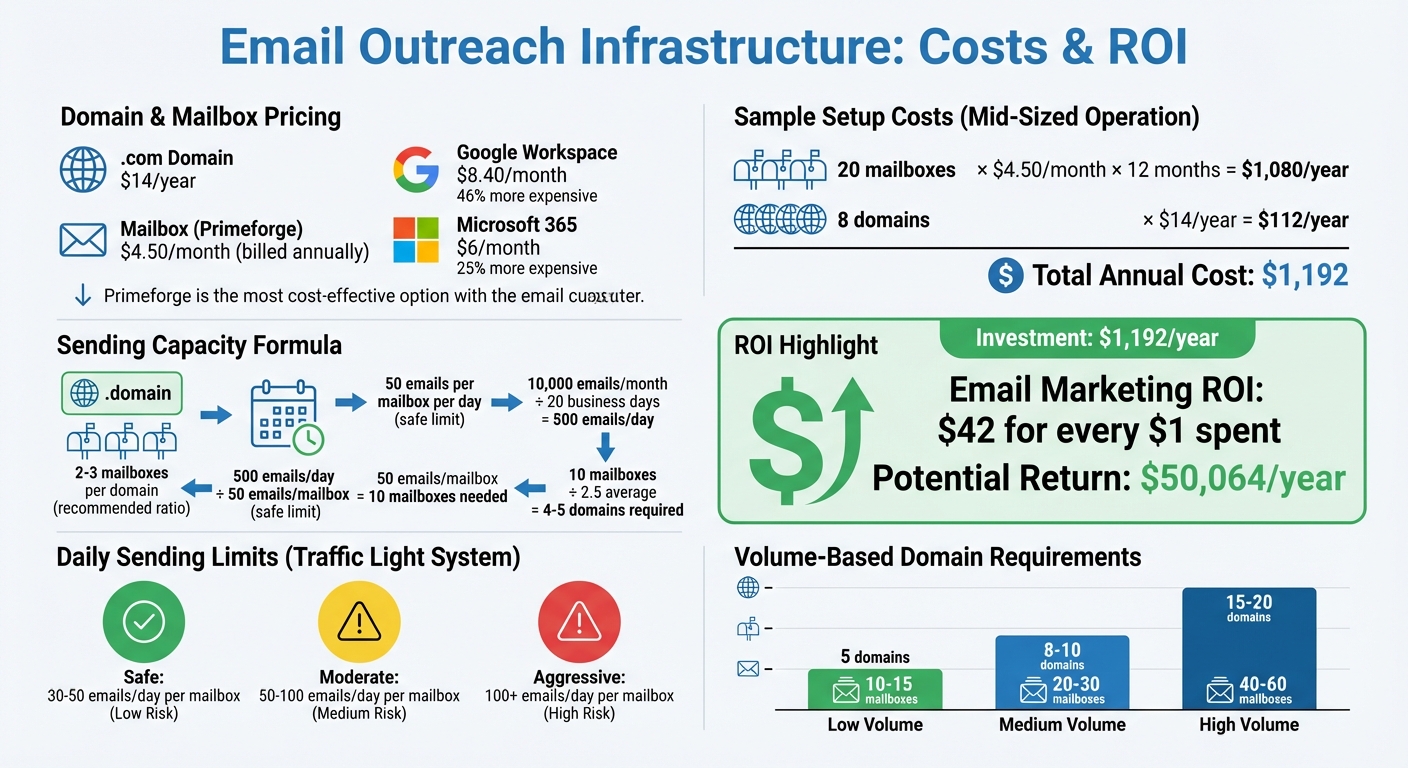
Email Outreach Domain Setup Cost Breakdown and ROI Calculator
Plan your sending volume, budget, and domain strategy carefully to set up a reliable email outreach system.
Here’s the basic rule: stick to 2–3 mailboxes per domain to keep a strong sender reputation intact. If you’re aiming for high-volume outreach, you’ll likely need 5–20 domains with a total of 10–60 mailboxes. For example, if you plan to send 10,000 emails per month over 20 business days, with each mailbox sending 50 emails daily, you’d need about 10 mailboxes spread across 4–5 domains. This setup reduces risks and helps protect your email infrastructure.
To boost deliverability, match your email service provider (ESP) to the recipient’s platform. Use Google for Gmail users and Microsoft 365 for Outlook users. Depending on your prospect list, you might need a mix of Google and Microsoft mailboxes. Crunch these numbers to ensure your domain strategy aligns with your budget.
Building a solid outreach infrastructure involves costs. A .com domain typically costs $14 per year, so five domains would set you back $70 annually, while 20 domains would cost $280. Mailbox subscriptions are another expense - around $4.50 per month when billed annually. This is significantly cheaper than going directly through providers: Primeforge mailboxes, for instance, are 46% cheaper than Google Workspace ($8.40/month) and 25% cheaper than Microsoft 365 ($6/month).
For a mid-sized operation with 20 mailboxes and 8 domains, you’re looking at an annual cost of about $1,080 for mailboxes (20 × $4.50/month × 12) and $112 for domains, totaling $1,192. Considering email outreach delivers an average ROI of $42 for every $1 spent, this investment quickly pays for itself. Just make sure to keep your primary domain separate from outreach efforts to protect your main communication channels.
Never use your primary domain for outreach campaigns. Even with the best practices, outreach domains can get flagged or blacklisted. You don’t want that to impact your main domain, which is critical for communicating with customers, partners, and existing clients. Losing that reputation is like gambling with your personal bank account on risky investments - it’s just not worth it.
Instead, purchase domains similar to your primary one but distinct enough to separate them. Set up permanent redirects from these outreach domains to your main business website. This way, prospects who manually type in the outreach domain will still land on your legitimate site. This strategy keeps your brand safe while allowing you to experiment and scale your outreach without worry.
(function(d,u,ac){var s=d.createElement('script');s.type='text/javascript';s.src='https://a.omappapi.com/app/js/api.min.js';s.async=true;s.dataset.user=u;s.dataset.campaign=ac;d.getElementsByTagName('head')[0].appendChild(s);})(document,372145,'wzqrljsrcet38mumssx2');
Picking the right domain registrar isn’t just about the initial cost - it affects everything from setup simplicity to long-term expenses. A good registrar makes managing multiple outreach domains easy, while the wrong one can lead to unnecessary headaches and higher costs. Here's how to ensure your choice aligns with your outreach goals.
Opt for well-known registrars with a proven track record. For instance, GoDaddy manages over 82 million domains for 20 million customers, making it the largest registrar globally. Namecheap offers competitive pricing, with .com domains at $10.28 per year (plus ICANN fees), along with free lifetime privacy protection. If budget is a concern, Cloudflare provides wholesale pricing with no markups - just $9.77 per year for .com domains.
Pay close attention to renewal prices. Some registrars lure you in with deals as low as $0.01 for the first year, only to hit you with steep renewal fees later. As Isamar Batista, VP of Marketing & CRM at Shoedazzle, puts it:
"If you rely on email marketing as a source of traffic and revenue, it is imperative that you are acquiring valid email addresses".
The same principle applies to domain costs - know exactly what you’re committing to for the long term. Once you’ve chosen a reputable registrar, confirm they offer bulk management features.
Managing multiple domains - whether it’s 5 or 20 - requires tools that simplify the process. Look for registrars that support bulk purchasing, multi-domain DNS updates, and automated renewals. For example, GoDaddy offers bulk domain search and registration, along with a "Discount Domain Club" that provides up to 60% off for high-volume buyers.
Enable auto-renewal to avoid losing domains to accidental expiration. Privacy protection should also be a standard feature, ensuring your personal details stay off public WHOIS records. Keep in mind that ICANN rules prevent domain transfers between registrars for the first 60 days after purchase, so choose wisely from the start.
If your team is focused on outreach efficiency, an all-in-one platform like Primeforge can simplify domain and email management. Primeforge combines domain management with email infrastructure, automating DNS setup for SPF, DKIM, and DMARC records. This is crucial, as about 40% of email senders misconfigure these records, and poor DNS setups result in 19% of emails failing to reach inboxes.
Primeforge also offers Google Workspace and Microsoft 365 mailboxes, along with automated DNS configuration. With a 4.7/5 rating from 125 reviews, the platform is highly regarded. Pricing starts at $45 per month for 10 mailbox slots (or $38 per month if billed annually). Additional features include bulk DNS updates, multiple workspaces, and mailbox profile pictures. Domain costs are separate - five .com domains are priced at $70 per year. While not the cheapest option, Primeforge’s time-saving tools and reduced technical complexity make it an appealing choice for outreach-focused teams.
Buying a domain without checking its background can lead to deliverability issues that are tough to fix. A domain's history and reputation are just as important as its technical configuration when it comes to email outreach. Here's what you need to examine before making a purchase.
Older domains tend to be more trusted by email providers. Spam filters often flag new domains because spammers frequently register fresh ones, blast out emails, and abandon them once flagged. Domains that have been around for over ten years can improve email delivery rates by as much as 30% compared to domains less than a month old, which are often treated with suspicion.
Daniel Polacek, an email marketing expert at Warmup Inbox, explains:
"Cybercriminals have adopted the practice of registering a new domain and sending out as many spam emails as possible before the domain is blocklisted or shut down. Because of this technique, spam filters and servers are wary of brand new domains".
Whenever possible, stick with .com domains. These are less likely to trigger spam filters compared to extensions like .xyz. Use WHOIS tools to verify the domain's registration date - its original creation date is especially important.
Once you’ve confirmed the domain’s age, the next step is to investigate its past usage and blacklist status.
Before finalizing a purchase, use tools like MX Toolbox or Cisco Talos to check if the domain has been blacklisted. These tools scan major blacklists, such as Spamhaus and Barracuda, to identify whether the domain has been associated with spam or other malicious activities. Even a single blacklist entry can harm your email reputation.
The Wayback Machine is another valuable tool - it lets you review old snapshots of the domain’s website. If the domain was previously used for illegal content, trademark violations, or spammy sites, it’s better to walk away. Remember, buying a domain means inheriting its past reputation, so a clean history is key to avoiding issues and maintaining good deliverability.
For those sending large volumes of emails, services like Google Postmaster Tools and Microsoft SNDS provide insights into how your domain is perceived by email providers. Domains that aren’t monitored often struggle with inbox placement, achieving rates below 40%. In contrast, monitored and properly warmed domains can hit inbox placement rates of 100% within two weeks.
Once you’ve verified the domain’s history, focus on finding a name that supports your brand.
Pick domains that look professional and align with your brand identity. Adding prefixes like "get-", "try-", or "hello-" can help differentiate outreach domains while keeping them connected to your brand (e.g., getcompany.com or trycompany.com).
Avoid domains with random characters, excessive hyphens, or numbers, as these can make your domain look untrustworthy. To further establish credibility, set up a 301 redirect from your outreach domain to your main business website.
Using tools like Primeforge can simplify the setup of SPF, DKIM, and DMARC, which are essential for protecting your email deliverability. A domain with a clean history not only boosts your email success but also makes it easier to configure these critical settings.
Before diving into email campaigns, make sure your domain is ready to handle the job. Start by verifying your domain's history to ensure it's clean, then configure DNS records and gradually warm up your domain. Why does this matter? A poorly set up domain is one of the top reasons emails end up in spam folders - even if your domain itself is solid. Proper DNS configuration and a reputation-building strategy can mean the difference between your emails landing in inboxes or being filtered out.
Email authentication is key to successful outreach. Here’s a quick breakdown of the essentials:
v=spf1 include:_spf.google.com ~all. Make sure you only have one SPF record and that DNS lookups stay within limits. If you’re juggling multiple services, consider "flattening" your SPF record by replacing include: statements with specific IP addresses using ip4:.
google._domainkey). Use 2048-bit encryption for added security.
p=none policy to monitor activity, then tighten policies once everything is authenticated. Don’t forget to set up a dedicated email (e.g., [email protected]) to receive detailed reports.
Tools like Primeforge can simplify this process by automating DNS configurations, cutting setup time from over a day to just about 30 minutes. Once you’ve made DNS updates, allow up to 48 hours for the changes to propagate before launching large-scale email campaigns.
With your authentication protocols in place, it’s time to focus on warming up your domain.
Jumping straight into sending cold emails from a brand-new domain is a surefire way to end up in spam folders. Instead, take the time to warm up your domain. This means gradually building trust with email providers by fostering natural engagement.
Encourage positive interactions, such as replies, marking emails as important, and moving messages from spam to the primary inbox. Gradually increase your email volume in small, varied steps. Tools like Google Postmaster Tools can help you monitor deliverability and catch any issues early. If your email open rates dip below 50%, it’s a red flag that your messages might be landing in spam or promotional folders.
In late 2022, Ramzi Malas, founder of Lux Sales Consulting, reported a 30%–50% boost in email open rates after using the Allegrow warm-up tool. This tool simulated real engagement across thousands of inboxes, helping to repair and maintain domain reputation. Once your domain is warmed up, stick to a safe limit of 30–50 emails per day per mailbox to avoid triggering spam filters.
| Sending Strategy | Daily Limit (per mailbox) | Risk Level |
|---|---|---|
| Safe | 30–50 emails | Low |
| Moderate | 50–100 emails | Medium |
| Aggressive | 100+ emails | High |
After building your domain’s reputation, the next step is connecting it to a reliable email infrastructure.
Integrating your domain with a compatible email service provider (ESP) is crucial for better inbox placement. Matching your domain with the right ESP - like Google Workspace for Gmail or Microsoft 365 for Outlook - can significantly improve deliverability.
Primeforge simplifies this process by offering Google Workspace and Microsoft 365 mailboxes. It also provides automated DNS setup, bulk DNS updates across multiple domains, and features like multiple workspaces and mailbox profile pictures. Using multiple ESPs can further distribute your email load, reducing the risk of overloading a single infrastructure.
In 2025, Carlos Palop Moliner, CEO of UniteSync, achieved an impressive 85.26% positive reply rate and a $2.86 Customer Acquisition Cost (CAC) by scaling his outreach with the Forge Stack (Salesforge, Mailforge, and Warmforge). By leveraging distributed infrastructure, he ensured his emails consistently landed in primary inboxes.
Once your domains are up and running, the next step is ensuring they remain secure and well-managed over time. This helps prevent issues like expiration or unauthorized access, both of which can cause major disruptions.
Relying on a single domain can be risky. Instead, consider spreading your email activity across 5–10 secondary domains. This approach minimizes the risk to your primary business domain from spam complaints or reputation damage. If one domain’s reputation takes a hit or gets blacklisted, you can shift your email volume to healthier domains. For added credibility, set up permanent redirects from these secondary domains to your main website, ensuring recipients always land on a legitimate and trustworthy destination. Once you’ve diversified your domains, secure them with proper management tools like auto-renewal and privacy settings.
Auto-renewal is a simple but essential step to avoid losing a domain due to an oversight. Alongside this, activate WHOIS privacy protection to keep your contact details hidden from public databases. This reduces the risk of spam and potential security breaches. However, be mindful of renewal costs when choosing a registrar. While companies like GoDaddy might offer attractive introductory rates, their renewal fees can be much higher. For consistent, affordable pricing, registrars like Cloudflare ($10.44/year) and Porkbun ($11.08/year) are worth considering.
Staying organized is key to managing multiple domains effectively. Create a master spreadsheet to track important details like purchase dates, registrar credentials, renewal costs, and DNS settings. This central record makes it easier to monitor renewals and quickly resolve any issues.
Monthly audits of your DNS records using tools like MXToolbox can help you catch any changes or problems early. Rob Pellow, Digital Experience Director at Armadillo, emphasizes the importance of vigilance:
"An IP reputation is hard to build, easy to lose, and hard to regain. Therefore, ensuring you are sending the best emails before they are sent will limit the damage caused".
To ensure your emails consistently land in the right inbox, having a solid domain strategy is non-negotiable. Key steps like selecting aged .com domains with clean histories and setting up proper authentication protocols - SPF, DKIM, and DMARC records - are vital for protecting your reputation and improving deliverability.
Why does this matter? Statistics reveal that 20% of legitimate emails never make it to the inbox, and only 24% of cold sales emails are opened. With numbers like these, every detail counts.
Tools like Primeforge simplify the process, cutting setup time down to just 30 minutes while saving 46% compared to direct subscriptions. For just $3.50 to $4.50 per mailbox per month, you get automated DNS configuration and complete reputation control - without the technical hassle.
Think of your domain setup as a long-term investment. Secure multiple secondary domains with auto-renewal to shield your primary domain's reputation. Regular audits and cleaning your email lists every 30 days can keep bounce rates low. Stick to sending 50–100 emails per mailbox per day to maintain optimal deliverability.
This checklist lays the groundwork for successful email outreach. The next step is execution: follow these guidelines, monitor your performance, and make adjustments as needed. Remember, building a strong sender reputation takes time, but it can be lost in an instant. Stay proactive and keep your domain infrastructure in top shape to achieve lasting success.
Using several domains plays a key role in protecting the reputation of your primary domain. By spreading out your email sending volume across multiple domains, you lower the risk of triggering spam filters or landing on a blacklist. This strategy helps maintain strong email deliverability, ensuring your outreach efforts stay on track.
Another advantage is the ability to experiment with different strategies or campaigns. With multiple domains, you can test new approaches without putting your main domain at risk - a crucial step for maintaining long-term success in cold outreach.
To verify a domain's reliability, begin by examining its WHOIS and DNS history. This will give you insights into past ownership, registrar changes, and DNS records. Tools offering detailed historical data, like WHOIS history lookups, are particularly useful here. Next, run the domain or its associated IP address through blacklist and reputation tools. These checks will reveal if the domain has been flagged for spam or abuse in the past. Taking these steps ensures you steer clear of domains with a shady history that could negatively impact your email outreach efforts.
To make sure your emails land in inboxes and not spam folders, it's crucial to set up the right DNS records for your domain. Here are the key ones to configure:
For an extra touch, consider adding a CNAME record. This allows you to create branded tracking links for your email campaigns, giving them a professional edge. Configuring these records not only boosts your email deliverability but also helps ensure your communications reliably reach your audience.
