
Personalized Outbound Strategy
Get The Right Outbound Strategy In Minutes
Enter your email to get a custom plan & stack recommendation for your business
It's being carefully crafted by AI
Please check your mailbox in 5 minutes

Setting up cold email inboxes is painful. You buy domains, fix DNS, create inboxes, warm them up, and still worry about spam.
Mailbomb says it fixes this by giving you ready-made Google Workspace and Microsoft 365 inboxes.
DNS, SPF, DKIM, DMARC, and warm-up are already done, so you can start sending fast.
In this Mailbomb review, we’ll walk through 5 real things you need to know before you invest.
By the end, you’ll know if Mailbomb fits your cold email setup or if you should look at other options.

Mailbomb is a cold email infrastructure service that sells ready-to-use Google Workspace and Microsoft 365 inboxes for outreach.
You do not have to create inboxes, buy domains, or set up email records yourself. Mailbomb does all of this work for you.
The inboxes are made for cold outreach, and Mailbomb also offers pre-warmed inboxes, which makes them safer to use from day one.
Mailbomb sets up SPF, DKIM, and DMARC to help your emails reach the inbox instead of spam.
Once your inboxes are ready, you connect them to your cold email tool and start sending.
Mailbomb is for people who want simple, done-for-you email inboxes without technical work.
Mailbomb handles the full setup of your cold email inboxes so you do not have to deal with technical work.
You choose how many inboxes you need, and Mailbomb prepares everything so you can start sending cold emails faster.
Mailbomb focuses on done-for-you email infrastructure for cold outreach.
These are the main features that help teams set up inboxes fast and send at scale.
| Feature | Why It’s Useful |
|---|---|
| Google Workspace inboxes | Mailbomb provides ready Google Workspace accounts for cold email. |
| Microsoft 365 inboxes | It offers Microsoft 365 Business accounts as another sending option. |
| Pre-warmed inboxes | It provides pre-warmed Google and Microsoft inboxes so you can start sending faster. |
| Automated DNS setup | Mailbomb sets up SPF, DKIM, and DMARC for your domains, so you avoid DNS work. |
| Bulk inbox provisioning | It lets you buy inboxes in bulk, and the cost per inbox drops at higher volumes. |
| Sending tool integrations | Mailbomb supports integrations with sending tools and CRMs using OAuth, master inbox, and Slack. |
| Pre-configured domains and inboxes | Mailbomb handles domain and inbox setup so you do not need to set them up yourself. |
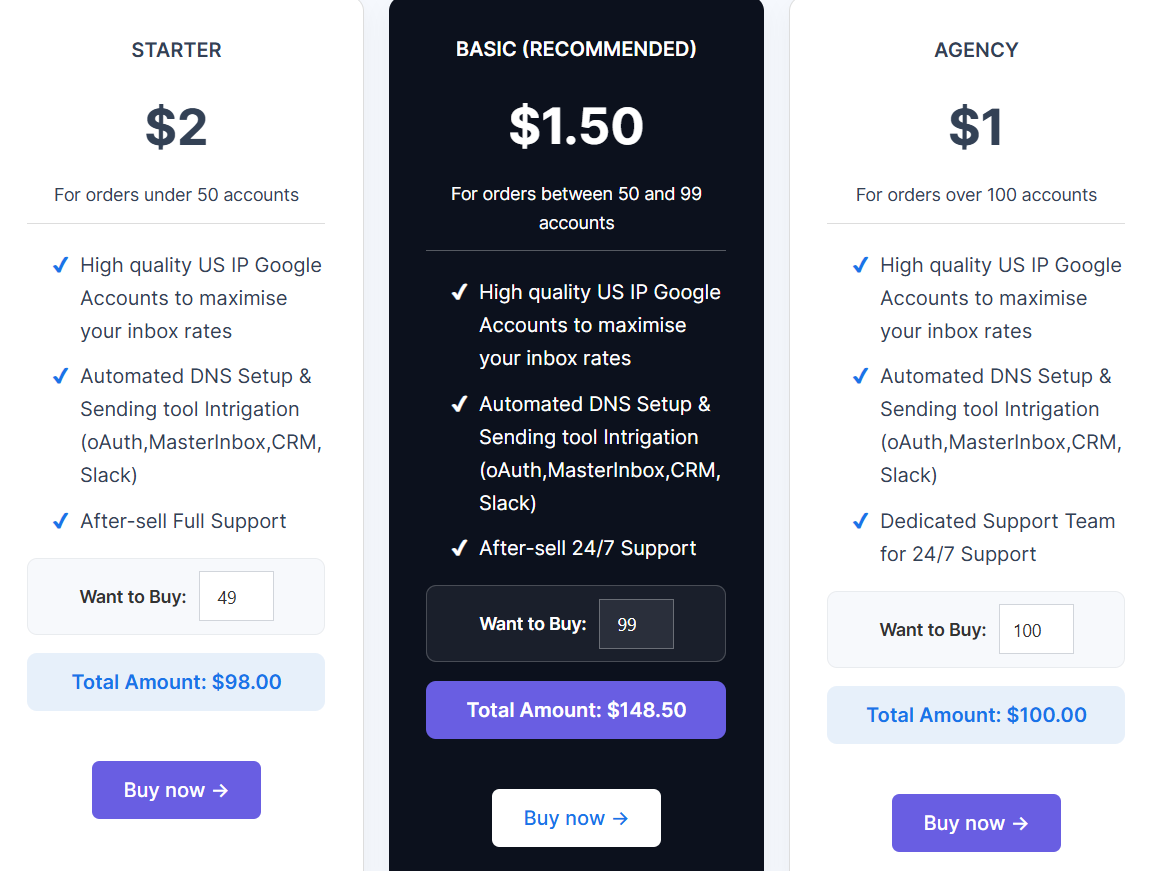
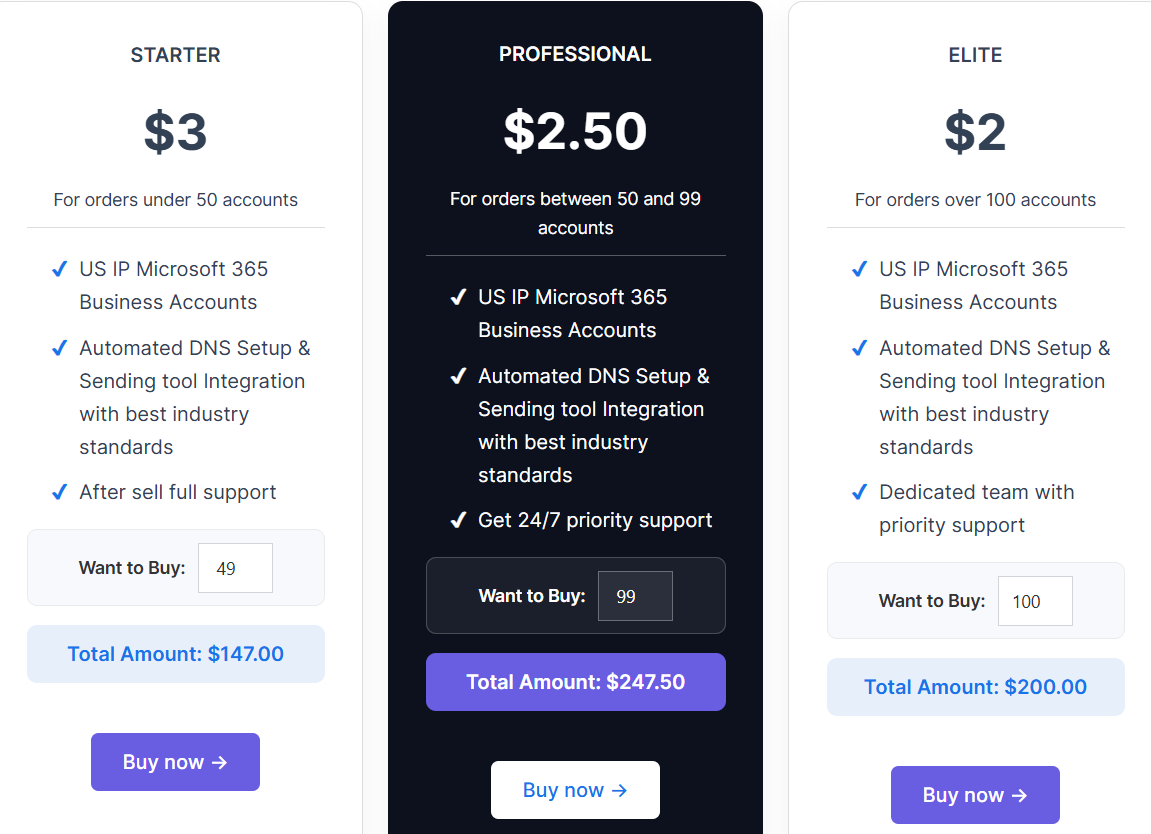
Mailbomb charges per inbox. The more inboxes you buy, the lower the price per forwarding account.
There are three main pricing groups: Google Workspace inboxes, Microsoft 365 inboxes, and pre-warmed inboxes.
I. Google Workspace inbox pricing
II. Microsoft 365 inbox pricing
III. Pre-warmed inbox pricing
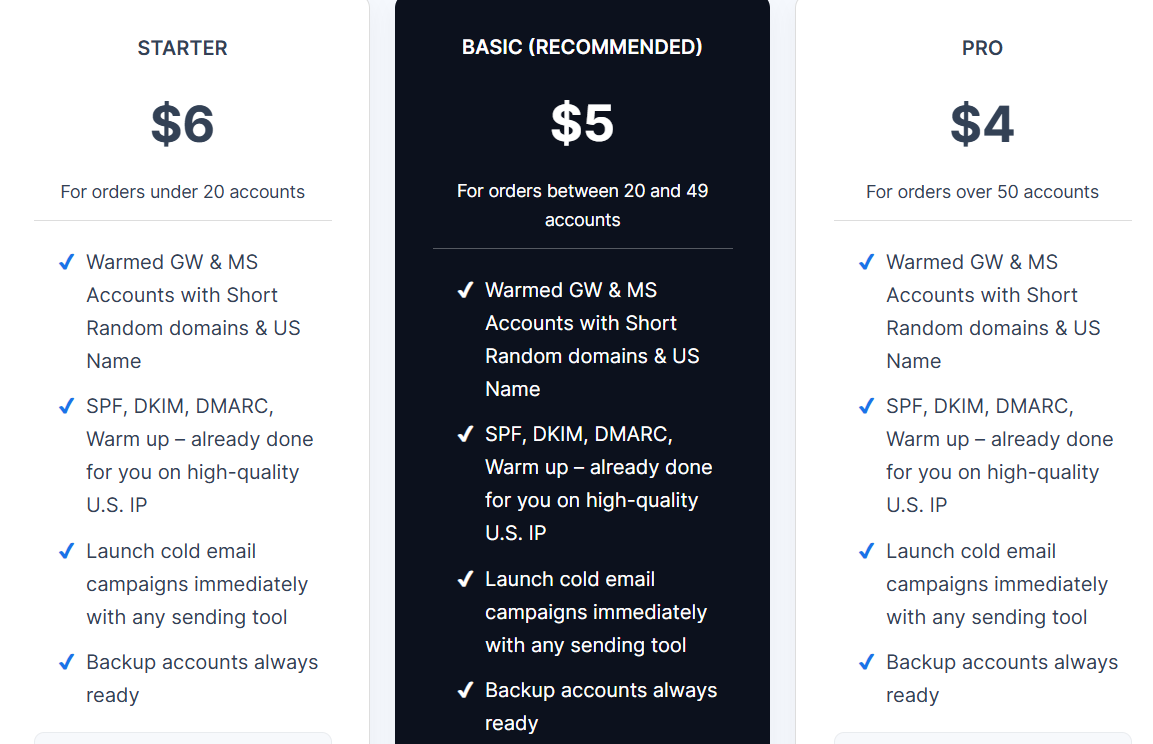
All plans include:
| Pros | Cons |
|---|---|
|
|
Mailbomb is built for teams that want ready-made email inboxes for cold outreach without doing technical setup.
It focuses on email infrastructure, not on running campaigns or managing replies.
I. Mailbomb is right for you if:
II. Mailbomb may not be right for you if:
If you like Mailbomb because it gives you ready email inboxes for cold outreach, Primeforge is a strong alternative when you want more control and faster setup.
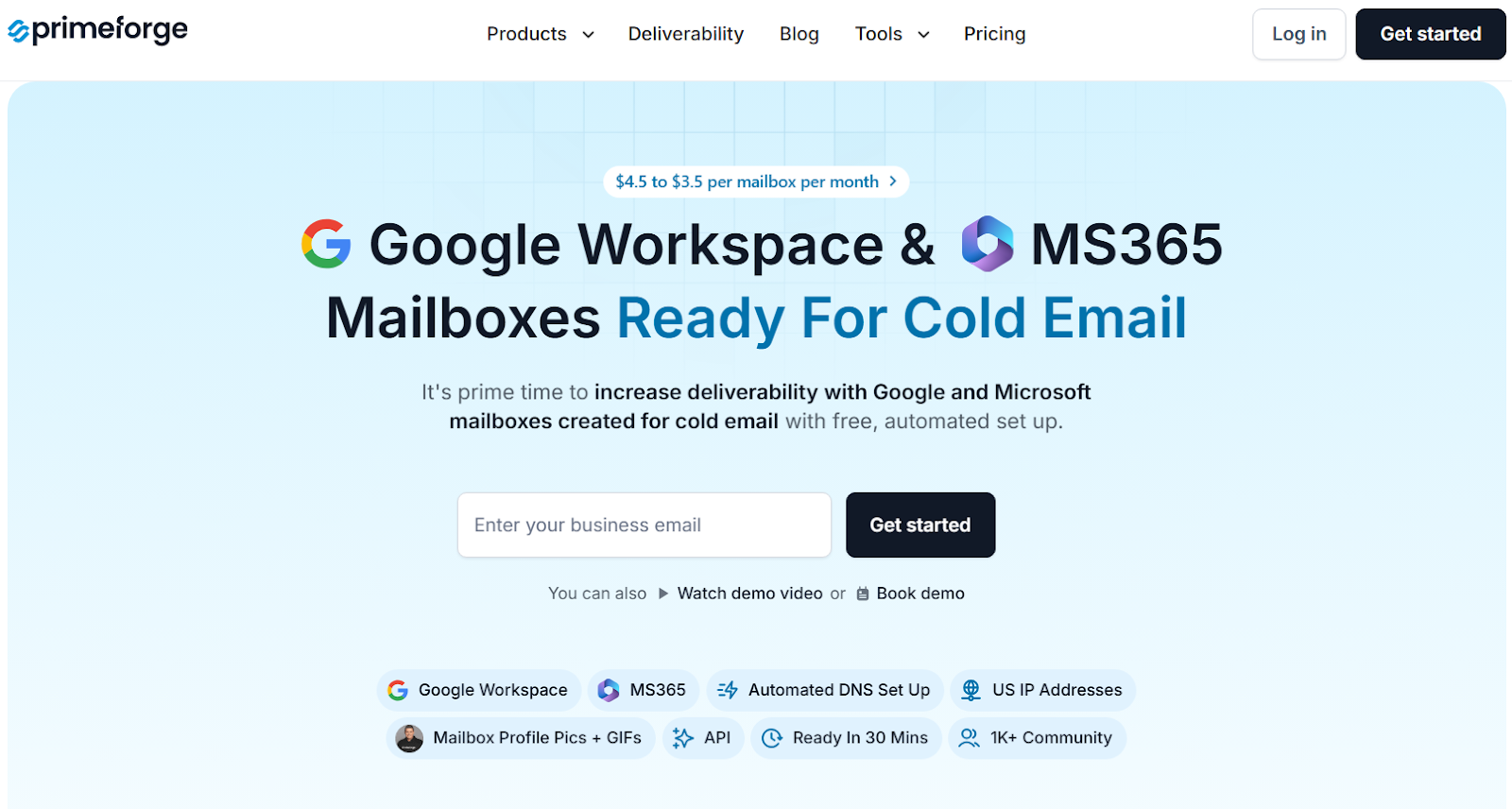
Primeforge provides Google Workspace and Microsoft 365 mailboxes that are made for cold email.
The setup is free and automated, so you do not need to touch DNS.
Your inboxes are ready in about 30 minutes, which is much faster than waiting 24-48 hours for DNS changes.
Primeforge adds features that Mailbomb does not offer, like mailbox profile pictures and GIFs, which help your emails stand out in the inbox.

It also supports ESP matching by letting you send from Google or Microsoft based on what your prospect uses.
| Feature | Mailbomb | Primeforge |
|---|---|---|
| Google Workspace inboxes | Yes | Yes |
| Microsoft 365 inboxes | Yes | Yes |
| Pre-warmed inboxes | Yes | Not listed |
| Automated DNS setup | Yes | Yes |
| Setup time | 24–48 hours (DNS) | ~30 minutes |
| Mailbox profile pictures / GIFs | No | Yes |
| Bulk domain & mailbox management | Basic | Advanced |
| Pricing model | Per inbox, bulk discounts | Per mailbox per month ($3.5–$4.5) |
If your main need is just done-for-you inbox setup, Mailbomb works.
If you want faster setup, more control, and features built for deliverability at scale, Primeforge is the stronger alternative.
Enter your email to get a custom plan & stack recommendation for your business
Please check your mailbox in 5 minutes

Mailbomb is useful if you want Google Workspace and Microsoft 365 inboxes without doing any setup work.
It provides ready inboxes, sets up SPF, DKIM, and DMARC, and lets you connect to your own sending tool.
However, it only offers email infrastructure and does not include any tool to send emails or manage replies.
Setup can also take 24–48 hours because DNS needs time to update.
If you want faster setup, more control over domains and mailboxes, and features built for cold email deliverability, Primeforge is the better option.
Sign up with Primeforge now!