
Choosing the right email deliverability tool can mean the difference between landing in the inbox or disappearing into spam.
To help you find the best option, I tested and compared 11 of the leading email deliverability tools based on the following criteria:
In this guide, you'll find email deliverability tools for different use cases. Some are built for sales teams running cold outreach, while others are better suited for marketers, agencies, and enterprise email programs.
Each recommendation includes its key features, pros, cons, pricing, and who it's best for, so you can choose the right tool for your needs.
Let's get started.
In a hurry?
These are the category winners:
| Tool | Category | Free Tier | Starting Price | G2 Rating |
|---|---|---|---|---|
Warmforge (Best Overall)
| Warmup + Placement Testing |
1 free warmup slot + 1 free placement test |
$10/slot/mo |
4.6/5 ⭐ |
|
| Primeforge | Mailbox Provider (Deliverability Foundation) | No free plan | $4.5 to $3.5/mailbox/month | 4.6/5 ⭐ |
| Warmy | AI Warmup + Suite | 7-day trial only | Volume-based, not publicly listed | 4.8/5 ⭐ |
| InboxAlly | Reputation Repair | 10-day trial only | $149/mo | 4.6/5 ⭐ |
| Warmup Inbox | Budget Warmup | 7-day trial only | $15/mailbox/mo | 4.6/5 ⭐ |
| Salesforge Free Inbox Placement Tester | Placement Testing | Free | Free | N/A |
| GlockApps | Placement + DMARC + Blacklist | 2 test credits + 10K free DMARC msgs/mo | $59/mo | 4.1/5 ⭐ |
| Mailtrap | Dev/QA Staging (Not Cold Email) | 50 test emails/mo | $17/mo | 4.8/5 ⭐ |
| Mail-Tester | Instant Spam Score | Free via web | $10/mo | 4.2/5 ⭐ |
| MxToolbox | Blacklist + DNS | 1 monitor + top 30 blacklists | $129/mo | 4.1/5 ⭐ |
| PowerDMARC | DMARC + Authentication | Personal domains only | $12/mo | 4.9/5 ⭐ |
I did not weigh every tool on every dimension. A DMARC monitor and a warmup tool serve different jobs. But five things mattered across the board.
A dashboard that tells me my spam rate is 0.5% is only useful if the tool helps me fix it. Warmup tools that only build reputation without spam recovery lost points. Testing tools without actionable next steps also lost points.
Almost every tool on this list has a "free plan." A meaningful number of them are demos with two credits. Those credits expire before you can run a real test. I called out which free tiers are actually usable and which are not.
If a tool takes three days of configuration to produce its first insight, most SDR teams will abandon it. Setup speed matters. That is especially true for outbound teams that spin up new domains often.
A tool that costs $15 per inbox looks cheap until you multiply it by 40 mailboxes. Several tools on this list have starting prices that look reasonable. Their total costs at scale do not. I did the math where it matters.
Outbound teams do not send from one inbox. They send from 20, 50, or 200. Tools that charge per inbox with no volume discount got flagged. Tools that only work well with a single mailbox also got flagged.
Before I get into the 11, a quick taxonomy: not all of these tools compete with each other. They fall into three real jobs plus a bonus tier.
These tools build trust for your sending mailbox or domain. They send simulated conversations, mark emails as important, pull them out of spam, and gradually ramp up sending volume. Warmforge, Warmy, InboxAlly, and Warmup Inbox all live here.
You send a real test email to a seed list of Gmail, Outlook, Yahoo, and other inboxes. The tool reports whether the email landed in the primary inbox, the Promotions tab, or spam. The Salesforge tester, GlockApps, Mailtrap Sandbox, and Mail-Tester live here.
These tools watch your sending IPs and domains against blocklists. They also check that SPF, DKIM, and DMARC are configured correctly. MxToolbox and PowerDMARC are the two on this list.
There is also a bonus tier: the free tools from the mailbox providers themselves. Google Postmaster Tools, Microsoft SNDS, and Yahoo Sender Hub are all free and authoritative.
If you send at any real volume, they are essential. I cover them in a mini-section further down.
Now, let’s get to the full list.
Five tools live in this category. One is my overall winner. One is a category-bender that I want to explain carefully before you skip past it.
The Heat Score gauge is what actually earned Warmforge the top spot for me.
Most warm-up tools show you a health metric that is either "green" or "yellow." They expect you to know what to do next. Warmforge gives you a score up to 100 and tells you what is dragging it down.
The second reason it wins is that the placement testing lives in the same dashboard. On a Warmforge Growth plan, you get unlimited placement tests. Each test covers up to 250 mailboxes. That combination is genuinely rare on this list.
The warmup traffic comes from real Google Workspace and Microsoft 365 mailboxes.
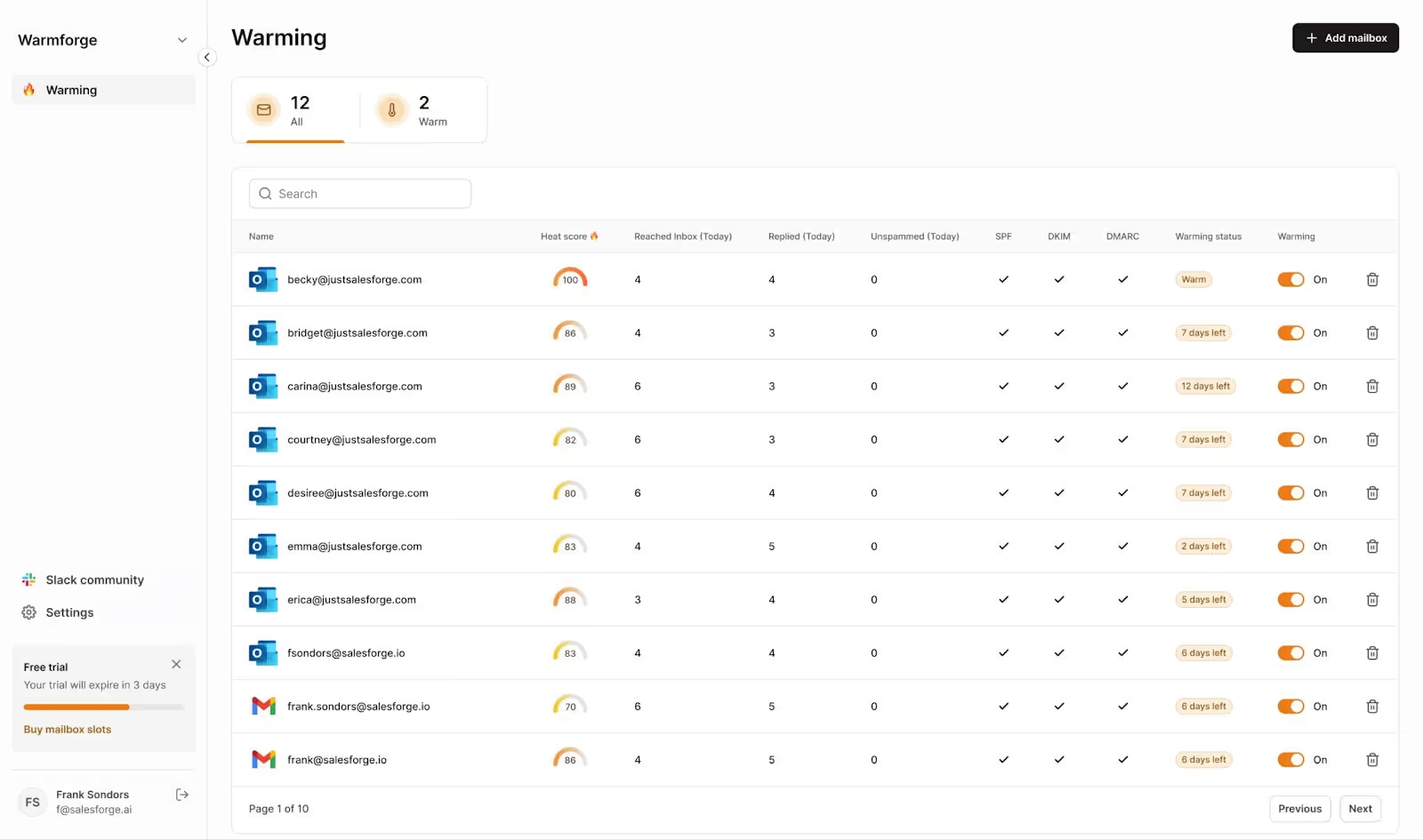
Reviewers on Warmforge's G2 profile confirm this in practice. Dave W., a Founder and Fractional Revenue Development Lead, called setup "easier than Smartleads" in his review on Warmforge's G2 page.
The 14-day warmup path to a "ready" state is standard. Where Warmforge separates itself is what happens on day 15. Spam recovery automation kicks in if a mailbox starts landing in spam. The tool adjusts warmup patterns without me having to touch anything.
| Plan | Price |
|---|---|
| Email Warmup | $10/slot/month |
| Placement Tests | $39/mo |
Warmforge also offers 1 free warming slot and 1 free placement test to try before committing.
Primeforge is on this list of deliverability tools for a very important reason.
Every other tool on this list assumes you already have mailboxes to warm up.
Primeforge is where those mailboxes come from. It sells real Google Workspace and Microsoft 365 mailboxes. They ship pre-configured with SPF, DKIM, DMARC, and mailbox profile pictures. No EDU tricks, no fragile SMTP loopholes.
That matters because a mailbox that is broken at the foundation cannot be fixed by warmup later. If your DNS is wrong or your IP is bad, Warmy will not save you. Primeforge is the layer that makes the rest of the stack actually work.
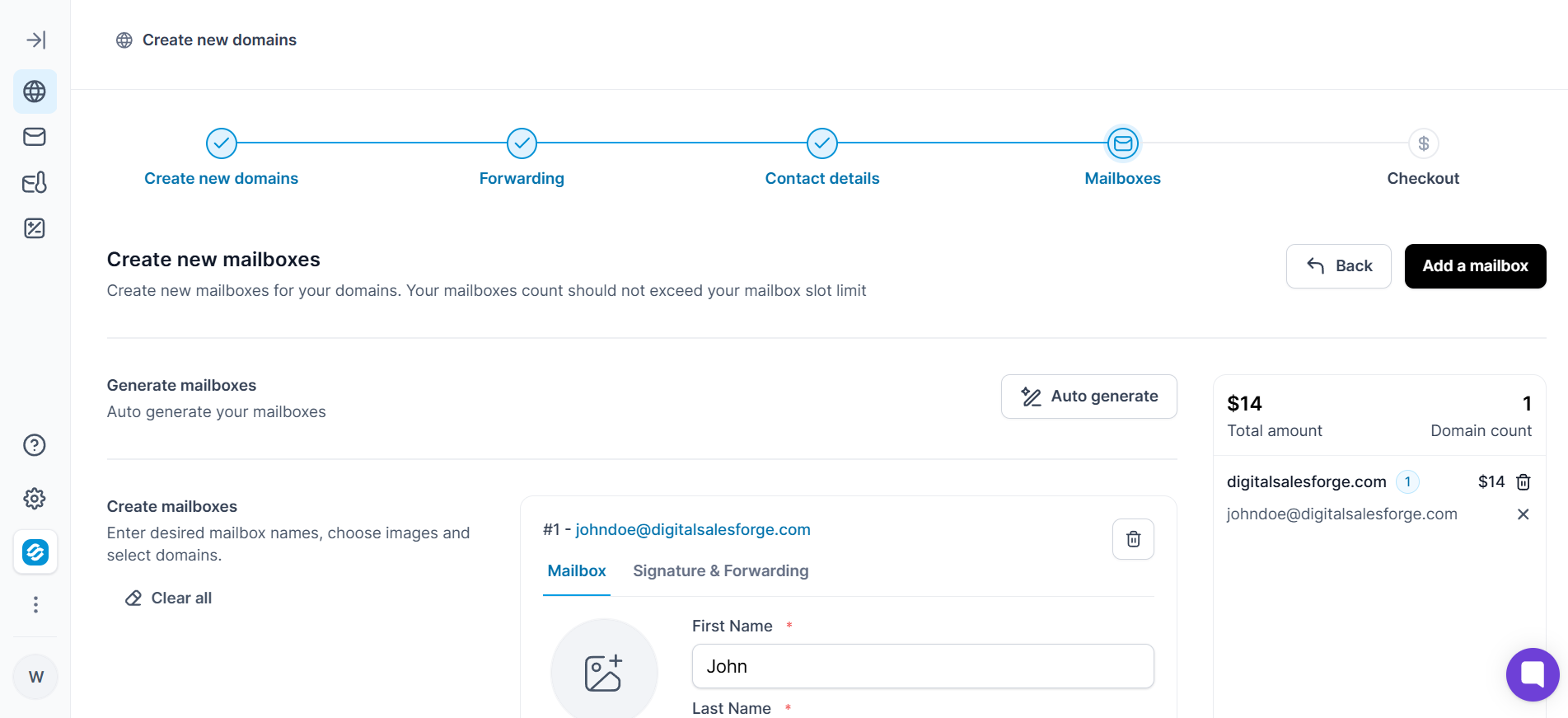
Setup speed is the specific number to know.
You can set up 30 minutes from purchase to send-ready. Dominique W., a Founder, confirmed the shift on Primeforge's G2 profile. Setup dropped from five to seven days down to about four hours. The 30-minute claim is aspirational for me. Four hours matches my experience.
The mailbox profile pictures sound trivial. They are not. Dominique W. called them out specifically: "they let you add profile pictures to the mailboxes. It's a small detail, but it makes outreach emails look more legitimate." Small detail that filters flag when missing.
| Plan | Price |
|---|---|
| Mailboxes | Starts at $4.50/mailbox/mo to $3.50/mailbox/mo |
| .com Domains | $14/year per domain |
Get Primeforge mailboxes ready in 30 minutes.
Also Read Cold Email Mailbox Providers
I almost cut Warmy from this list, then I saw the G2 review count.
Warmy has 523 reviews on G2 with an average rating of 4.8. That is more social proof than any other warmup tool here. It kept the tool on the list.
The differentiator is real. Warmy runs two separate warmup mailbox pools. One is B2B (Google Workspace, Microsoft 365). The other is B2C (Gmail, Yahoo, Outlook.com). If you send to consumers on Gmail and businesses on Google Workspace, a B2B-only pool sends the wrong signals. Warmy is the only tool on this list that splits the pools cleanly.
The other genuine differentiator is Adeline AI.
It is Warmy's warmup AI that adjusts patterns to provider-specific rules automatically. The tool also ships with an integrated Google Postmaster view, SPF and DMARC generators, and a large library of free deliverability tools.
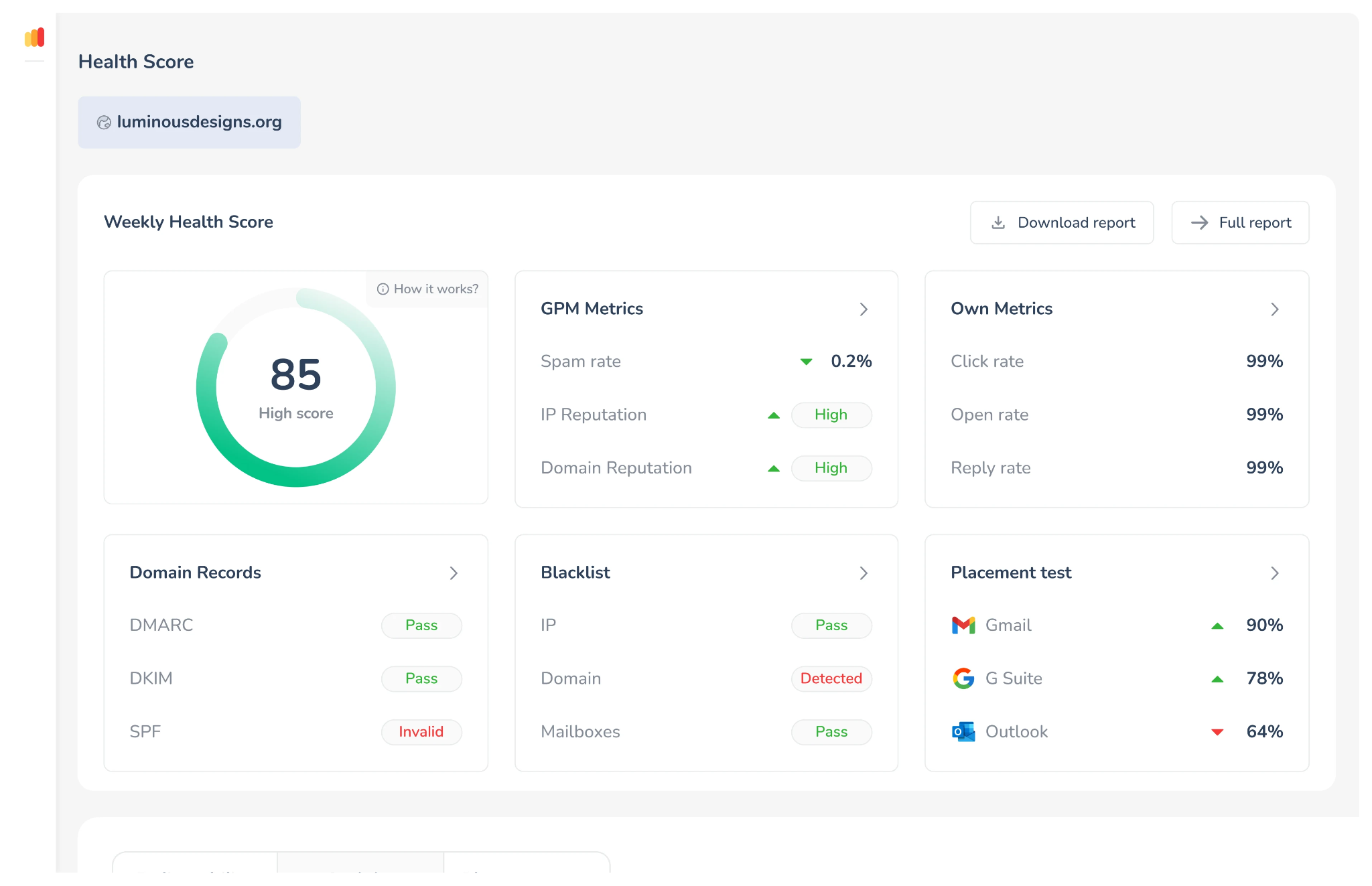
Here is the honest read. Warmy's pricing page does not display prices. Every plan says "Volume-based pricing" with a "Book a demo" CTA.
For a comparison listicle, this is a real friction point. It also matches what reviewers say. Viktir P., a Digital Marketing Specialist, wrote on Warmy's G2 profile that "the entry barrier for testing is too high."
His full note: "Forced to either commit to an expensive monthly tier or buy an annual package."
The G2 pros and cons tally reinforces this. "Expensive" appears in 53 negative reviews. "Warmup Issues" appears in 40. That is a lot of pain around cost and reliability for a tool with a 4.8 average. Worth taking seriously.
Warmy is the right pick if you send high volumes across B2B and B2C. You need budget approved and want the largest warmup pool. It is the wrong pick if you want to try before you buy.
Warmy offers a 7-day free trial with no credit card required.
If your domain is already burning, warmup alone will not save you. That is the specific problem InboxAlly exists to solve.
Warmup tools build reputation on new mailboxes. InboxAlly repairs reputation on mailboxes that already land in spam. The mechanism is different. InboxAlly sends your real campaign emails to a network of seed inboxes.
Their seed accounts then open the emails, click links, mark them as important, and pull them out of spam. Mailbox providers see the engagement signals and update your reputation.
Setup is unusually clean because InboxAlly does not need DNS access or mailbox credentials. You just add their seed list addresses to your regular campaign send. That means you can run it against Salesforge, Smartlead, Instantly, or any sending platform without integration work.
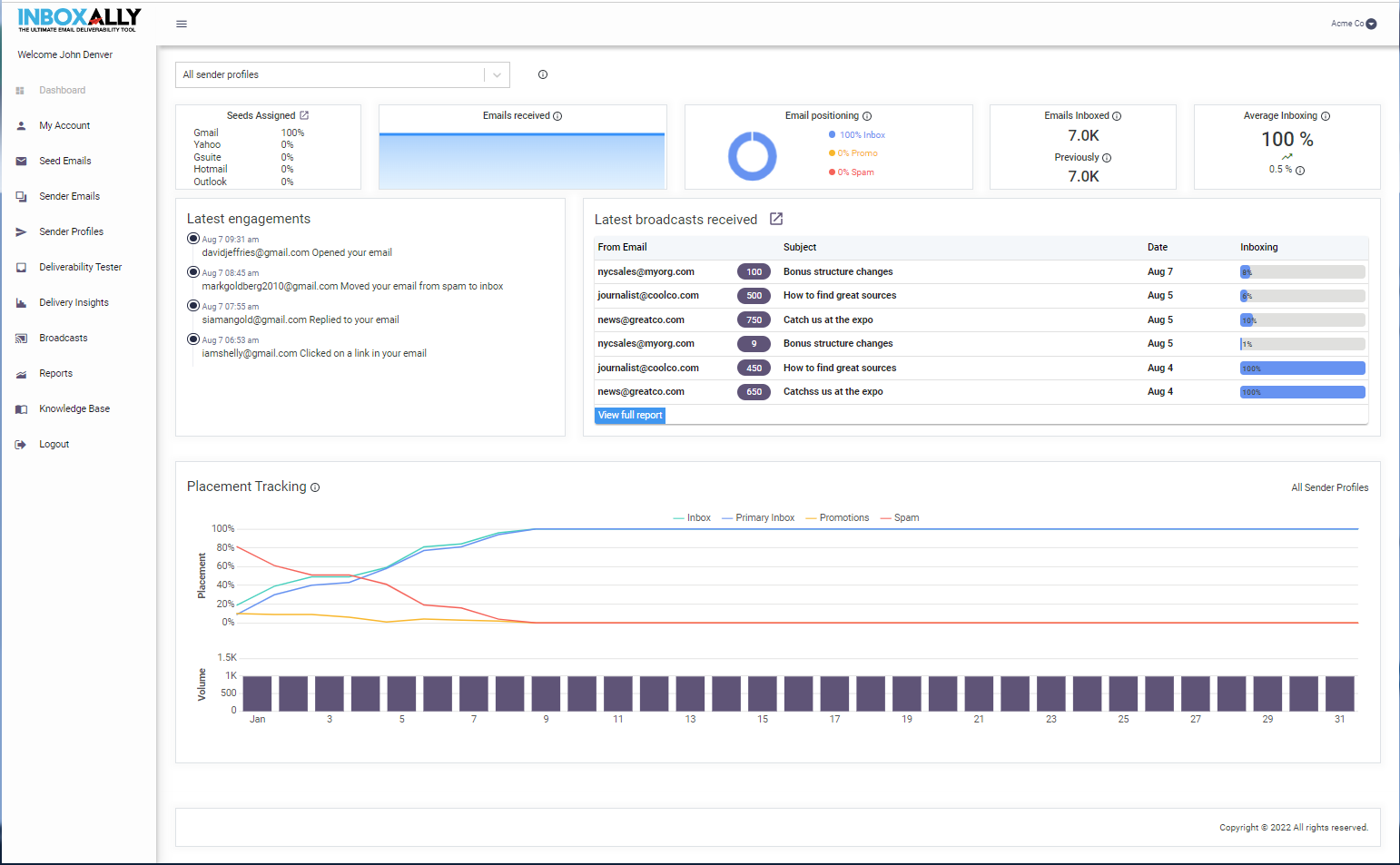
The 2026 features are genuinely useful. IA Assistant is an in-app AI grounded in your account data that answers questions about your reputation. IA Score predicts inbox placement using an ML model. IA Reputation gives you a LOW, MED, or HIGH domain rating. That is essentially the Google Postmaster equivalent that non-Gmail senders never get from anywhere else.
Here is the pricing reality. InboxAlly starts at $149 per month. That gets you one sender profile and 100 seed emails per day. The next tier up is $645 per month for 500 seed emails per day and five sender profiles.
That is the tier most outbound teams will actually need. $645 per month is a real number. This is one of the tools where the best features scale with plan tier. Dedicated CSM, larger seed volumes, and phone support all live on higher plans.
Reputation repair takes 2 to 4 weeks for most domains and 4 to 8 weeks for badly damaged ones. If you are curious about the underlying reasoning, how long email warmup takes covers the timelines in more depth.
| Plan | Price |
|---|---|
| Starter | $149/mo (100 seed emails/day, 1 sender profile) |
| Plus | $645/mo (500 seed emails/day, 5 sender profiles) |
| Premium | $1,190/mo (1,000 seed emails/day, 10 sender profiles) |
| Enterprise | Custom |
10-day free trial available. No credit card required.
Fifteen dollars per inbox is the number that keeps Warmup Inbox on this list. It is the cheapest per-inbox warmup I found that is not free.
The tool is deliberately simple. You connect a mailbox from Google, Outlook, Zoho, or SendGrid.
It sends warmup emails to a network of over 30,000 real inboxes. It replies to them, marks them as important, and pulls them out of spam. Reply rate is configurable up to 25% on the Basic plan and 45% on Pro.
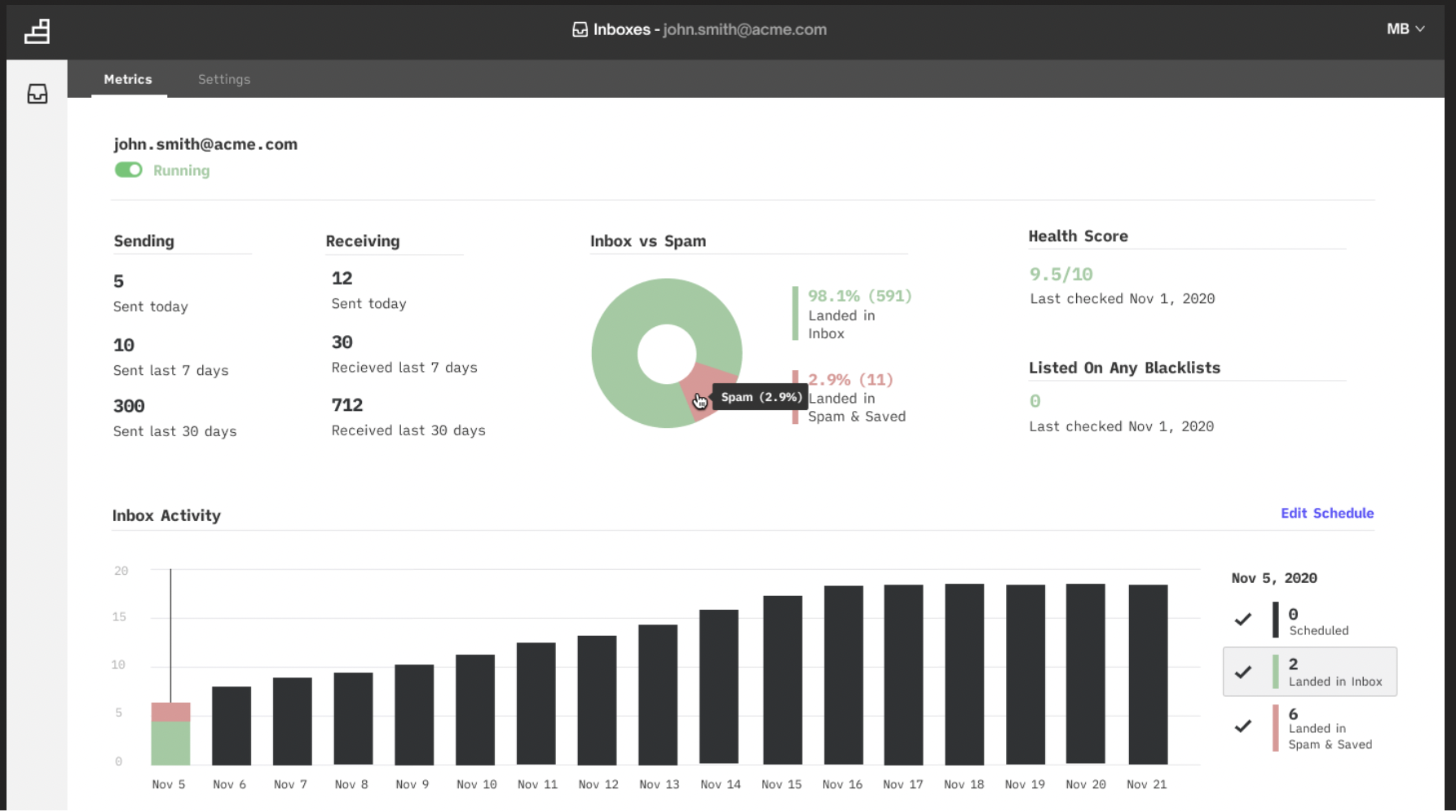
Setup is fast. A G2 reviewer noted, "Within minutes, we were able to integrate our email accounts and start the warming process." That matches my experience.
Two things to watch. First, the price per inbox looks great at one mailbox and adds up quickly at scale. At 10 mailboxes on the Basic plan, that is $150 per month. At 40 mailboxes, $600 per month. A reviewer on Warmup Inbox's G2 profile flagged this directly: "It can be a bit pricey if you add many inboxes." True.
Warmup Inbox is the right pick if you are a solo sender or a small team on one to three mailboxes. If you are running more than 10 mailboxes, do the math against Warmforge before committing.
| Plan | Price |
|---|---|
| Basic | $15/mailbox/mo |
| Pro | $49/mailbox/mo |
| Top Tier | $79/mailbox/mo |
7-day free trial. No credit card required.
Four tools in this category. One is free and cold-email-native. One is the industry workhorse. One is on almost every listicle for the wrong reason.
I ran the same test email through this tool three times last week. Mostly to verify it works the way it says it does. It does.
The Salesforge Free Inbox Placement Tester is a two-step flow. You paste a unique tracking code (something like ptest_abc123) into your email body.
You send the email to a provided list of seed addresses. The tool returns a report showing how many landed in the Inbox, how many hit Spam, and how many went Missing. No login. No credit card. No credit limit for the first test.
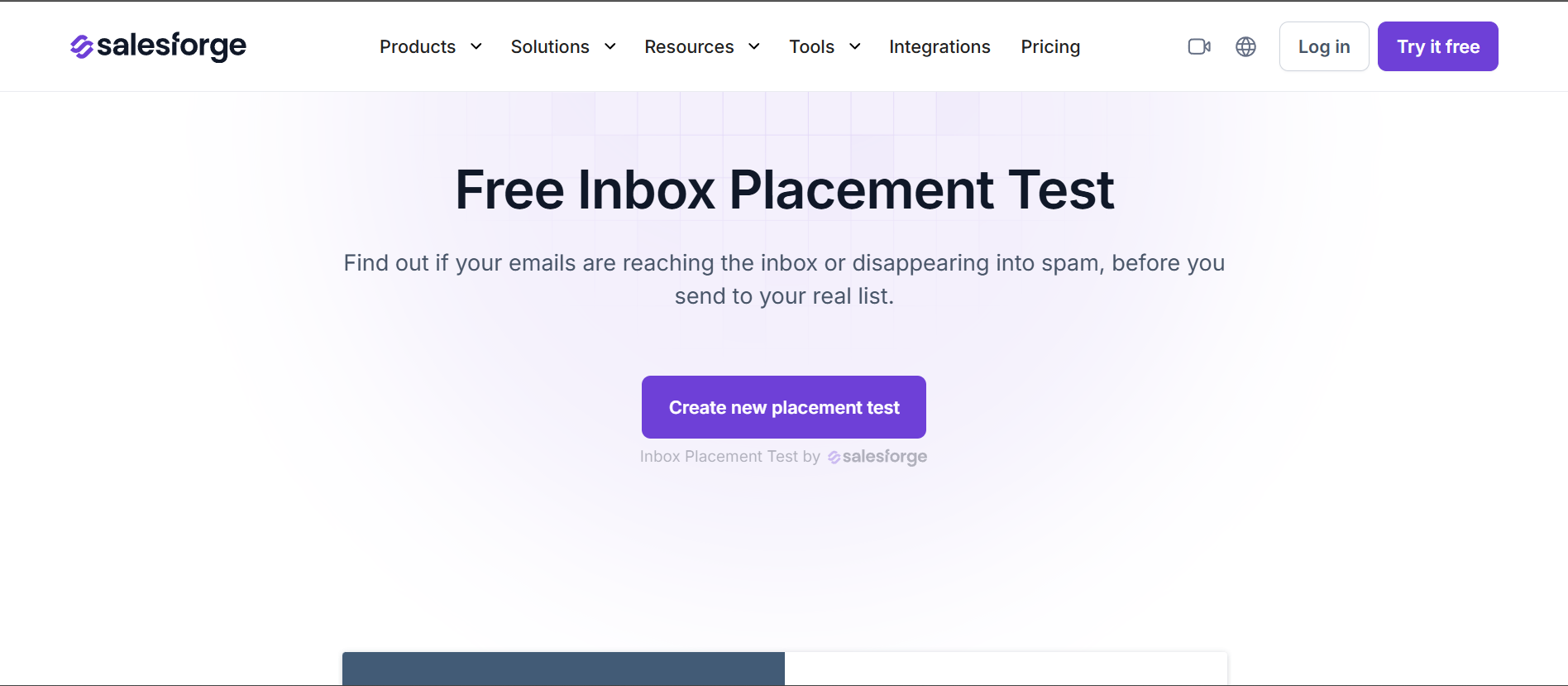
The Missing count is where this tool earned my attention. Most free spam testers only tell you if an email is likely to be flagged. This one shows you which seeds never received the email at all.
That is a signal you cannot get from Mail-Tester. You would pay for it on GlockApps.
The tool is free to use.
| Plan | Price |
|---|---|
| Free Tester | $0 |
GlockApps is what most deliverability agencies use in the background. Once you see the report it makes sense why.
The inbox placement test uses a 115-address seed list checked against 5 spam filters. That is the largest seed coverage on this list.
The report shows exactly where your email landed with each provider. Gmail Primary, Gmail Promotions, Outlook Inbox, Outlook Junk. It flags authentication issues, blocklist hits, and content triggers all in one view.
The DMARC analytics are the second reason to look at GlockApps. The free plan includes 10,000 DMARC messages per month at no cost. That is the most generous free DMARC processing I found. Reputation monitoring runs against 50+ blocklists. Uptime and blocklist alerts fire in real time.
Free plan reality check: 2 test credits and 1 account. Enough to see if the tool works. Not enough to actually monitor deliverability.
The Essential plan at $59 per month covers 360 credits, which is where most solo senders end up. The Growth plan at $99 per month for 1,080 credits is the practical tier for outbound teams.
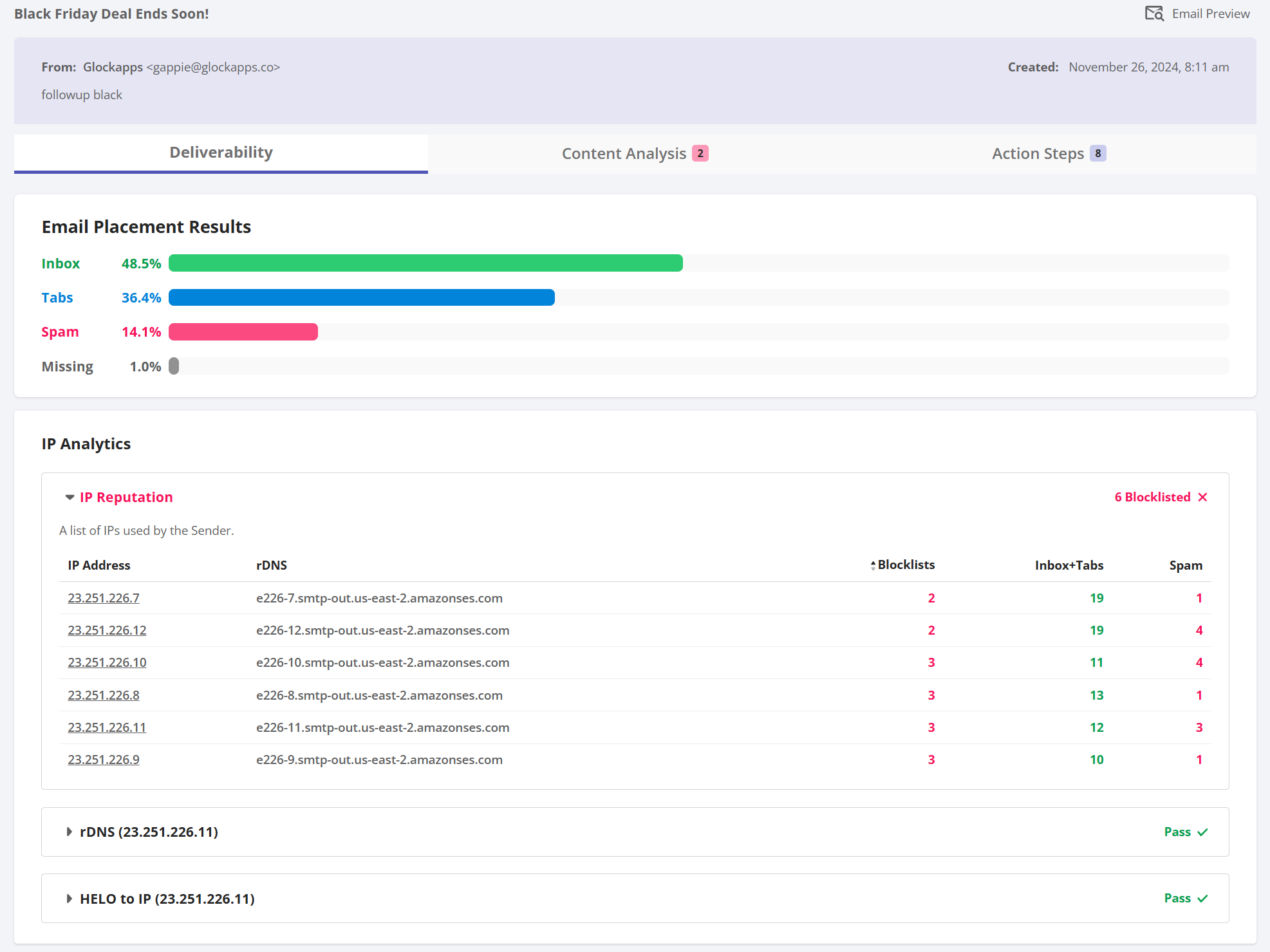
Areg H., a Link Building Manager, put it well on GlockApps' G2 profile. His words: "GlockApps quietly became one of my most useful marketing tools." That is a summary I would sign off on.
Where it is thin: G2 sits at 4.1 out of 5 across 26 reviews. That is the lowest paid-tool rating on this list. Common threads in the cons tally are around customer support and reporting depth. Not fatal, but worth knowing.
| Plan | Price |
|---|---|
| Free | $0 (2 credits, 1 account, 10K DMARC msgs/mo) |
| Essential | $59/mo |
| Growth | $99/mo |
| Enterprise | $129/mo |
| Custom | Contact Sales |
Mailtrap Email Sandbox is a staging and QA tool. It captures SMTP traffic from your dev environment so test emails never reach real recipients.
Engineering teams use it to validate HTML, check spam scores, and debug SMTP behavior before pushing to production.
That is not the same thing as inbox placement testing for cold email.
If you send a "test" email through Mailtrap Sandbox, the email hits a virtual inbox that Mailtrap controls. It does not reach real Gmail, real Outlook, or real Yahoo mailboxes. Whatever placement score you get is a diagnostic from Mailtrap's own filters. It is not proof that Gmail will inbox it.
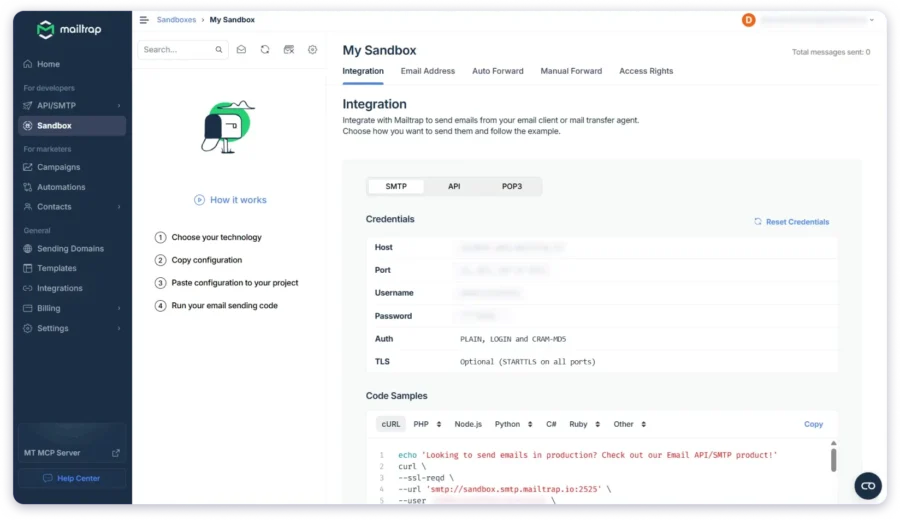
If you are running cold email campaigns, Mailtrap Sandbox is the wrong tool. If you are a developer validating that transactional emails render correctly before release, it is one of the best tools available. That is who it is built for.
Setup is fast (under 5 minutes) and the developer experience is legitimately good. Hiram L., an AI Engineer, called it a "Reliable Transactional Email Platform with Great Support" on Mailtrap's G2 profile. He also flagged that "IP allowlisting is harder with changing cloud outbound IPs."
| Plan | Price |
|---|---|
| Free | $0 (50 test emails/mo) |
| Basic | $17/mo (500 test emails, 3 users) |
| Team | $42/mo (5,000 test emails, 5 users) |
| Business | $123/mo (50,000 test emails, 50 users) |
| Enterprise | $498/mo (Unlimited test emails) |
Mail-Tester has been around since 2004. It still does one thing exceptionally well: gives you a score out of 10 on a single email in about 10 seconds. Copy the unique test address on the homepage. Paste it into the To field of your email. Send. Refresh the results page. Done.
The score breaks down authentication (SPF, DKIM, DMARC), spam trigger words in your content, blacklist reputation, and DNS setup. Each point deduction is itemized with a fix.
If your content is triggering SpamAssassin flags, Mail-Tester tells you the exact rules that fired.
Free. No login required. Uses a rotating test address per session. You have to send before the address expires (usually within 45 minutes of loading the page).
Two limits. First, Mail-Tester does not have a G2 profile at all. I cannot give you review-based social proof.
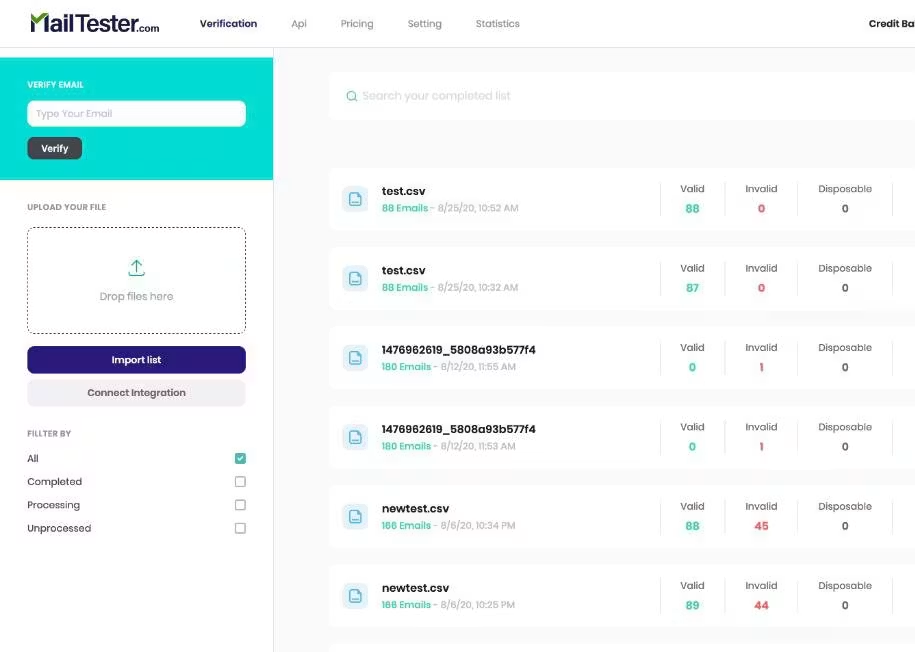
This is a 20+ year old tool that most senders know by word of mouth. Second, it does not do ongoing monitoring. It is a point-in-time score. If you want alerts when something breaks, pair it with MxToolbox or GlockApps.
Paid plans give you API access, whitelabel embedding, and volume testing. If you are running 50 tests a month, paid at $10 works out to about 20 cents per test. Fair.
| Plan | Price |
|---|---|
| Free (Web) | $0 (Single test at a time) |
| 50 Tests/Month | $10/mo ($0.20/test) |
| 500 Tests/Month | $25/mo ($0.05/test) |
| 2,000 Tests/Month | $80/mo ($0.04/test) |
| 7,500 Tests/Month | $250/mo ($0.033/test) |
Two tools here. Both do jobs the other categories cannot.
MxToolbox looks like a website from 2004. That is not a compliment or a complaint. It is a statement of fact about a tool that has been solving the same core problem well for two decades.
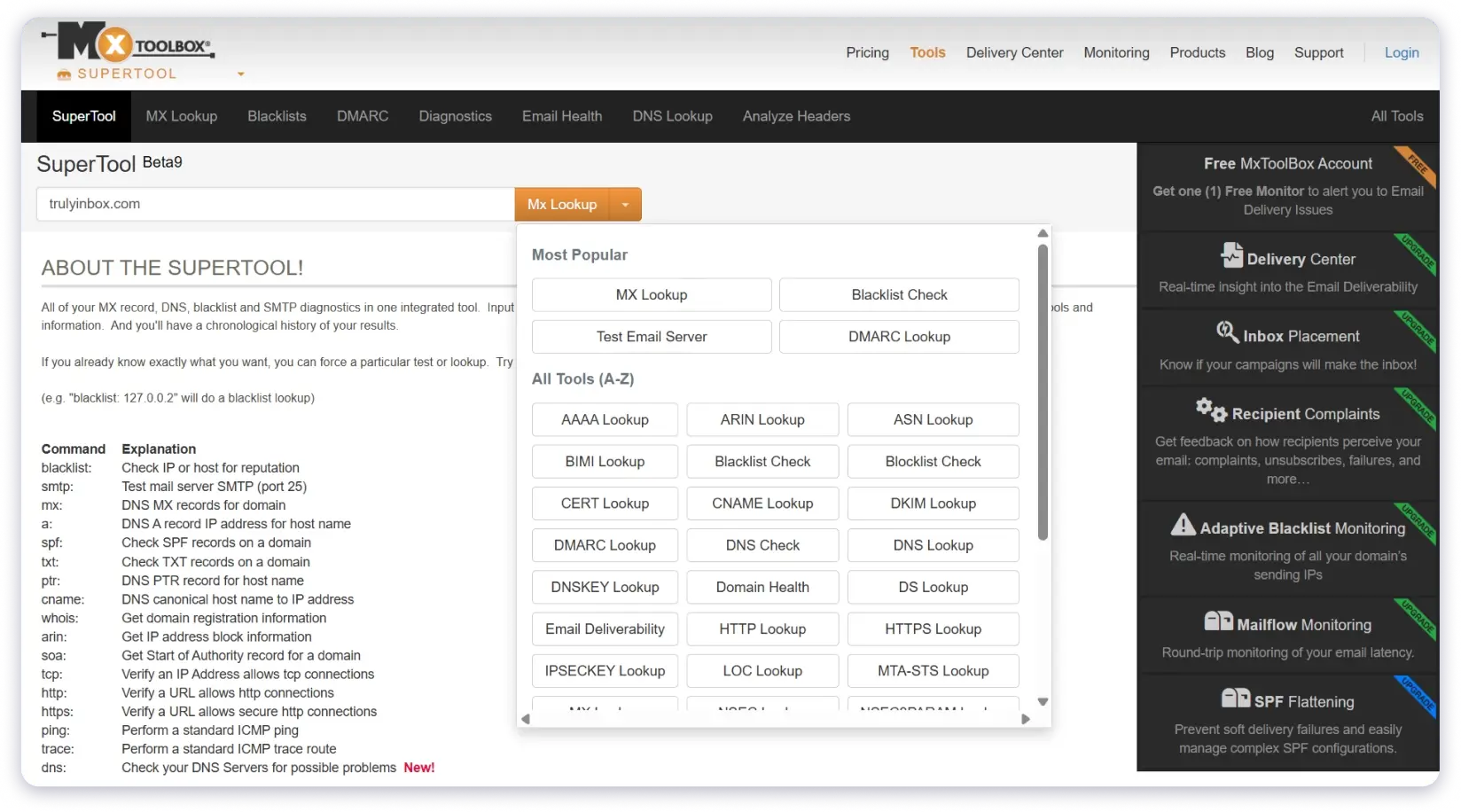
The SuperTool is what earns MxToolbox its place. Paste your sending IP into the free SuperTool and it checks you against 105 DNS-based blocklists in one instant lookup. That is the broadest free blocklist check on this list. Genuinely useful without paying anything.
You also get free lookups for MX, SPF, DKIM, DMARC, reverse DNS, and PTR records. If a client complains that their emails are landing in spam, MxToolbox is where I start.
Five minutes and you know whether the domain has a DNS problem, a blocklist problem, or something else.
My dedicated vs shared IPs breakdown covers how blocklist exposure changes with your IP setup.
The paid tiers are where it gets expensive. Delivery Center starts at $129 per month. It adds inbox placement analysis, complaint reporting, DMARC reporting, and adaptive blocklist monitoring. Delivery Center Plus at $399 per month adds SPF flattening and advanced threat tools.
That $129 jump from free to paid is steep. If all you need is occasional blocklist lookups, stay on the free tier. If you need continuous monitoring of five or more domains with real-time alerts, the Delivery Center starts making sense.
Diku N., an Info Security Admin at a mid-market company, put it well on MxToolbox's G2 profile. His verdict: it is the "best tool for contextual lookup and network diagnostics." That is exactly what it is.
| Plan | Price |
|---|---|
| Free | $0 (1 monitor, weekly blocklist check, top 30 blocklists, 1 domain) |
| Delivery Center | $129/mo |
| Delivery Center Plus | $399/mo |
I only started paying attention to PowerDMARC after Yahoo's 2024 sender rules made DMARC unavoidable.
If you send more than 5,000 emails per day to Gmail or Yahoo, you now need SPF, DKIM, and DMARC configured correctly. Otherwise your mail gets rejected. That is not optional anymore.
My Google and Yahoo sender requirements piece walks through what changed and why it matters for cold email.
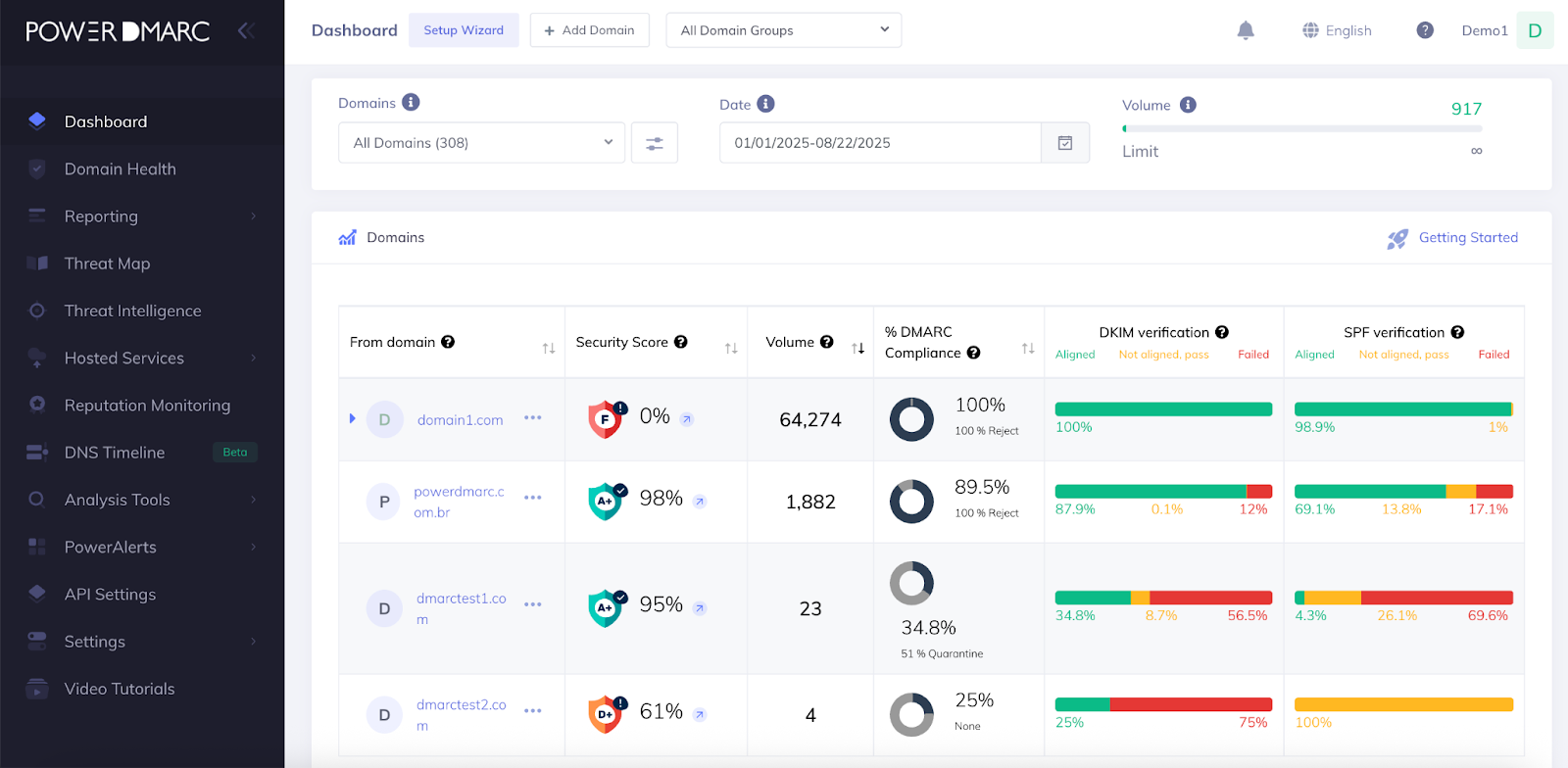
PowerDMARC solves the DMARC part. It processes DMARC aggregate and forensic reports. It shows you every source sending mail as your domain.
It helps you move from p=none to p=quarantine to p=reject without breaking legitimate mail. That gradual enforcement path is the practical value. Most senders publish a DMARC record, panic when Gmail blocks their own newsletters, and rip it out.
The hosted services are what earn PowerDMARC the top DMARC slot. Hosted SPF, hosted DKIM, hosted MTA-STS, hosted TLS-RPT, hosted BIMI. All of it managed by their platform with automatic DNS publishing. For an outbound agency running 50 client domains, that is a real time saver.
Pricing is honest. $12 per month billed yearly for the Basic plan. That covers 5 domains, 100,000 emails, and hosted DMARC/MTA-STS/TLS-RPT/BIMI. One of the more affordable paid plans on this entire list. The free plan is for personal domains only. Business use requires the paid tier.
The G2 numbers are the strongest on this list: 4.9 out of 5 across 249 reviews. Micael S., a Tech Lead, called it "total visibility and comprehensive management of DMARC in an intuitive platform" on PowerDMARC's G2 profile. A Verified User in Market Research at a mid-market company noted mail-volume caps and onboarding complexity as the honest downsides.
That maps to what I found. The tool is powerful and non-technical users hit a learning curve. If you have never touched a DMARC report before, expect to spend a week understanding what you are looking at.
| Plan | Price |
|---|---|
| Free | $0 (Personal domains only, 10K compliant emails, 10 days history) |
| Basic | $12/mo billed yearly |
| Enterprise | Custom |
Deliverability is not one problem. It is three: reputation, testing, and monitoring.
Reputation is where most cold email teams live and die. It is where Warmforge does the best work I found in 2026. Heat score gauge, always-on warmup, spam recovery automation, and integrated placement testing solve the job in one dashboard.
Testing is a job you can start free with the Salesforge tester and scale into GlockApps for historical reporting. Monitoring is MxToolbox for blocklists and PowerDMARC for authentication.
Underneath all of it, you need mailboxes built for cold outreach in the first place. That is Primeforge.
Ready to actually reach the inbox?
Start warming your mailboxes with Warmforge.
Email deliverability tools help you reach the primary inbox instead of Promotions or Spam. They fall into three main jobs. Warming up mailboxes to build sender reputation. Testing where your emails actually land across Gmail, Outlook, and Yahoo. Monitoring your sending IPs and domains against blocklists and authentication issues. Most serious senders use one tool from each category.
Usually yes. Most sending platforms include a basic warmup network. The pools are small, the engagement patterns are generic, and reputation building is passive. Dedicated warmup tools like Warmforge use larger real-mailbox pools, spam recovery automation, and heat scoring you can act on. If you send from more than a few mailboxes or you have hit spam before, a dedicated tool pays for itself.
A spam checker (like Mail-Tester) scores a single email against filter rules and content triggers. Inbox placement testing (like the Salesforge tester or GlockApps) sends a real email to a seed list across Gmail, Outlook, and Yahoo. It reports where the email actually landed. Placement testing tells you the outcome. Spam checking tells you the risk.
No, but they should be used alongside them. Google Postmaster, Microsoft SNDS, and Yahoo Sender Hub show you what mailbox providers see about your sending. They do not warm up mailboxes, do not simulate engagement, and do not monitor blocklists across the wider ecosystem. Use them as your source of truth for reputation. Use paid tools to build reputation and diagnose problems.
For a domain that recently started landing in spam, expect 2 to 4 weeks with a warmup or reputation repair tool. For a domain that has been burning for months, plan for 4 to 8 weeks. Be prepared to pause outbound during the recovery period. The specific tool matters less than consistency and giving the mailbox providers time to update their view of you.
For placement testing, the Salesforge Free Inbox Placement Tester (no login, no credit card). For a quick spam score check, Mail-Tester. For blocklist monitoring, MxToolbox's free SuperTool covers 105 blocklists. For authentication monitoring, use Google Postmaster if you send to Gmail and Microsoft SNDS if you send to Outlook. Add PowerDMARC's free tier for personal domains. Stack the free tools together and you get a real read on deliverability without spending anything.
